 Noctalia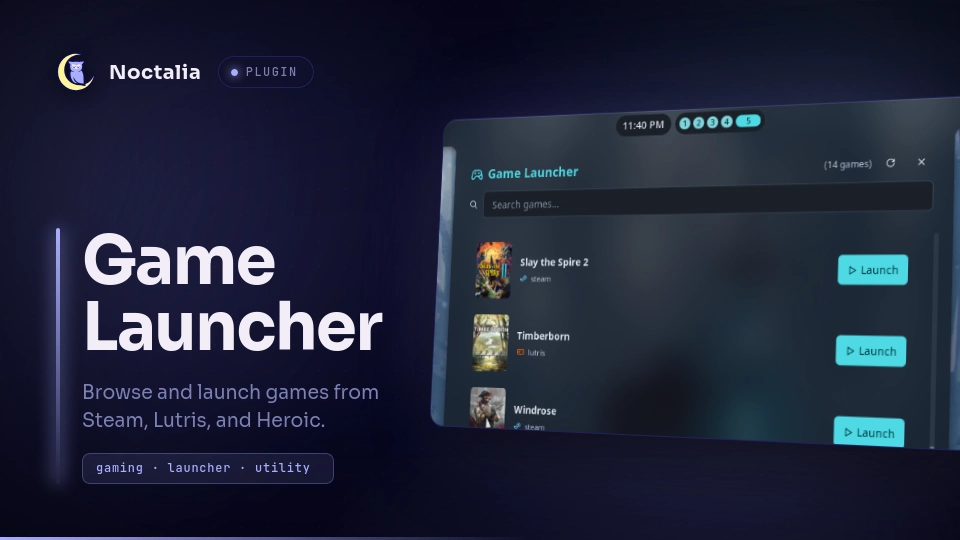
About
Game Launcher
Browse and launch games from Steam, Lutris, and Heroic Games Launcher directly from your bar. Opens a full-height side panel with search, cover art, and one-click launch — or the original look. One panel, two looks — flipping Panel style under Settings → Plugins re-renders it live.
Plugin
| Field | Value |
|---|---|
| ID | alexander/game-launcher |
| Entries | Bar widget: launcher; panels: browser (sidebar dock), original (center box); launcher provider: search |
| Launcher Prefix | /g |
Requirements
Requires xdg-utils (provides xdg-open) and gcc on PATH.
# Debian/Ubuntu
sudo apt install xdg-utils gcc

# Fedora
sudo dnf install xdg-utils gcc

# Arch
sudo pacman -S xdg-utils gcc
The scanner binary (gamelauncher) is compiled automatically on first use — the plugin runs cc to build it when needed. No manual build step required.
Usage
Add the bar widget alexander/game-launcher:launcher to your bar. The widget shows a gamepad icon — click it to open it (look follows Panel style).
In the panel, use the search bar to filter by name or runner. Click Launch on any game to start it.
To open the panel via IPC:
noctalia msg panel-toggle alexander/game-launcher:browser
noctalia msg panel-toggle alexander/game-launcher:original
From the launcher, type /g followed by a game name to search. Activate a result to launch the game.
In the panel: Up/Down moves the highlight (pages turn automatically), Enter launches the highlighted game. The list is keyboard-only with no scrolling — 8 games per page, covers sized to fill the dock. To dock the panel on the left instead of the right, change its Position under Settings → Plugins.
Settings
| Setting | Type | Default | Description |
|---|---|---|---|
glyph |
glyph |
device-gamepad-2 |
Bar widget icon |
steampoacher_enabled |
bool |
false |
Enable steampoacher proxy for Steam cover art |
steam_enabled |
bool |
true |
Show Steam games |
heroic_enabled |
bool |
true |
Show Heroic games |
lutris_enabled |
bool |
true |
Show Lutris games |
Security & Data Flow
The plugin addresses all findings from Noctalia's security audit:
1. No shell commands in C scanner — The scanner (gamelauncher.c) uses only local filesystem reads and a bundled SQLite database reader. No system(), popen(), curl, wget, python3, or grep is invoked. All network requests (cover downloads) are handled in Luau via Noctalia's built-in noctalia.http and noctalia.download APIs, which respect offline mode.
2. No shell injection in launch paths — The C scanner outputs protocol URLs only (e.g., steam://rungameid/730, lutris:rungame/slug, heroic://launch/appid). Luau validates each URL against known protocol prefixes, filters every character through a strict allowlist ([%w_%-%.%/] — no shell metacharacters), and double-quotes the argument before passing it to xdg-open via noctalia.runAsync.
3. xdg-utils declared — xdg-utils is listed in plugin.toml dependencies.
4. Steampoacher opt-in & disclosure — By default, Steam cover art is fetched directly from store.steampowered.com/api/appdetails. The API only provides small header_image art (460×215). For high-resolution library capsule covers, enable the steampoacher Cloudflare Worker by setting steampoacher_enabled to true in ~/.config/noctalia/plugins/game-launcher.json. When enabled, Steam app IDs from your installed library are sent to the proxy at steam-asset-proxy.steampoacher.workers.dev, which returns a CDN capsule URL on shared.steamstatic.com with full-size 1200×450 art. Cover art for Heroic games uses the art URL from Heroic launcher metadata.
[!NOTE] Without steampoacher enabled, Steam covers will be bad (600×900 instead of high resolution).
Notes
- Scans all detected Steam library folders, Lutris SQLite databases, and Heroic store caches (Legendary, GOG, Nile).
- Results are cached in
~/.cache/gamelauncher/games.jsonand rescanned on click if sources changed. - No external CLI tools (curl, wget, python3, grep) are invoked anywhere in the plugin.
Versions
| Version | Plugin API | Updated |
|---|---|---|
| v1.5.2 latest | 43 | Oct 25, 2026 |
| v1.5.1 | 13 | Oct 13, 2026 |
| v1.0.1 | 9 | Jul 24, 2026 |
| v1.0.0 | 4 | Jul 20, 2026 |
Older versions stay installable on a Noctalia release whose plugin API is below the latest version's.