 Noctalia
About
Flatpak Background Apps
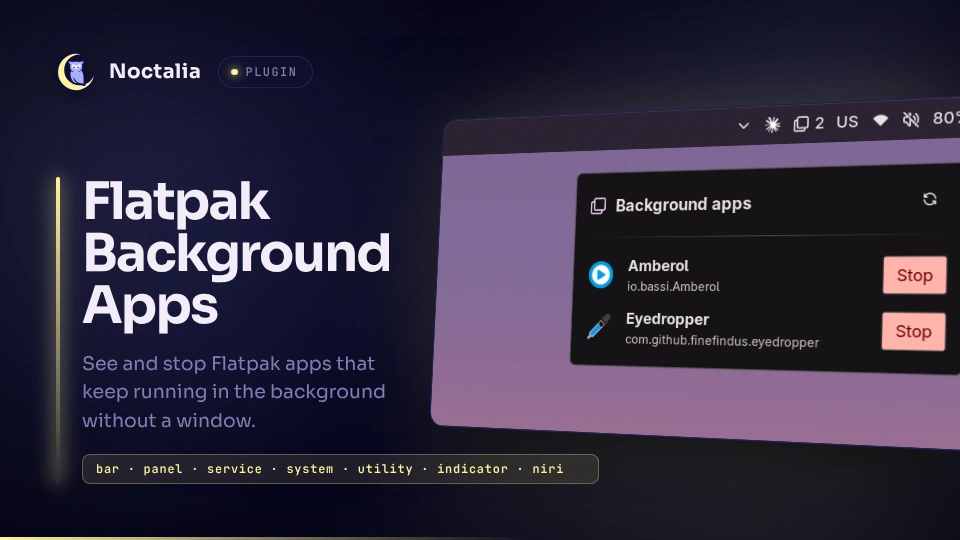
Flatpak Background Apps shows Flatpak apps that are still running but have no window open in niri, such as chat, sync or download apps that keep running after you close their window, and lets you stop them from the bar. The headless service tracks windows and Flatpak instances; the bar widget and the panel are thin clients of the state it publishes.
Plugin
| Field | Value |
|---|---|
| ID | naijnus/flatpak-bg |
| Entries | Service: service; bar widget: bar; panel: panel |
Requirements
- The niri compositor, with
nirionPATH. Windows are read from niri's IPC, so this version supports niri only; support for other compositors is planned for a later update. flatpak, used to find the installations and to force-stop apps.sh,killandsleepfrom the base system, used to run the niri event stream, ask apps to quit and wait for the stop timeout.
Usage
Bar widget
Add the bar widget to your bar. It shows the icon and how many Flatpak apps
run in the background, and its tooltip lists their names. By default it only
appears while there are background apps; turn on Always show in the widget
settings to keep the icon in the bar (the count is left out while it is 0).
Turn off Show count to show the icon only. If a scan fails, it shows !
and the tooltip says so. Click it to open the panel. Each bar widget has its
own icon, Always show and Show count settings.
Panel
The panel lists each background app with its icon, name and app id. Stop asks the app to quit; the button reads Stopping… until the app is gone. The refresh button in the header rescans right away. The panel grows and shrinks with the list while it is open, and scrolls when the list is long.
Toggle it from a keybind or a script with:
noctalia msg panel-toggle naijnus/flatpak-bg:panel
What counts as a background app
An app counts as running in the background when it has a running Flatpak
instance and none of its windows is open in niri. A window belongs to an app
when its process runs inside the app's sandbox, or when its niri app_id
matches the app id, the last part of the app id, or the StartupWMClass of the
app's desktop file. The last two cover X11 apps through xwayland-satellite.
A freshly started app gets 5 seconds to open its first window before it is
listed.
Apps that are meant to run in the background, such as a sync client or a
download manager, can be added to Ignored apps by their app id (for
example com.example.App, as shown under each app in the panel). They are then
never listed or counted, but can still be stopped over IPC.
Settings
| Setting | Type | Default | Description |
|---|---|---|---|
interval |
int |
5 |
Seconds between checks for Flatpak apps that started or exited (1 to 60). Window changes are picked up immediately and do not wait for this. |
stop_timeout |
int |
5 |
Seconds an app gets to quit after Stop before it is killed with flatpak kill (1 to 30). |
ignored_apps |
string_list |
empty | Flatpak app ids that are never listed or counted, for apps meant to run in the background. |
glyph |
glyph |
box-multiple |
Bar widget setting: icon shown in the bar. |
always_show |
bool |
false |
Bar widget setting: keep the icon in the bar while no Flatpak app runs in the background. When off, the widget only appears while there are background apps. |
show_count |
bool |
true |
Bar widget setting: show the number of background apps next to the icon. It is never shown while it is 0. |
IPC
# Rescan right away, for example from a script that starts an app
noctalia msg plugin naijnus/flatpak-bg:service all refresh

# Stop a background app, the same way the panel's Stop button does
noctalia msg plugin naijnus/flatpak-bg:service all stop "com.example.App"

# Show the current background apps in a notification
noctalia msg plugin naijnus/flatpak-bg:service all list
stop shows an error notification when the app is not running.
Notes
- Stopping an app: Stop sends
SIGTERMto the app's main sandboxed process (kill -TERM <pid>), so it can save its state. If the app is still running afterstop_timeoutseconds, the plugin runsflatpak kill <app-id>, which ends it without a chance to clean up. - Processes started:
flatpak --installationsonce at startup;niri msg -j event-streamthroughsh, kept running while the plugin is enabled and restarted if niri restarts;niri msg -j windowsonly while that stream is down; andkill,sleepandflatpak killwhen you stop an app. A regular check starts no process. - Files read: Flatpak instance data in
$XDG_RUNTIME_DIR/.flatpak/,/proc/<pid>/root/.flatpak-infoof sandboxed processes, and the exported desktop files of the Flatpak installations, for app names. - The plugin writes no files and makes no network requests.
- If
niriorflatpakis missing fromPATH, the service shows an error notification when it starts.
Versions
| Version | Plugin API | Updated |
|---|---|---|
| v1.1.0 latest | 43 | Nov 11, 2026 |
Older versions stay installable on a Noctalia release whose plugin API is below the latest version's.