 Noctalia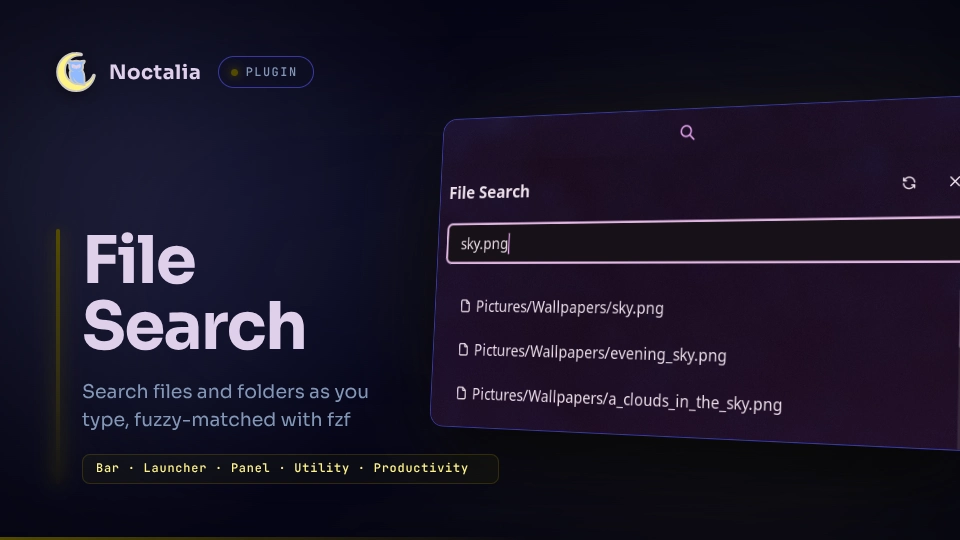
About
File Search
A noctalia v5 bar plugin: fuzzy
search files and folders as you type, matched with
fzf. Click the bar glyph to open a search
panel; picking a result opens it with the system MIME association
(xdg-open) — directories open in the file manager. A /fs launcher entry
gives the same search with native keyboard navigation. The panel can widen
the search to mounted USB/removable disks, and show a disk-usage donut for
the search folder.
Plugin
| Field | Value |
|---|---|
| ID | nightwatch75/file-search |
| Entries | Bar widget: file-search; panel: panel; launcher provider: launcher |
| Launcher Prefix | /fs |
Usage
Add the file-search widget from Noctalia's widget picker and click it to
open the search panel. You can also open the panel directly or bind it in
your compositor:
noctalia msg panel-toggle nightwatch75/file-search:panel
| Action | Effect |
|---|---|
| Left click | Open/close the search panel |
| Right click | Open the search folder in the file manager |
Middle click is not handled: every bar widget carries a built-in binding for it that opens the widget's own settings, so a bound gesture never reaches the plugin. Use the panel's settings button, or the command below.
The panel
| Key | Action |
|---|---|
| ↑ / ↓ | Move the selection through the results (hold to repeat) |
Enter |
Open the selected result (the top match until moved) |
Esc |
Close the panel (noctalia default) |
The list scrolls to keep the selection in view. The mouse wheel still scrolls freely; the next ↑ or ↓ brings the selection back.
Header buttons, left to right:
| Glyph | Button | Effect |
|---|---|---|
| 🗠/🗺 | Ranking | Switches how matches are scored (see Search syntax) |
| ◕ | Usage chart | Shows/hides the disk-usage donut |
| 🌐 | Whole system | Searches all of / instead of the search folder (see Whole-system search) |
| 🗀 | Scope | Cycles what the search covers (see Searching external disks) |
| ↻ | Refresh | Rebuilds the index (and, on the folder scope, re-measures disk usage) |
| ⚙ | Settings | Opens this plugin's page in Settings → Plugins (same as noctalia msg settings-open-plugin nightwatch75/file-search) |
| ✕ | Close | Closes the panel |
Every choice made from these buttons (ranking, whole system, scope, usage chart shown or not) survives a restart. The plugin version sits next to the panel title; the footer shows how many results are listed, how many entries are indexed, and how long the last index build took.
On a result row:
| Action | Effect |
|---|---|
| Left click | Open it with the system MIME association |
| Right click | Open the row menu |
| Row menu entry | Effect |
|---|---|
| Open | Same as a left click |
| Show in file manager | Open the containing folder with the item selected |
| Copy full path | Put the absolute path on the clipboard |
| Copy name | Put just the file or folder name on the clipboard |
Everything but Open leaves the panel up, so several rows can be picked off
in a row. A path too long for one row is shortened in the middle, keeping the
file name (the part the query matched) readable:
.local/share/flatpak/repo/tmp/cache/…dolphin.idx.sig.
Search syntax
The query goes to fzf as-is, so its extended-search operators work here.
The panel keeps a one-line reminder of them above the results.
| Query | Matches |
|---|---|
panel luau |
both terms, in any order (space is AND) |
'panel.luau |
exact, not fuzzy — a single quote, not double quotes |
^src |
at the start |
.webp$ |
at the end |
luau !src |
luau, excluding anything with src |
.toml$ | .json$ |
either one (spaces around the | are required) |
A lowercase query is case-insensitive; one uppercase letter anywhere makes it case-sensitive. There is no regex — fzf does not have one.
The ranking button switches how matches are scored:
| Ranking | Effect |
|---|---|
| Path-aware (default) | A match starting a file or folder name wins, so config finds .ssh/config, not …/Steam Controller Configs/ |
| Generic | fzf's own scoring, which mostly rewards the shortest path |
Path-aware needs fzf 0.36 or newer; on an older build the button stays on generic and its tooltip says why.
Searching external disks
| Scope | Covers |
|---|---|
| Search folder only (default) | The search_folder setting |
| Search folder + external disks | Both, in one index |
| External disks only | Only the mounted removable volumes |
An external disk is a mounted volume that came from a USB port or reports
itself removable: sticks, bus-powered SSDs, LUKS-encrypted drives, SD cards,
optical media. Internal drives never count — put those in search_folder
instead. The plugin mounts nothing; it only sees what your desktop already
mounted. When disks are in scope, the scope button's tooltip also shows free
space across them.
The scope choice is shared with the /fs launcher, and each scope keeps its
own index — switching to the disks and back never re-walks the search
folder.
External disks are only ever indexed on command. Opening the panel, switching scope, changing a setting or plugging a disk in never starts a walk on a disk scope — the index stays as-is and the footer says out of date. Press refresh (or Rebuild search index in the launcher) to walk it. The search folder alone keeps re-indexing itself automatically, since that takes seconds rather than minutes.
Disk usage chart
A donut under the results shows what fills the search folder: its biggest direct children, the rest folded into other, and loose files that belong to no subfolder. Each legend row gives the size and share of the total. It is only offered on the search folder scope, since measuring a disk means walking it — exactly what this plugin refuses to do unasked.
Click a folder in the legend to search inside it: results narrow to that
folder, a strip above them names it, and clicking the strip's ✕ (or the same
row again) lifts the restriction. It combines with whatever you type — pick
winboat, type img, get winboat/data.img.
Sizes come from du -x -d1, measured once and cached for a day, so restarts
and reopens cost nothing (du over a home directory takes a few seconds).
The refresh button re-measures immediately. Other filesystems are never
walked — a mount point under the search folder is skipped and named in the
legend as not counted: … (other filesystem). The usage_exclude_dirs
setting keeps du out of specific, slow-but-same-filesystem folders instead.
Launcher
/fs <text>
| Key | Action |
|---|---|
| ↑ / ↓ | Move through the results |
Enter |
Open the selected result (MIME/xdg-open) |
An empty /fs query also offers Rebuild search index and the scope
switch; the index is shared with the panel. Rebuild search index walks the
tree right away, keeping the launcher open, and is offered next to the
results whenever the index is out of date.
Features
- Live results while you type: the search folder is walked once with
findinto a cache, then every keystroke is fuzzy-matched withfzf --filter - Configurable search folder (defaults to
~), excluded folder names, hidden entries on/off, max results, and bar glyph - Folder results are marked with a trailing
/and a folder glyph - Reveal in file manager uses
org.freedesktop.FileManager1.ShowItems(Thunar, Nautilus, Dolphin, Nemo, Caja, PCManFM-Qt); falls back to opening the containing folder if no file manager implements it - Panel placement (attached/floating), position and open-near-click are the standard per-panel settings noctalia exposes in Settings → Plugins
Settings
| Setting | Type | Default | Description |
|---|---|---|---|
search_folder |
folder |
(empty) | Root folder the search indexes. Empty = your home folder. |
exclude_dirs |
string |
.git, node_modules, .cache, .venv |
Folder names skipped while indexing, separated by , or ;, matched anywhere in the tree. |
show_hidden |
bool |
false |
Index files and folders whose name starts with a dot. |
usage_exclude_dirs |
string |
(empty) | Folders left out of the disk usage chart, separated by , or ;. A bare name matches anywhere below the search folder; a path (absolute, or starting with ~) matches that one folder. Folders on another filesystem are already skipped. |
max_results |
int |
50 |
How many matches the panel lists at most (10–200). |
glyph (widget) |
glyph |
search |
Icon shown on the bar. |
Requirements
- noctalia with
plugin_api = 33(the release after v5.2.1 that addsrevealKeyonui.scroll, which keeps the keyboard selection in view; an older shell keeps being served the last version it can load) — also for the row context menu, relative Luau imports (the three entries shareshared.luau) and direct argv process execution, sodu,xdg-openand the reveal call take their arguments with no shell parsing them fzf— the fuzzy matcher. 0.36 or newer for path-aware ranking; older builds work with fzf's default rankingfind(GNU findutils) — walks the roots into the indexxdg-open(xdg-utils) — opens results with the MIME associationmktemp,mv,wc,head,rm,date,du— GNU coreutils, standard on any Linux desktop. Missingdu, the usage chart says so; everything else still workslsblk(util-linux) — lists mounted USB/removable volumes, only run when the scope includes them. Missing, it falls back to/proc/mountsand the udisks2 layout (/run/media/<user>/…,/media/…)gdbus(glib2) — reveals a result in the file manager. Missing, or with no file manager implementingFileManager1, Show in file manager opens the containing folder instead
Install
Install File Search from Noctalia's plugin store (Settings → Plugins), then add the widget to a bar from Settings → Bar. Plugin options live in Settings → Plugins.
For local development, add your working copy as a path source instead
(.luau edits hot-reload):
noctalia msg plugins source add dev path /path/to/plugins
noctalia msg plugins enable nightwatch75/file-search
Whole-system search
The 🌐 button searches all of / instead of the search folder. It is off by
default. /proc, /sys, /dev, /run, remote and FUSE mounts (NFS, CIFS,
sshfs, rclone, OneDrive…) and removable disks stay excluded. Unreadable
folders are skipped.
Notes
- The index lives in the plugin's private data directory
(
noctalia.pluginDataDir(), by default~/.local/state/noctalia/plugins/data/nightwatch75/file-search/):list-<scope>is the plain list of paths,meta-<scope>the fingerprint it was built with,count-<scope>its entry count and build time, andscope/ranking/usage-chartthe one-word header choices. The disk usage measurement is cached inusage.json, rendered as one of two alternating SVG files. A fingerprint mismatch (a settings change, a scope change, a disk plugged in or removed) rebuilds the search-folder index automatically and marks a disk index out of date. - Several disks share one index, not one each: a rebuild walks every mounted volume in a single pass, unplugging one still leaves the rest openable.
- Volume metadata from other operating systems is pruned at every root
(
lost+found,$RECYCLE.BIN,System Volume Information,.Trash-*, macOS Spotlight/Time Machine/AppleDouble leftovers, and similar), since it is never a user file and can otherwise add tens of thousands of records. findis bound by metadata latency, so a spinning USB drive with a million files can run for minutes — hence indexed on command only. A walk covering disks gets 30 minutes against 3 for the search folder; the panel stays usable throughout.- Both the index and its fingerprint are written to temp files and renamed into place, so a rebuild never writes through a symlink at the cache path.
- Names containing a newline are excluded from the index, and every record is validated against the roots it claims to come from before being opened.
- Excluded entries match by folder/file name (
find -name), not by path; entries containing/are skipped and logged. Unreadable subtrees are silently skipped. tests/run.shexercises the panel's keyboard model (selection, wrap, hold-to-repeat, Enter) under the stockluauCLI with the host stubbed.
License
MIT.
Versions
| Version | Plugin API | Updated |
|---|---|---|
| v0.4.0 latest | 33 | Oct 10, 2026 |
| v0.3.0 | 28 | Sep 27, 2026 |
| v0.0.25 | 15 | Jul 30, 2026 |
| v0.0.11 | 9 | Jul 24, 2026 |
| v0.0.10 | 3 | Jul 17, 2026 |
Older versions stay installable on a Noctalia release whose plugin API is below the latest version's.