
About
Emoji & Symbol Picker
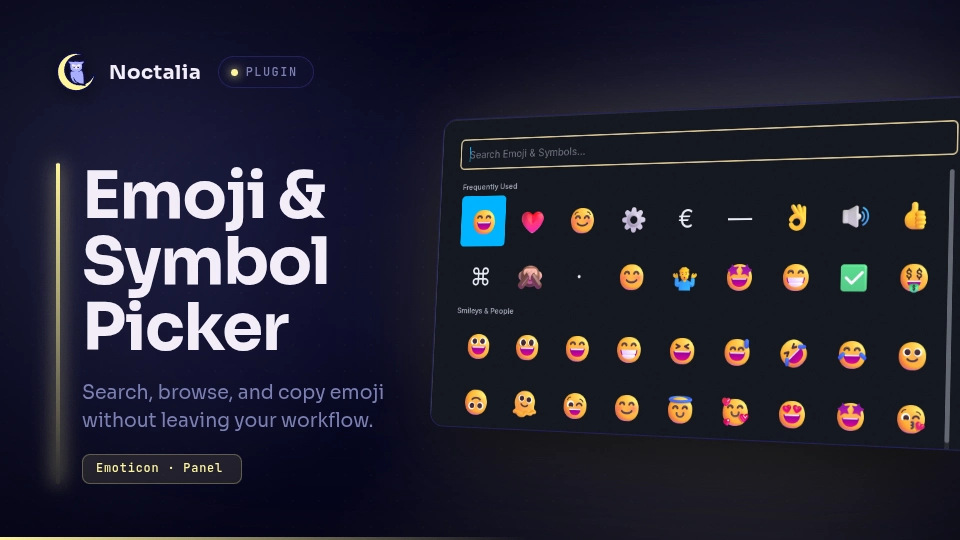
A Raycast-inspired emoji and Unicode symbol browser for Noctalia: instant fuzzy search over ~4,300 emoji and symbols, category browsing, and a frequently-used section that learns from what you pick. Selecting an entry copies it to the clipboard (and can optionally run a paste command), then closes the panel — built for a bind-Select-paste flow.
Plugin
| Field | Value |
|---|---|
| ID | liamwh/emoji-picker |
| Entries | Bar widget: widget; panel: wide; panel: desktop; panel: compact |
The three panel entries share one script and differ only in window size, so
you can bind the one that suits each display — wide for ultrawide
monitors, desktop for 1080p-class displays, compact for laptop panels.
Usage
The bar widget (widget), listed as "Emoji & Symbol Picker" in the shell's
bar-widget picker, can be added to the bar; clicking it opens the compact
picker panel.
Bind a key to the panel that fits your display (Noctalia Settings → Shortcuts → Panel, or your compositor's spawn). For example:
noctalia msg panel-toggle liamwh/emoji-picker:wide
The other entries, same command shape:
noctalia msg panel-toggle liamwh/emoji-picker:desktop
noctalia msg panel-toggle liamwh/emoji-picker:compact
- Type to search names and keywords — "coffee", "arrow right", "euro", "plusminus", or paste a character itself to find it.
- Arrows move the selection, Enter copies the selected entry and closes the panel, Escape closes without copying.
- Without a query, the panel shows category tabs along the top — All plus the nine categories (Smileys & People, Animals & Nature, Food & Drink, Activities, Travel & Places, Objects, Symbols, Characters, Flags) — with Frequently Used (ranked by a recency-decayed frequency score) pinned at the top of every tab. The picker opens on Smileys & People; clicking a tab switches the grid to that category (All shows every section and is slower).
- While a query is active the tab strip hides: search spans all categories.
- The tile grid fits its panel: each entry binds the shared picker to its
manifest width (
wide→ 9 columns,desktop→ 8,compact→ 6), tiles grow to fill the row so the margins stay thin, and a scrollbar gutter is reserved so the rightmost column never slides under the scrollbar (rows keep equal left/right margins). - Queries that name a symbol ("euro", "gbp", "check") rank the plain character (€, £, ✓) above related emoji, so text symbols are one keystroke away too.
Settings
| Setting | Type | Default | Description |
|---|---|---|---|
paste_command |
string |
"" |
Optional shell command run after the copy. {emoji} is replaced with the shell-quoted character. Empty copies to the clipboard only. |
Because Wayland deliberately prevents one surface from injecting keystrokes into another, the plugin does not ship its own paste machinery. If you want paste-on-select and already run an input-injection tool, configure it here, for example:
ydotool key -d 20 29:1 47:1 47:0 29:0— press Ctrl+V after the copy (the clipboard already holds the character);wtype {emoji}— type the character literally.
The command runs asynchronously after the panel closes, when the window you launched the picker from has its focus back.
Requirements
None. The paste setting is optional and only needs a tool if you configure one (see above).
Notes
- Data:
assets/emoji.jsonis committed data generated from pinned Unicode sources (CLDR 48.2 English annotations + Emoji 18.0 emoji-test.txt and UnicodeData.txt from UCD 18.0.0) bytools/emoji-list-gen.py— 4,323 entries: 3,963 emoji plus 360 curated Unicode symbols. Regenerate with that script; see its docstring for the exact inputs. Licensing: CLDR data is Unicode-licensed, Unicode data files are Unicode-licensed; the generated dataset and this plugin's code are MIT. - Files written: one —
<plugin data dir>/usage.json, the frequently-used counters (pick counts and timestamps, per character). Deleting it resets Frequently Used. - Network: none. Processes: none spawned by default; only the
optional
paste_commandyou configure yourself. - Search runs locally over the bundled dataset on every keystroke; the
dataset ships pre-lowered (names/keywords/aliases) and the search blob
is derived once while indexing, so a full-dataset search stays well
inside the shell's per-callback CPU budget (see
tests/). tests/holds a self-contained search/ranking/interaction suite runnable with the stockluauCLI:python3 tests/build_test.py --out /tmp/t.luau && luau /tmp/t.luau.- Panel chrome: the panel draws on the host-owned surface — the card background, rounded corners, outline and shadow belong to the shell, so the plugin paints no background of its own.
Versions
| Version | Plugin API | Updated |
|---|---|---|
| v1.2.0 latest | 28 | Oct 16, 2026 |
Older versions stay installable on a Noctalia release whose plugin API is below the latest version's.