 Noctalia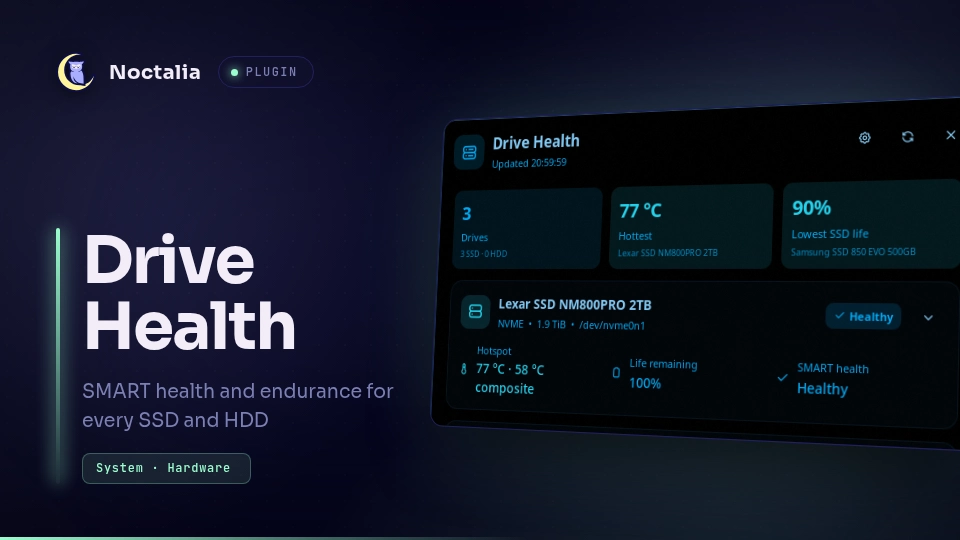
About
Drive Health
Drive Health is a storage-health monitor for Noctalia Shell. It discovers SSDs and HDDs, shows temperature and mounted-space usage, and can optionally expose full SMART health, endurance, error counters, trends, alerts, and background self-tests through a read-only system collector.
Plugin
| Field | Value |
|---|---|
| ID | gustav0ar/drive-health |
| Entries | Bar widget: summary; panel: drives; services: collector, alerts, history |
Requirements
Drive Health runs on Linux with Noctalia Shell v5 and uses the following
commands declared in plugin.toml:
lsblk, smartctl, sh, date, dirname, mkdir, mktemp, rm, sed,
cat, chmod, mv, env, bash, install, systemctl, pkexec,
id, tr, pacman, apt-get, dnf, zypper, apk, xbps-install, and
emerge.
Most are standard system utilities. Install smartctl from the
smartmontools package and lsblk from util-linux. systemctl and pkexec
are needed only for the optional collector and SMART self-tests.
The dependency card uses the desktop authorization dialog before it runs a
package-manager command for pacman, apt-get, dnf, zypper, apk,
xbps-install, or emerge. The exact command remains visible for review.
Usage
Enable Drive Health from Noctalia's community source, then add the summary
widget to a bar. Select the widget to open the drives panel. The same panel can
be toggled with:
noctalia msg panel-toggle gustav0ar/drive-health:drives
Basic mode discovers drives, mounted folders, storage use, and temperatures available to the user session. Open the collector controls from the gear in the panel header to compare basic mode with optional Full SMART mode.
Full SMART installation uses the desktop authorization dialog and runs in the background. After approval, the installer adds a hardened systemd oneshot and timer. Starting, pausing, removing the collector, and changing its interval use the same dialog. Disabling Full SMART in settings makes Drive Health ignore the collector cache; use Stop background service to stop an installed timer as well.
Plugin lifecycle actions also reconcile the installed collector. Enabling or re-enabling Drive Health starts it when Full SMART is enabled, disabling the plugin pauses it, and uninstalling an enabled plugin removes it. Each privileged action uses the desktop authorization dialog. Reloading Drive Health or stopping Noctalia leaves the system timer unchanged. If authorization is cancelled or fails, the collector remains in its prior state and Drive Health reports the failure when its runtime is still available.
Expand a drive for detailed counters, trend history, per-drive preferences, and SMART self-tests. A self-test requires explicit confirmation and a Polkit authorization prompt, then runs in the background while progress and its final firmware result appear in the panel. Sleeping HDDs are not spun up merely to refresh their SMART data.
Transient SMART read failures are stabilized across three distinct successful collector snapshots. The first failure establishes a pending state; an alert is created only if unavailability persists, so device passthrough and reattachment do not produce one-scan notification noise.
Settings
| Setting | Type | Default | Description |
|---|---|---|---|
system_collector_enabled |
bool |
false |
Read the optional root collector cache for complete SMART data. |
refresh_seconds |
int |
30 |
Seconds between lightweight user-session refreshes (15–300). This updates drive inventory, mounts, and non-waking sysfs temperatures; the root timer refreshes full SMART data every 15 minutes. |
full_smart_refresh_minutes |
int |
15 |
Minutes between privileged full SMART reads (1–1440). Applying a changed interval requires explicit administrator approval from the collector controls. |
warning_temperature |
int |
65 |
Global warning temperature in °C. |
critical_temperature |
int |
80 |
Global critical temperature in °C. |
life_warning_percent |
int |
20 |
Remaining SSD-life percentage that triggers a warning. |
alerts_enabled |
bool |
true |
Show notifications for new or worsening issues. |
notify_recovery |
bool |
true |
Notify when an active issue clears. |
show_hdd |
bool |
true |
Include rotational drives in the panel. |
alert_hdd |
bool |
true |
Evaluate rotational drives for health alerts. |
drive_missing_alerts |
bool |
true |
Alert when an established internal drive disappears. |
missing_grace_scans |
int |
3 |
Successful scans a drive may be absent before alerting (1–20). |
use_hotspot_temperature |
bool |
true |
Use the hottest valid NVMe sensor for summaries and alerts. |
history_interval_minutes |
int |
60 |
Minutes between saved trend samples (15–1440). |
history_retention_days |
int |
30 |
Days of bounded trend history to retain (1–365). |
Per-drive controls can set an alias and alert thresholds, reorder or hide a drive, and enable missing-drive alerts. Dismissed alerts are dropped and only return when the condition clears and later recurs or escalates.
IPC
The normal public entry is the panel command above. The plugin's internal services communicate through Noctalia state and do not require manual IPC.
Notes
Drive Health makes no network requests and does not download or execute code. It spawns only the commands documented under Requirements. Conditional package-manager commands are generated locally and require desktop administrator authorization.
The plugin stores bounded local state in its Noctalia data directory:
alert-state.jsonfor current and dismissed alert state;history.jsonfor temperature and endurance samples;drive-preferences.jsonfor per-drive display and alert preferences;last-collector-snapshot.jsonfor monotonic-counter comparisons.
Full SMART mode installs these system files only after explicit approval:
/usr/local/libexec/noctalia-drive-health/collect_raw.sh;/usr/local/libexec/noctalia-drive-health/smart-action.sh;/usr/local/libexec/noctalia-drive-health/manage-collector.sh;/usr/local/libexec/noctalia-drive-health/uninstall-collector.sh;/etc/systemd/system/noctalia-drive-health.service;/etc/systemd/system/noctalia-drive-health.timer;/run/noctalia-drive-health/raw.json.
The runtime directory is mode 0750, the cache is mode 0640, and access is
limited to root plus the desktop user's primary group. SMART serials and mount
paths stay inside the local cache and panel; they are never transmitted.
The system collector performs read-only smartctl --all queries. SMART
self-tests are separate, explicitly authorized firmware operations. They can
take minutes or hours, may increase drive activity, and should not be confused
with filesystem repair or data recovery.
To remove the optional collector explicitly, use Remove collector in its controls and approve the desktop authorization dialog. Uninstalling Drive Health while it is enabled requests the same cleanup. Because the plugin cannot wait for an authorization dialog after its runtime is destroyed, a cancelled or failed uninstall authorization leaves the collector installed; reinstall the plugin and use Remove collector to retry. If the plugin was disabled first, its service is no longer running and cannot receive the uninstall event; use the collector control before disabling in that sequence.
NixOS
/etc/systemd/system is generated from system config on NixOS, so the installer
exits instead of writing to it. The plugin detects NixOS from /etc/os-release
(ID=nixos) or /etc/NIXOS, hides the pkexec install buttons, and shows a
hint instead. A collector writing /run/noctalia-drive-health/raw.json is
recognised as installed.
Add the equivalent declaratively: a unit and timer that run the plugin's
scripts/collect_raw.sh. Point pluginDir at the plugin checkout so the
collector version stays in sync with the plugin, and set user to the desktop
user that reads the cache:
{ config, pkgs, ... }:
let
  user = "<you>";
  pluginDir = "/path/to/drive-health"; # absolute path of the plugin directory
in
{
  environment.systemPackages = [ pkgs.smartmontools ];

  systemd.services.noctalia-drive-health = {
    description = "Collect read-only SMART data for Noctalia Drive Health";
    after = [ "local-fs.target" ];
    path = with pkgs; [ bash coreutils util-linux smartmontools ];
    serviceConfig = {
      Type = "oneshot";
      ExecStart = "${pkgs.bash}/bin/sh ${pluginDir}/scripts/collect_raw.sh --output /run/noctalia-drive-health/raw.json";
      Group = config.users.users.${user}.group;
      RuntimeDirectory = "noctalia-drive-health";
      RuntimeDirectoryMode = "0750";
      RuntimeDirectoryPreserve = "yes";
      UMask = "0027";
      StandardOutput = "null";
      TimeoutStartSec = "60s";
      NoNewPrivileges = true;
      PrivateTmp = true;
      PrivateNetwork = true;
      ProtectSystem = "strict";
      ProtectHome = "read-only";
      ProtectHostname = true;
      ProtectKernelLogs = true;
      ProtectKernelTunables = true;
      ProtectKernelModules = true;
      ProtectControlGroups = true;
      ProtectClock = true;
      RestrictAddressFamilies = "AF_UNIX";
      RestrictNamespaces = true;
      RestrictRealtime = true;
      RestrictSUIDSGID = true;
      SystemCallArchitectures = "native";
      LockPersonality = true;
      MemoryDenyWriteExecute = true;
      CapabilityBoundingSet = [ "CAP_DAC_OVERRIDE" "CAP_SYS_ADMIN" "CAP_SYS_RAWIO" ];
      ReadWritePaths = [ "/run/noctalia-drive-health" ];
      ReadOnlyPaths = [ pluginDir ];
    };
  };

  systemd.timers.noctalia-drive-health = {
    description = "Refresh SMART data for Noctalia";
    wantedBy = [ "timers.target" ];
    timerConfig = {
      OnBootSec = "20s";
      OnUnitActiveSec = "15min";
      AccuracySec = "5s";
      Unit = "noctalia-drive-health.service";
    };
  };
}
The unit mirrors packaging/noctalia-drive-health.service.in. Rebuild with
sudo nixos-rebuild switch, then enable Full SMART in the plugin settings
(system_collector_enabled = true).
If an imperative collector is already installed, remove it first to avoid a
conflicting noctalia-drive-health.service unit:
sudo /usr/local/libexec/noctalia-drive-health/uninstall-collector.sh
Development
Run the unit, shell, translation, lint, privacy, and packaging checks from this directory:
make test
This source is licensed under the MIT License.
Versions
| Version | Plugin API | Updated |
|---|---|---|
| v1.2.9 latest | 43 | Oct 25, 2026 |
| v1.2.8 | 17 | Oct 18, 2026 |
| v1.2.4 | 9 | Jul 27, 2026 |
| v1.2.2 | 3 | Jul 24, 2026 |
Older versions stay installable on a Noctalia release whose plugin API is below the latest version's.