 Noctalia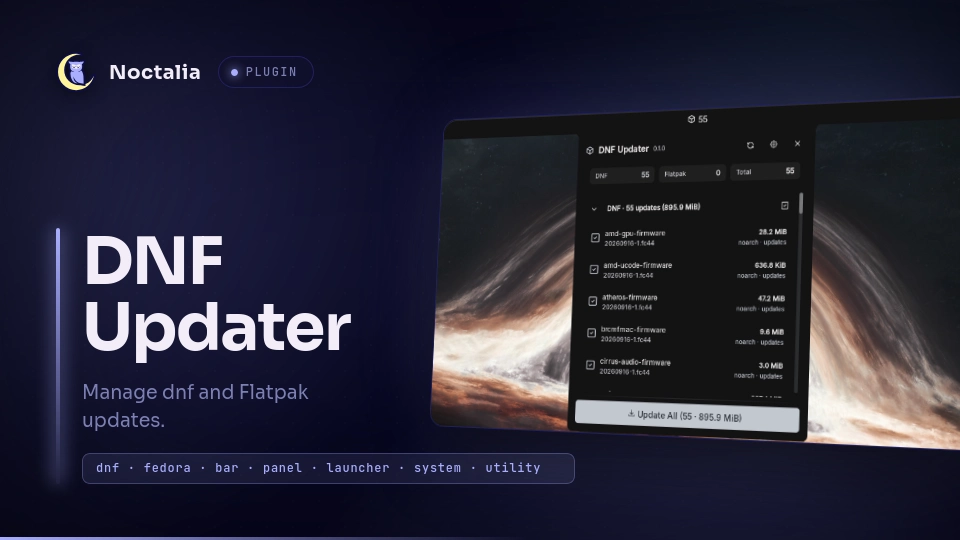
About
DNF Updater
DNF Updater monitors and manages pending DNF5 and Flatpak updates directly from the Noctalia bar. It provides a lightweight update badge in the bar, per-package selection to skip or apply specific upgrades, package search filtering, reboot required detection, download size estimation, and safe execution through Polkit or an interactive terminal.
Plugin
| Field | Value |
|---|---|
| ID | strob3/dnf-updater |
| Entries | Bar widget: widget; panel: panel; service: service |
Requirements
The plugin expects the following dependencies on $PATH:
dnf5- required for DNF, COPR, and RPM package management. Fedora 41+ uses DNF5 by default.flatpak- optional, Flatpak application managerpkexec- (Polkit authentication for non-interactive privileged package installation)
Passwordless Background Upgrades (Optional)
To enable background upgrades without a password prompt, install the included hardened helper script and Polkit rule with:
curl -fsSL https://raw.githubusercontent.com/strob3/dnf-updater/main/scripts/install.sh | sudo bash
Alternatively, if you have cloned the repository locally:
sudo ./scripts/install.sh
To remove the helper and Polkit rule later:
curl -fsSL https://raw.githubusercontent.com/strob3/dnf-updater/main/scripts/install.sh | sudo bash -s -- --uninstall
# or: sudo ./scripts/install.sh --uninstall
Usage
Add the DNF Updater widget to the bar using Noctalia's bar widget picker. Left-click the widget to open the updates panel. You can also toggle the panel or bind it to a compositor shortcut:
noctalia msg panel-toggle strob3/dnf-updater:panel
Shortcuts & Keybindings
You can also toggle the panel with a hotkey or shell alias:
Niri (~/.config/niri/config.kdl):
binds {
    Mod+U { spawn "noctalia" "msg" "panel-toggle" "strob3/dnf-updater:panel"; }
}
Hyprland (hyprland.conf):
bind = $mainMod, U, exec, noctalia msg panel-toggle strob3/dnf-updater:panel
Shell Alias (~/.bashrc or ~/.zshrc):
alias dnf-updater="noctalia msg panel-toggle strob3/dnf-updater:panel"
alias dnf-check="noctalia msg plugin strob3/dnf-updater:service service check"
Controls
| Action | Target | Description |
|---|---|---|
| Left Click | Bar Widget | Open or close the updates panel |
| Right Click | Bar Widget | Refresh the updates |
| Middle Click | Bar Widget | Open plugin settings in Settings → Plugins |
| Search Input | Panel Top | Filter packages in real time by name, repo, or ref |
| Click Row | Package Row | Toggle package selection (include or exclude from update) |
| Chevron Click | Section Header | Collapse or expand DNF or Flatpak package section |
| Check Click | Section Header | Select all or deselect all packages in section |
| Refresh Icon | Panel Header | Re-check repositories for latest updates |
| Update Button | Panel Bottom | Apply updates for all selected packages |
Settings
| Setting | Type | Default | Description |
|---|---|---|---|
check_interval |
int |
30 |
Interval in minutes between automatic checks (0 to 10080, 0 disables). |
enable_dnf |
bool |
true |
Enable checking and upgrading DNF5 system packages. |
enable_flatpak |
bool |
true |
Enable checking and upgrading Flatpak applications. |
include_flatpak_runtimes |
bool |
false |
Include Flatpak runtime and extension updates alongside applications. |
show_widget_when_clean |
bool |
true |
Show the widget icon in the bar even when system is up to date. |
notify_on_updates |
bool |
true |
Send a desktop notification when new pending updates are found. |
update_in_terminal |
bool |
true |
Launch update commands inside your terminal emulator instead of background Polkit execution. |
glyph |
glyph |
package |
Widget icon glyph displayed in the bar. |
IPC
Trigger background service operations using noctalia msg:
# Check for updates immediately
noctalia msg plugin strob3/dnf-updater:service service check

# Apply updates for all pending packages
noctalia msg plugin strob3/dnf-updater:service service update
Notes
- Privilege Separation: Noctalia never runs as root. System upgrades invoke hardened helper script with explicit arguments via Polkit, or launch inside the user's terminal emulator when configured.
- Selective Upgrades: When packages are deselected, DNF5 is invoked with
--exclude=<pkg>arguments and Flatpak is invoked with only selected application IDs. - Background Checks: Update queries use non-blocking JSON queries (
dnf5 check-upgrade --jsonandflatpak remote-ls --updates -j) to prevent freezing the shell. - Reboot Detection: Checks
dnf needs-restarting -rto detect when core packages (kernel, systemd, glibc) require a system restart.
License
Versions
| Version | Plugin API | Updated |
|---|---|---|
| v1.1.0 latest | 43 | Oct 26, 2026 |
| v1.0.3 | 24 | Oct 6, 2026 |
Older versions stay installable on a Noctalia release whose plugin API is below the latest version's.