
About
Discord Voice
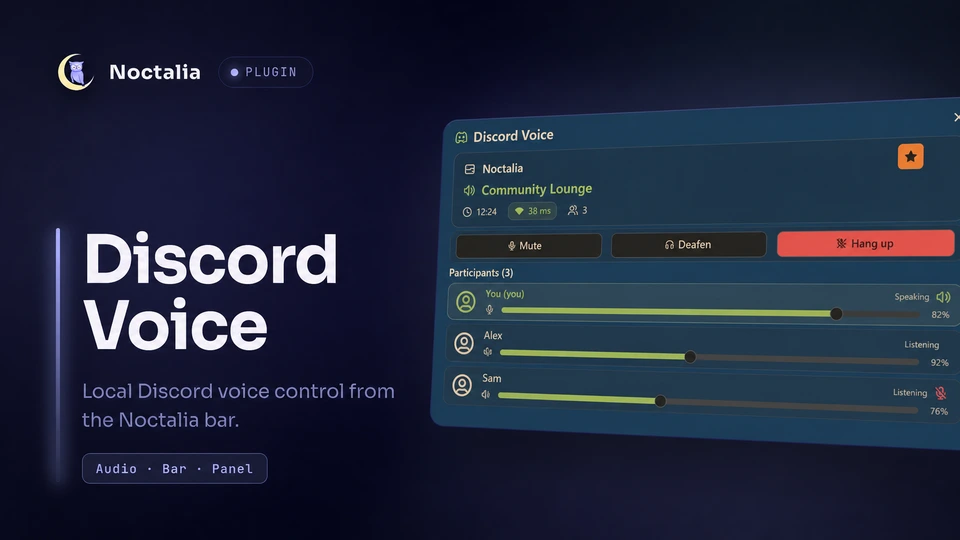
Monitor and control a local Discord desktop voice session without leaving Noctalia. The bar widget and panel expose voice state and controls through Discord's local RPC interface.
Plugin
| Field | Value |
|---|---|
| ID | raycursive/discord-voice |
| Entries | Bar widget: bar; panel: panel; service: bridge |
Requirements
- Noctalia with plugin API 9 or newer.
python33.10 or newer onPATHfor the local Discord RPC bridge.- The
discorddesktop client. The default executable is/usr/bin/discord; change Discord executable if yours is elsewhere.
Discord must be running locally. The bridge detects native, Flatpak, Snap, and common temporary Discord IPC socket locations; the Discord web app alone is not sufficient.
Usage
Enable raycursive/discord-voice in Settings → Plugins, then add the bar entry from Settings → Bar → Widgets.
- Click the bar widget to open the
panelentry. If Discord is not running, the first click launches the configured Discord executable. - Select Authorize Discord and accept Discord's local consent prompt.
- Use the panel to mute, deafen, hang up, adjust your input volume from 0–100%, or adjust another participant's listening volume from 0–200%.
- Select saved recent or favorite channels to rejoin them in Discord.
The bridge service starts automatically when the plugin is enabled and keeps the bar widget and panel synchronized. Open the panel without the bar widget with:
noctalia msg panel-toggle raycursive/discord-voice:panel
Settings
| Setting | Type | Default | Description |
|---|---|---|---|
discord_binary |
file |
/usr/bin/discord |
Executable used to launch Discord and open channel deep links. |
glyph |
glyph |
brand-discord |
Glyph used by this bar-widget instance when no participant avatar is shown. |
show_channel_name |
bool |
true |
Shows the active voice-channel name beside the glyph. |
hide_when_disconnected |
bool |
false |
Hides the bar widget while no voice channel is connected. |
IPC
The bridge service accepts these events:
# Start Discord's local authorization flow.
noctalia msg plugin raycursive/discord-voice:bridge all authorize

# Refresh current voice and channel state.
noctalia msg plugin raycursive/discord-voice:bridge all refresh

# Leave the current voice channel.
noctalia msg plugin raycursive/discord-voice:bridge all hangup

# Write a token-free state summary to the Noctalia log.
noctalia msg plugin raycursive/discord-voice:bridge all dump
Notes
- The plugin requests only the Discord OAuth scopes
rpc,rpc.voice.read, andrpc.voice.write. It does not request message, notification, relationship, or guild-member scopes. - Authorization sends the code to
https://streamkit.discord.com/overlay/token. Participant avatars are downloaded fromhttps://cdn.discordapp.com; no downloaded content is executed. - The Python bridge connects to Discord and to its own control channel over local Unix sockets. Noctalia spawns the bridge, and the bar or panel may spawn the configured Discord executable.
- The bridge authenticates the connected Discord process by UID and rejects endpoints owned by another user or whose peer credentials cannot be verified, including sockets found in shared temporary directories.
- The access token is stored at
$NOCTALIA_STATE_HOME/noctalia/discord-voice/token.json, or under$XDG_STATE_HOMEwhen the Noctalia override is unset. Recent and favorite channel metadata is stored beside it inchannels.json. The directory uses mode0700and both files use mode0600. - Participant avatars are cached under
$XDG_CACHE_HOME/noctalia/discord-voice/avatars/. The bridge's control socket is created under$XDG_RUNTIME_DIR, with a per-user/tmpfallback, and removed on a clean shutdown. - Discord's StreamKit token exchange does not provide a refresh token. Authorize again after the access token expires.
- Voice levels changed through Discord RPC belong to the active integration; Discord may restore previous levels when the bridge disconnects.
- The bridge reconnects after Discord restarts. The integration depends on Discord's public StreamKit identity and token broker, which Discord may change.
The authorization design was from PandorasFox/dms-discord-widget.
Versions
| Version | Plugin API | Updated |
|---|---|---|
| v0.3.2 latest | 9 | Aug 17, 2026 |
Older versions stay installable on a Noctalia release whose plugin API is below the latest version's.