
About
Cursor
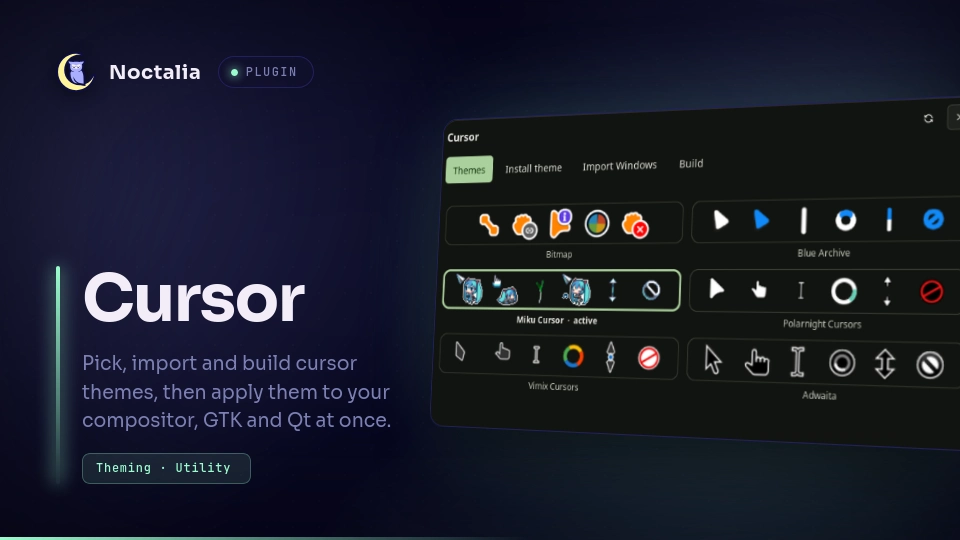
A cursor panel for Noctalia. Pick a theme and size once and it is applied to the compositor, GTK, Qt/XWayland and the session environment together, with a warning when they drift apart. It also turns Windows cursor packs or your own PNGs into Xcursor themes.
Plugin
| Field | Value |
|---|---|
| ID | vn1k/cursor |
| Entries | Panel: manager; shortcut: shortcut |
Requirements
python3 is the only hard requirement. The engine that does the work ships with the plugin
as bin/curmgr.py, so nothing needs to be on PATH.
For the full experience, installing these as well is recommended:
| Package | What it adds |
|---|---|
win2xcur |
theme previews, importing Windows .cur / .ani packs, building themes |
python-wand |
resizing and rendering cursor images; uses imagemagick |
imagemagick |
the image library python-wand binds to |
zenity |
the panel's Folder… browse buttons |
Installing
win2xcur is a Python library, so it has to be importable by the system python3.
Fedora:
sudo dnf install python3-wand ImageMagick zenity
pip install --user win2xcur
Arch Linux (win2xcur is in the AUR):
sudo pacman -S python-wand imagemagick zenity
yay -S win2xcur
Debian / Ubuntu:
sudo apt install python3-wand imagemagick zenity
pip install --user --break-system-packages win2xcur
On Debian and Ubuntu the --break-system-packages flag is needed because pip refuses to
install into the system Python otherwise. With --user the package still goes to your home
directory, not the system.
Check that everything is in place:
python3 -c "import win2xcur, wand; print('ok')"
Reopen the panel afterwards.
When they are present, the plugin also calls a few tools you already have: gsettings for the
GNOME layer, plus the running compositor's own tools (niri validate, sway -C / swaymsg,
hyprctl, mmsg) to check and reload a config change. A missing one is skipped and the
panel says why. You do not install any of them for this plugin.
Listing and applying themes works without the optional packages. Importing and building
report what is missing instead of failing halfway. Without zenity, the browse buttons tell
you to type the path instead.
Usage
Open the panel from the control centre tile (the shortcut entry, added under the control
centre in Settings), or with:
noctalia msg panel-toggle vn1k/cursor:manager
Themes lists every theme in ~/.local/share/icons, ~/.icons and /usr/share/icons,
each with a rendered preview strip. Pick one, pick a size and press Apply. Hide when
typing and Hide after ms set the compositor's cursor hiding. The bar at the top shows
what each layer currently reports. When they disagree it says so, and applying again brings
them back in line.
Import Windows turns a Windows cursor pack folder into an Xcursor theme. Extract a
downloaded archive first. If the pack ships an Install.inf (nearly all do), the role
mapping and theme name come from it. Otherwise filenames are matched against the Windows
cursor roles. The pack is read and shown before anything is written. A grid lists every role
next to the file it got, and you can click a role to pick a different file or clear it.
Anything left unrecognised is shown, not guessed. Animated .ani cursors stay animated.
Windows shadow bakes in the drop shadow Windows draws for you, which most packs assume.
Build turns a folder of PNGs into a theme, with the same preview grid. Filenames are read
as Windows role names or Xcursor names (left_ptr.png, xterm.png, sb_h_double_arrow.png),
so a PNG export of an existing theme maps on its own. Numbered frames (wait-01.png,
wait-02.png, …) become one animated cursor. A spec.json in the folder takes over and sets
roles, hotspots and animation delays exactly:
{
  "name": "MyCursor",
  "inherits": "Adwaita",
  "cursors": {
    "arrow": { "png": "arrow.png", "hotspot": [3, 1] },
    "wait":  { "png": "wait_*.png", "hotspot": [16, 16], "delay_ms": 40 }
  }
}
Install theme copies a finished Xcursor theme (a folder with a cursors/ directory inside)
into ~/.local/share/icons byte for byte, with its alias symlinks intact.
Themes you installed, imported or built can be removed from the panel. The first click on Remove this theme arms it and the second one removes it.
Settings
| Setting | Type | Default | Description |
|---|---|---|---|
engine_path |
string |
empty | Leave empty. Points at a different curmgr.py than the bundled bin/curmgr.py, for a checkout that keeps the engine elsewhere. |
build_sizes |
select |
24,32,48,64,96 |
Nominal sizes baked into every theme the plugin imports or builds. Larger sets cost build time and disk; HiDPI screens want the bigger entries. |
scale_filter |
select |
lanczos |
Resampling filter used when cursor art is scaled to those sizes. point keeps hard pixel edges crisp on 32×32 Windows art; lanczos suits anti-aliased modern packs; mitchell sits between them. |
Notes
Files written. Applying a theme writes the four portable layers below, plus one layer for each compositor whose config file exists:
| Layer | File or command | Reaches |
|---|---|---|
| GNOME | gsettings org.gnome.desktop.interface cursor-theme / cursor-size |
GTK 4, libadwaita, portals |
| GTK | ~/.config/gtk-3.0/settings.ini, ~/.config/gtk-4.0/settings.ini |
GTK apps, on restart |
| Legacy | ~/.icons/default/index.theme (Inherits=) |
Qt, SDL, Electron, XWayland, on restart |
| Env | ~/.config/environment.d/90-xcursor.conf |
new processes, next login |
| niri | ~/.config/niri/cursor.kdl |
niri, instantly |
| Hyprland | ~/.config/hypr/cursor.conf |
Hyprland, via hyprctl reload + hyprctl setcursor |
| Sway | ~/.config/sway/cursor.conf |
Sway, via swaymsg reload |
| MangoWC | ~/.config/mango/cursor.conf |
MangoWC, via mmsg dispatch reload_config |
The compositor's main config (config.kdl, hyprland.conf, sway's config, mango's
config.conf) is the only file the plugin edits that it does not own. It is edited once:
- It is backed up to
<config>.bak-cursor-<timestamp>. - One include line for the file above is appended.
- niri only: a conflicting top-level
cursorblock is commented out. A second one would collide in KDL, while the other three are last-wins parsers. - niri and Sway then validate the result (
niri validate,sway -C), and a rejected config is restored from the backup.
Every later apply rewrites only the managed include file. Every compositor that has a config gets its file, not just the one running, so the theme stays right if you switch compositors.
Imported and built themes go to ~/.local/share/icons/<name>. Preview images are cached under
~/.cache/curmgr. The browse buttons hand the chosen path back through the plugin's data
directory. Remove only ever deletes under ~/.local/share/icons, and refuses any path
outside it, so a theme in /usr/share/icons is never touched.
Processes. The panel runs python3 bin/curmgr.py, zenity for the browse buttons, and
noctalia msg panel-open to reopen itself after a browse. The engine runs gsettings and the
compositor tools named above.
Network. None. Nothing is downloaded. Binary cursor formats are handled by
win2xcur, and nothing here parses .cur, .ani or
Xcursor by hand.
Already-running apps keep the cursor they read at startup. That is how Wayland works, not a
bug. The environment.d and ~/.icons/default layers exist so the next start picks up the
new theme.
The engine is a plain CLI, so the same operations work from a keybind or a script with the shell stopped. Every subcommand prints one JSON object:
python3 ~/.local/state/noctalia/plugins/materialized/community/cursor/bin/curmgr.py list
Versions
| Version | Plugin API | Updated |
|---|---|---|
| v1.0.0 latest | 8 | Sep 23, 2026 |
Older versions stay installable on a Noctalia release whose plugin API is below the latest version's.