 Noctalia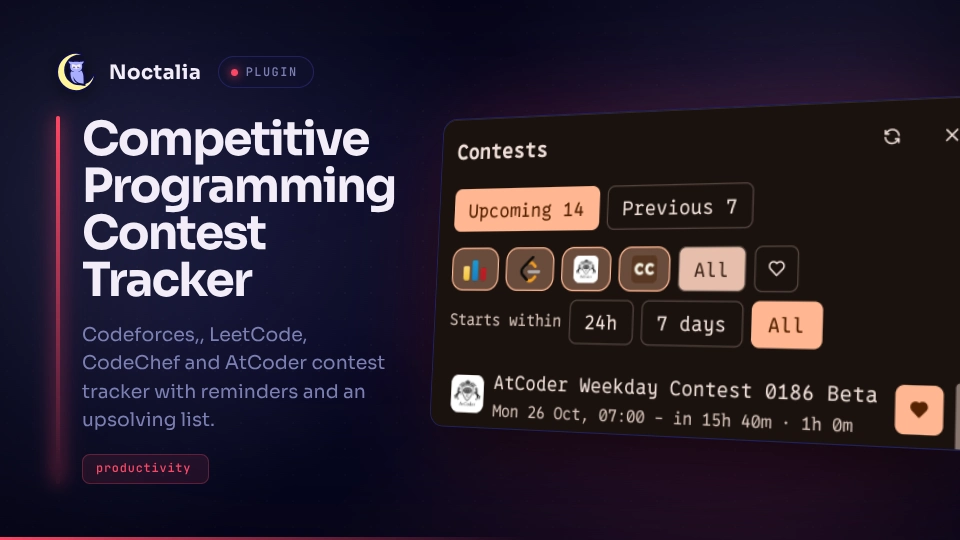
About
Competitive Programming Contest Tracker
Shows upcoming and recently finished contests from Codeforces, CodeChef, LeetCode and AtCoder. A bar widget shows the next contest, a desktop widget lists the next few, a side panel lists them all, save contests, send reminders, and finished contests can be saved for upsolving.
Plugin
| Field | Value |
|---|---|
| ID | quantinium/competitive-programming-contest-tracker |
| Entries | Bar widget: next; desktop widget: upcoming; panel: panel; service: fetcher |
Requirements
Install xdg-open (opens a contest in your default browser) and notify-send (reminders) on PATH. The plugin
needs network access to Codeforces, CodeChef, LeetCode and AtCoder.
Usage
Add the Competitive Programming Contest Tracker widget (next) to your bar from the Add widget picker. It shows the next contest's platform logo and the time until it starts (or "live" while it runs); hovering lists the next five contests. Clicking it opens the panel.
The desktop widget (upcoming) lists the next upcoming contests on your desktop: platform logo, name (a heart marks contests you take part in), start time and duration. Add it from Settings, Desktop widgets, and click a contest to open it in your browser. It follows the platform filters and hearts set in the panel.
The panel (panel) opens as a side sheet. Open it from the bar widget or with:
noctalia msg panel-toggle quantinium/competitive-programming-contest-tracker:panel
- Upcoming tab: click a contest to open it in your browser. Toggle a platform logo to filter by platform, pick a "Starts within" range, and heart the contests you take part in. The heart button filters to those.
- Previous tab: recently finished contests. Bookmark the ones you want to upsolve; saved contests stay pinned on top until you unsave them. The bookmark button filters to those.
- Hearted contests send a reminder before they start and, optionally, when they start. Clicking the notification opens the contest.
- The refresh button in the panel fetches immediately. The
fetcherservice otherwise refreshes on its own.
Settings
Open them with noctalia msg settings-open-plugin quantinium/competitive-programming-contest-tracker, or from
Settings, Plugins.
| Setting | Type | Default | Description |
|---|---|---|---|
refresh_minutes |
int |
30 |
How often the contest lists are fetched (5 to 240 minutes). A failed fetch is retried after 5 minutes. |
hide_longer_than_days |
int |
3 |
Hides multi-day events such as long practice rounds. Hearted and saved contests are always shown. 0 shows everything. |
past_days |
int |
7 |
How many days finished contests stay in the Previous tab (1 to 30). Saved contests stay longer. Raising it takes effect on the next refresh, since older contests are only fetched then. |
reminders_enabled |
bool |
true |
Send notifications for hearted contests. |
remind_minutes |
int |
30 |
Minutes before the start to send the reminder. 0 turns off the early reminder. |
remind_at_start |
bool |
true |
Send a second notification when the contest starts. |
widget_width |
int |
340 |
Desktop widget only: width in pixels (240 to 640). |
visible_items |
int |
5 |
Desktop widget only: how many upcoming contests it lists (1 to 12). |
IPC
noctalia msg plugin quantinium/competitive-programming-contest-tracker:fetcher all refresh        # fetch now
noctalia msg plugin quantinium/competitive-programming-contest-tracker:fetcher all test-reminder  # send a sample reminder for the next contest
noctalia msg plugin quantinium/competitive-programming-contest-tracker:panel all tab previous     # switch the panel's tab (upcoming or previous)
Notes
- Network: each refresh requests the Codeforces API (
contest.list), the CodeChef contest list API, the LeetCode GraphQL endpoint and the AtCoder contests page. AtCoder has no public API, so its page is scraped. - Files written:
contests.json(cache of the last fetch),filters.json(platform filters, hearts, saved contests) andreminded.json(reminders already sent), in the plugin's data directory (~/.local/state/noctalia/plugins/data/quantinium/competitive-programming-contest-tracker/). - Processes spawned:
xdg-open <url>to open a contest andnotify-sendfor reminders. Contest names come from remote sites, so they are quoted before reaching a shell, and URLs are passed toxdg-openas arguments. - Privacy: no account, handle or login is used; the requests carry no personal data.
Versions
| Version | Plugin API | Updated |
|---|---|---|
| v0.1.0 latest | 32 | Oct 25, 2026 |
Older versions stay installable on a Noctalia release whose plugin API is below the latest version's.