 Noctalia
About
ClearClock
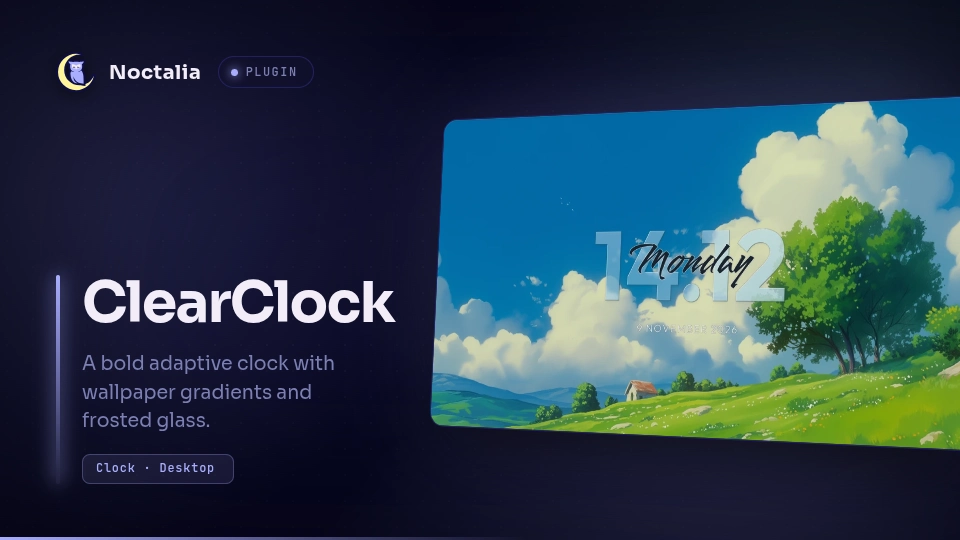
An adaptive desktop clock widget for Noctalia with a bold Outfit clock, script weekday overlay, and spaced date.
Plugin
| Field | Value |
|---|---|
| ID | nirusaki/clearclock |
| Entries | Desktop widget: desktop; service: defaults |
Requirements
Requires python3 and python-pillow on your system for wallpaper gradient sampling and frosted glass rendering effects.
Custom font families are resolved with fc-match from fontconfig when it is installed. fontconfig is optional: without it, or when a family cannot be matched, ClearClock falls back to the bundled Outfit and Smooch fonts.
Usage
Enable the plugin and add ClearClock to your desktop:
- Enable
nirusaki/clearclockin the Noctalia Plugin Store or settings. - Open the desktop widget editor:
noctalia msg desktop-widgets-toggle-edit - Add ClearClock under Settings → Desktop or via the widget palette.
- Drag and position the widget across your screens. New saved instances automatically default to a transparent background.
- Exit the editor:
noctalia msg desktop-widgets-exit
Presets
Frosted Glass Font (as shown in preview)
To achieve translucent beveled glass digits with a softened wallpaper fill:
- Frosted glass font (
frostedFont):true - Font frosting strength (
fontGlassStrength):0.0 - Wallpaper gradient (
adaptiveGradients):false - Adaptive colors (
adaptiveColors):true - Background:
false(transparent) - Clock font size (
clockFontSize):218
Adaptive Wallpaper Gradient
For smooth multi-color digits sampled from the underlying wallpaper:
- Wallpaper gradient (
adaptiveGradients):true - Adaptive colors (
adaptiveColors):true - Frosted glass font (
frostedFont):false
Settings
Settings can be customized per widget instance in the Noctalia Desktop editor or widget settings:
| Setting | Type | Default | Description |
|---|---|---|---|
adaptiveColors |
bool |
true |
Follow the active Noctalia palette. Set to false to configure custom font colors. |
adaptiveGradients |
bool |
true |
Sample a smooth gradient from the wallpaper beneath the saved clock position. |
frostedGlass |
bool |
false |
Blur the wallpaper beneath the clock into a translucent rounded card. |
glassStrength |
double |
0.5 |
Strength of the frosted background card blur (0.0 to 1.0). |
frostedFont |
bool |
false |
Translucent digits with a frosted wallpaper fill and polished glass edges. |
fontGlassStrength |
double |
0.55 |
Strength of the frosted font glass effect (0.0 to 1.0). |
clockUse24hFormat |
bool |
true |
Toggle between 24-hour and 12-hour time format. |
clockShowSeconds |
bool |
false |
Display seconds and request second-level ticks. |
clockSeparator |
string |
. |
Delimiter between hours, minutes, and seconds. |
timezone |
string |
"" |
IANA time zone identifier (leave empty for system local time). |
clockFontColor |
color |
#ffffff |
Font color for clock digits when adaptiveColors is disabled. |
clockFontFamily |
string |
ccdefault |
Font family for clock digits (ccdefault selects bundled Outfit). |
clockBoldText |
bool |
true |
Render clock digits in bold weight. |
clockFontSize |
int |
220 |
Font size for clock digits. |
showDayDisplay |
bool |
true |
Toggle the cursive weekday overlay. |
dayFontColor |
color |
#5e4573 |
Font color for weekday text when adaptiveColors is disabled. |
dayFontFamily |
string |
ccdefault |
Font family for weekday text (ccdefault selects bundled Smooch). |
dayBoldText |
bool |
false |
Render weekday text in bold weight. |
dayFontSize |
int |
100 |
Font size for weekday text. |
showDateDisplay |
bool |
true |
Toggle date display below the clock. |
dateCustomDateFormat |
string |
%-d %B %Y |
Date format string using strftime tokens. |
dateFontColor |
color |
#ffffff |
Font color for date text when adaptiveColors is disabled. |
dateFontFamily |
string |
ccdefault |
Font family for date text (ccdefault selects bundled Outfit). |
dateBoldText |
bool |
false |
Render date text in bold weight. |
dateFontSize |
int |
24 |
Font size for date text. |
dateLetterSpacing |
int |
2 |
Letter spacing between date characters. |
dateGap |
int |
-20 |
Vertical spacing gap between clock digits and date. |
Notes
- Wallpaper Rendering: When
adaptiveGradients,frostedGlass, orfrostedFontare active, a lightweight helper script samples the desktop wallpaper directly beneath the widget and renders optimized cached PNGs into the plugin data directory. - Licenses:
- Plugin source code is licensed under GPL-3.0-or-later (original design by qewer33, ported by Nirusaki). See
LICENSE. - Bundled fonts are licensed under the SIL Open Font License 1.1:
- Outfit (
fonts/Outfit-Regular.ttf,fonts/Outfit-Bold.ttf): Copyright 2021 The Outfit Project Authors. Seefonts/Outfit-OFL.txt. - Smooch (
fonts/Smooch-Regular.ttf): Copyright 2021 The Smooch Project Authors. Seefonts/Smooch-OFL.txt.
- Outfit (
- Plugin source code is licensed under GPL-3.0-or-later (original design by qewer33, ported by Nirusaki). See
Versions
| Version | Plugin API | Updated |
|---|---|---|
| v1.2.1 latest | 31 | Nov 10, 2026 |
Older versions stay installable on a Noctalia release whose plugin API is below the latest version's.