
About
Claude Code Usage
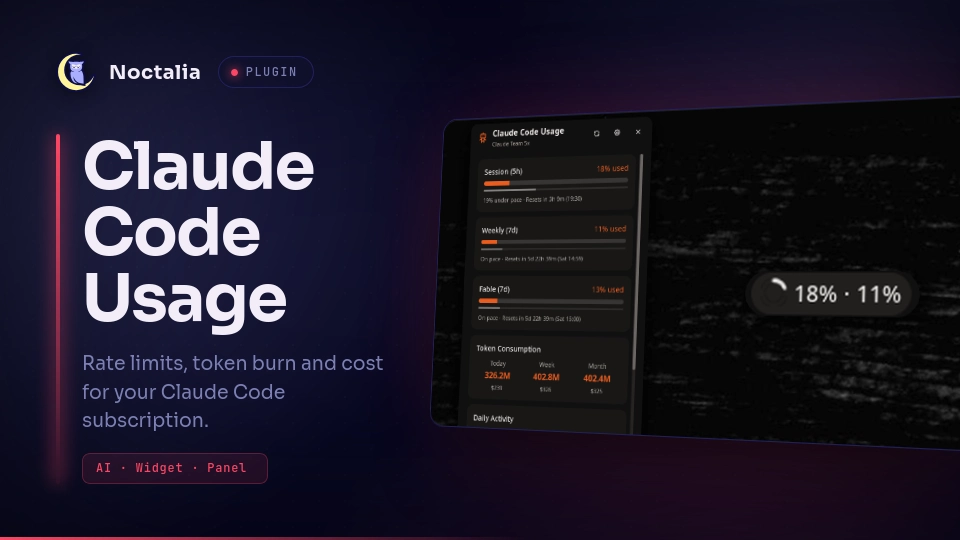
Watch your Claude Code subscription burn down without leaving the bar: rate-limit windows, token consumption, estimated cost, daily activity and a per-model breakdown, refreshed in the background and mirrored into a bar pill, a click panel and a desktop tile. Ported from the original Dank Material Shell plugin by Nicolas Bellamy.
It reads the usage Anthropic already reports for your own account, using the credentials Claude Code holds, so it covers the real subscription rate windows — the 5-hour session, the plan-wide week, and the model-scoped week a plan carries when it has one — rather than counting local tokens and guessing. There is no companion CLI to install and no second config file to keep in sync: enable the plugin and the numbers are there.
Past the quota percentage it carries what a percentage alone leaves out — token counts for today, this week and this month, their estimated cost in USD or EUR at live model prices, a Monday-to-Sunday activity chart, a per-model breakdown for the week, all-time session and message totals, and a selector for switching between CCS profiles. The bar pill, the panel and the desktop tile all read one shared fetch, so putting up all three costs one process.
Plugin
| Field | Value |
|---|---|
| ID | jrohland/claudecode |
| Entries | Bar widget: pill; panel: popout; desktop widget: panel; service: service |
The service entry is headless and owns the single fetch loop; pill, popout and
panel are thin clients that watch the state it publishes. Entry ids are unique across
entry types, which is why the click panel is popout while the desktop tile keeps the
older id panel.
Requirements
- A Noctalia build at plugin API level 26 or newer.
- An authenticated Claude Code install, i.e.
~/.claude/.credentials.jsonexists. jqandcurlonPATH. The service checks for both and reports a status instead of running when either is missing.bash, plus the usual base userland thatget-claude-usagecalls:awk,grep,date,cut,tr,wc,cat,head,find,basenameandmktemp. These ship with coreutils, findutils and gawk on every supported distribution.
Usage
Add the Claude Code Usage widget to a bar from the Add-widget picker. The pill shows
the chosen rate window as NN%, colored by pacing: neutral when you are on or under
pace, warning when over pace, error when over quota, with an ↑ cue when you are off
track. Hover it for a summary: the plan, then one row per rate window with how much is
gone, how long is left and the clock time it comes back, then today's and this week's
tokens with their cost.
- Left-click the pill opens the usage panel.
- Right-click forces a refresh.
pill_extras puts more beside the percentage: the time left in the window
(17% · 3h 20m), the pace against the clock (↓16 is sixteen points under where the
window says you should be, ↑16 is sixteen over), both, or neither. It describes
whichever window the bar metric tracks — the 5-hour one under both, the same window
the ring follows, so the two never disagree. With pace showing, the bare ↑ off-track
cue steps aside; the number already says it.
Both are [widget.actions] defaults, so they are re-bindable in the bar's gesture
settings; the script's own onClick / onRightClick do the same thing if you remove a
binding.
The panel header names the plan the account is on in words — "Claude Team 5x", rebuilt
from the machine tokens the credentials file actually stores (team,
default_claude_max_5x). The same name heads the tooltip.
The panel opens attached under the pill and carries the full detail: a card for every
rate window the plan reports, each with a reset countdown, the wall-clock time it lands
on, and a pacing bar, token consumption for today, this
week and this month with estimated cost, a Monday-to-Sunday activity chart you can hover
for a single day's tokens and cost, a per-model breakdown for the current week, all-time
session and message stats, and a profile selector that cycles the CCS instances found in
~/.ccs/instances/*. Refresh, settings and close buttons sit in its header.
Open or close it from a terminal with:
noctalia msg panel-toggle jrohland/claudecode:popout
Force a refresh without touching the bar:
noctalia msg plugin jrohland/claudecode:service all refresh
For an always-visible copy, add the desktop widget from the desktop-widget editor
(noctalia msg desktop-widgets-edit). It lays out the same panel; being a desktop
surface it takes no hover, so the daily chart has no per-bar detail and the profile
selector is a cycle button rather than a dropdown.
Settings
Plugin-wide settings live under Settings → Plugins; the rest are per-entry and appear with the widget.
| Setting | Type | Default | Description |
|---|---|---|---|
refresh_interval |
int |
2 |
Minutes between background fetches (2–15). |
currency |
select |
auto |
Cost display: auto follows the locale, or force usd / eur. |
pill_metric |
select |
five_hour |
Which window the pill reports: five_hour, seven_day, or both. |
pill_style |
select |
glyph_text |
Pill appearance: glyph + percentage, a circular ring, or ring + percentage. |
pill_extras |
select |
none |
What rides beside the percentage: countdown, pace, both or none. |
show_glyph |
bool |
true |
Show the Claude glyph next to the percentage. |
ring_size |
int |
16 |
Ring diameter in pixels (10–28). Keep it under the bar height or it clips. |
ring_thickness |
int |
3 |
Ring stroke width in pixels (1–6). |
ring_color |
color |
#89B4FA |
Ring progress color, used only when the active palette cannot be read. |
ring_track_color |
color |
#585B70 |
Ring background color, same fallback. |
accent |
color |
primary |
Desktop widget accent. |
Under pill_metric = both the ring tracks the 5-hour window only — the text still
carries both numbers. Two concentric rings do not read at bar size.
Rate windows
The windows come from the API's own list rather than a fixed pair, so a plan gets
exactly the cards it is actually metered on: Session (5h), Weekly (7d), and on plans
that scope a week to one model, that model's own row — Fable (7d). A window Anthropic
adds later appears on its own with no change here.
Each card colors by pace, whether quota is running ahead of the clock. Anthropic also
labels a window high or critical when it wants attention, and that outranks the pace
arithmetic, so a card never reads calm while the vendor is calling it urgent.
How it differs from the DMS version
- Noctalia's
ui.*has no arc primitive, soring.luaugenerates an SVG and hands it tobarWidget.setImage; the image loader rasterizes it through librsvg. - An SVG needs literal hex and the plugin API has no palette-role resolver, so
ring.luauresolves the active palette itself: custom and community palettes are read from disk, wallpaper palettes are re-derived by runningnoctalia theme. Built-in palettes live inside the shell binary and cannot be read, so those fall back toring_color/ring_track_color. - Inside the panel and the desktop widget, progress is still linear (
ui.progress). - The panel is a fixed 380×640 and scrolls; the DMS popout auto-sizes.
Architecture
get-claude-usage— the data engine, a Bash script. The plugin runs it with--json; its defaultKEY=valueoutput and thetests/suite are preserved unchanged.service.luau— headless service: runs the script on the configured interval and publishes the parsed result asusageandstatus.shared.luau— formatters, countdown math, pacing model and profile projection, required by the three UI entries so they cannot drift on how a number reads.widget.luau— the bar pill.ring.luau— the pill's circular-progress SVG and palette resolution.panel.luau— the click panel.desktop.luau— the desktop tile.
Notes
What this plugin touches, so nothing is a surprise:
- Reads
~/.claude/.credentials.jsonfor the OAuth token that authorizes the usage query, and enumerates~/.ccs/instances/*for the profile selector. The token is sent only to Anthropic. - Network: the Anthropic usage API for your account's rate windows; LiteLLM's public model-price table to cost the tokens; Frankfurter (ECB rates) for USD to EUR. All over HTTPS, on the refresh interval.
- Spawns
get-claude-usagethroughbash, andnoctalia themewhen the ring needs a wallpaper-derived palette. - Writes nothing outside the plugin's own data directory.
Localized in English. Translations for other locales are welcome through Noctalia Translate.
Development
Point a path source at a checkout; Luau edits hot-reload on save, manifest changes need
a config reload.
git clone https://github.com/jrohland/noctalia-v5-claudecode ~/dev/noctalia-v5-claudecode
noctalia msg plugins source add jrohland-dev path ~/dev/noctalia-v5-claudecode
noctalia msg plugins enable jrohland/claudecode
Run the data-engine tests with bash tests/test-get-claude-usage.sh. They mock curl,
so they need no network and no credentials.
AI assistance
This plugin was built with AI assistance, and not in a small way: the port from Dank Material Shell and everything since — the rate-window handling, the generated bar ring, the two panels, the Bash data engine — were written with Claude Code. The author directed the work and verified it by running it: every surface exercised on a live shell, every setting toggled, the data engine's suite run. The author has not read all ~3,400 lines line by line, and would rather say so than imply an audit that did not happen.
It is written to be read. Plain Luau and Bash, nothing minified, obfuscated or machine-emitted; a comment on every non-obvious decision saying why it is that way rather than what it does; and a 92-assertion suite over the data engine's parsing that needs no network and no credentials to run. If a reviewer finds a line whose purpose is not clear from the code and its comment, that is worth an issue.
License
Versions
| Version | Plugin API | Updated |
|---|---|---|
| v1.0.1 latest | 26 | Sep 22, 2026 |
Older versions stay installable on a Noctalia release whose plugin API is below the latest version's.