
About
Claude Sessions
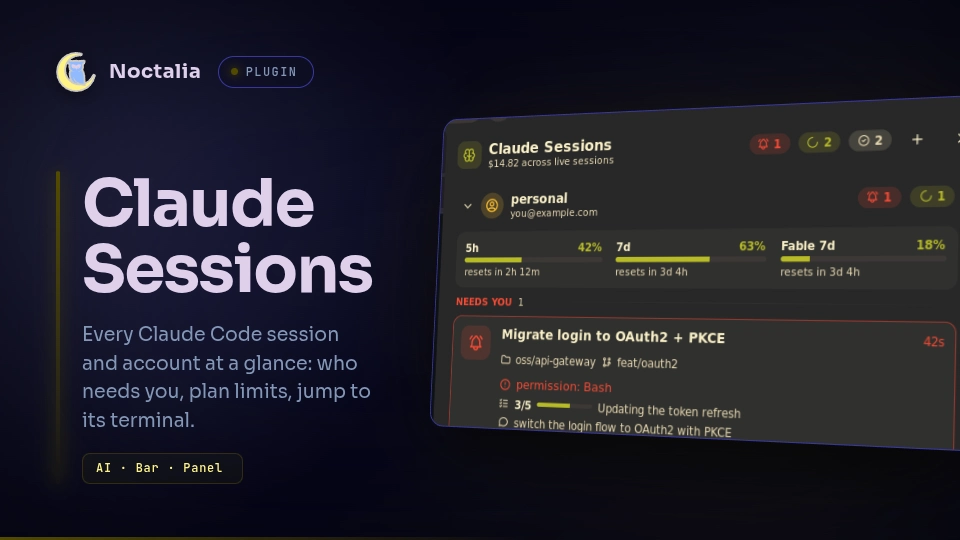
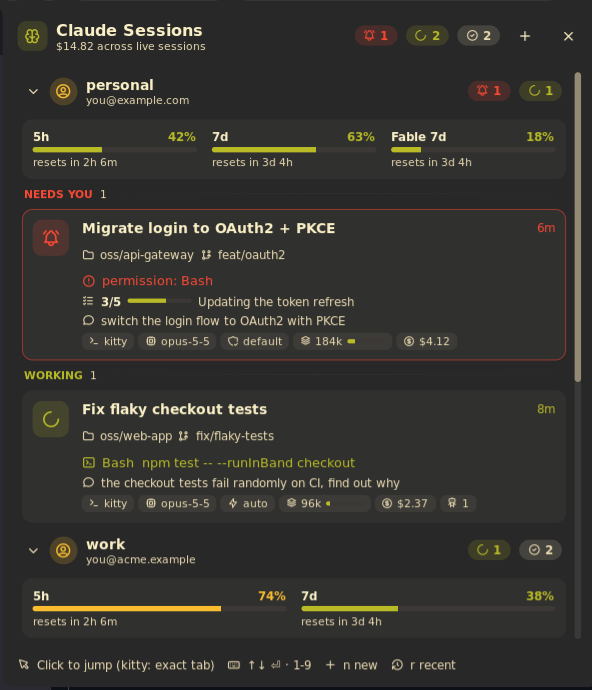
Every Claude Code session at a glance, right in your Noctalia bar. See which sessions are working, which are waiting for you and what each one is doing, keep an eye on your plan limits, and jump to any session's terminal in one click, down to the exact kitty tab.
Features
- 🔔 Know when you're needed. Sessions waiting for a permission or an answer jump to the top, turn the bar icon into a red bell and send a desktop notification.
- ⚙️ See what each session is doing. The tool it's running (
Bash: npm test,Edit: src/app.ts, …), its todo progress, your last prompt, model, permission mode, context size and estimated cost. - 📊 Plan limits. 5-hour, 7-day and per-model weekly usage (e.g. Fable) with reset countdowns.
- 🎯 Jump to the terminal. Click a session to focus its window; on kitty it lands on the exact tab or split.
- ⏪ Resume and start sessions. Reopen recently closed sessions, or start a new one in a recent project.
- ⌨️ Keyboard and launcher. Navigate the panel without a mouse, or search sessions from the launcher with
/cs. - 👥 Multiple accounts. Sessions started with different
CLAUDE_CONFIG_DIRs (e.g. personal and work) are detected automatically and shown per account, each with its own plan limits. - 🖥️ Works on Hyprland, niri and sway.
Plugin
| Field | Value |
|---|---|
| ID | lfdominguez/claude-sessions |
| Entries | Bar widget: bar; panel: panel; service: poller; launcher provider: search |
| Launcher Prefix | /cs |
Requirements
| Requirement | Why |
|---|---|
| Claude Code 2.1+ | It writes the per-session state files this plugin reads. |
jq |
Reads session state and transcripts. |
curl |
Fetches plan limits when claude-dashboard isn't installed (see Privacy). |
xdg-open |
The "open folder" and "open transcript" actions. |
hyprctl, niri or swaymsg |
Focusing a session's window on Hyprland (classic or Lua config), niri or sway. On other compositors everything else still works. |
kitty (optional) |
Exact tab/split focusing, and opening new or resumed sessions as kitty tabs. |
kitty integration (optional)
kitty sessions get the best experience: clicking one switches to its exact tab or split, and new or resumed sessions
open as tabs in your most recently used kitty. Enable remote control in kitty.conf, then restart kitty:
allow_remote_control socket-only
listen_on unix:@kitty-{kitty_pid}
Sessions running in any other terminal (or in kitty without remote control) still work: clicking one focuses its terminal window, and new sessions open in Noctalia's configured terminal.
Usage
Bar widget
Add Claude Sessions to a bar from the widget picker.

It shows one dot per session, sorted by status:
| Dot | Meaning |
|---|---|
| Red (with a bell icon) | Needs you: waiting for a permission or an answer |
| Accent color | Working |
| Grey | Idle |
After the dots it shows your plan usage, colored by how close it is to the limit. By default that's the 5-hour window, as in the image above. Choose which windows with Bar limits, and a linear bar or a ring with Bar limits style. Here it shows the 5-hour and 7-day windows as rings, for two accounts:

Prefer numbers? Set Bar style to Counts to show the number of sessions waiting, then busy/total:

Hover the widget for a summary of every session and your plan limits. Click it to open the panel.
Panel
Open it from the bar widget, or bind this to a key:
noctalia msg panel-toggle lfdominguez/claude-sessions:panel
From top to bottom:
- Plan limits. One meter per usage window, with a reset countdown.
- Sessions. Grouped into Needs you, Working and Idle. Each card shows the task title, project folder and git branch, what Claude is doing right now (or what it's waiting for), todo progress, your last prompt, and chips for terminal, model, permission mode, context size, cost, running subagents and last turn time.
- Recent. Closed sessions you can resume (click the header to expand).
Click a card to jump to its terminal. Hover it (or select it with the keyboard) to reveal its actions:
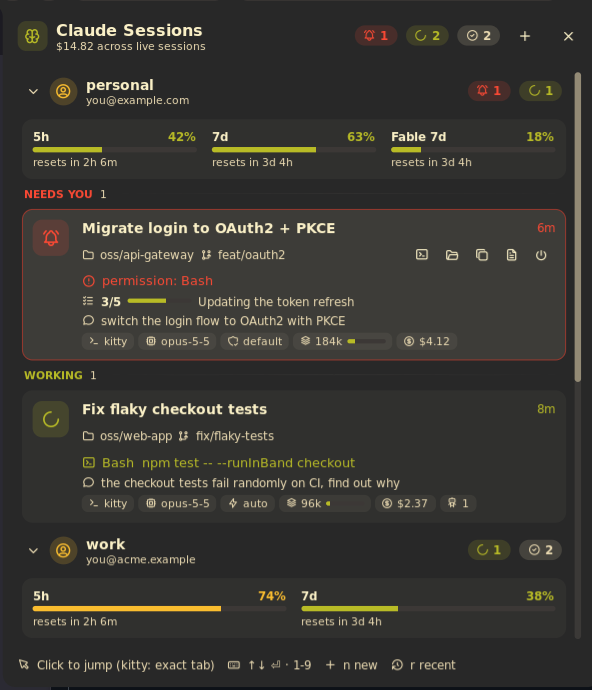
| Action | What it does |
|---|---|
| ▶ Resume (recent only) | Reopens the session with claude --resume in a new terminal tab |
| Shell | Opens a shell in the project folder |
| Folder | Opens the project folder in your file manager |
| Copy | Copies a cd … && claude --resume … command |
| Transcript | Opens the session's transcript file |
| Stop (live only) | Stops the session; click twice to confirm |
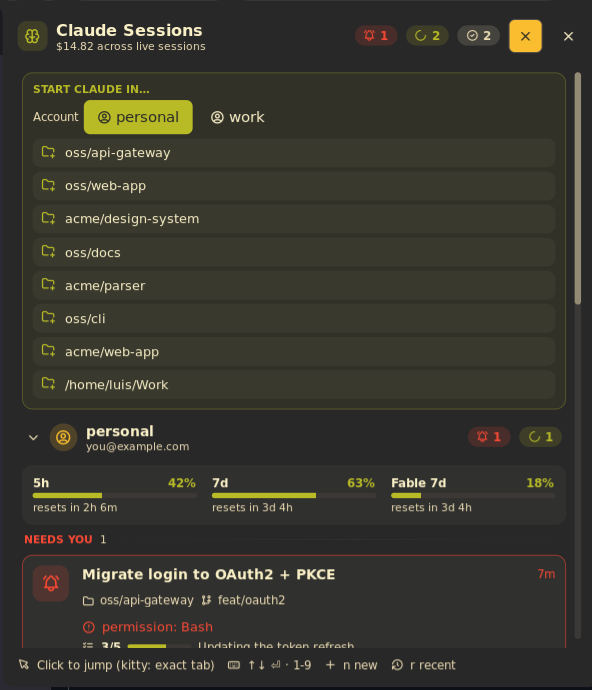
The + button in the header starts a new Claude session in one of your recent projects. With several accounts you also choose which account it runs under:
Keyboard
| Key | Action |
|---|---|
↑ / ↓ |
Select a session |
Enter |
Jump to the selected session |
1–9 |
Jump straight to that session |
n |
New session |
r |
Show or hide Recent |
Esc |
Close |
Multiple accounts
Claude Code keeps each account in its own config dir: ~/.claude by default, or whatever CLAUDE_CONFIG_DIR
points at. For example:
CLAUDE_CONFIG_DIR=~/.claude-work claude
The plugin picks up the config dir of every running session automatically and remembers it, so that account's recent sessions stay available after you close it. To show an account before you start any session in it, add its dir to Extra Claude config dirs.
With more than one account:
- Panel. Each account gets its own section with its name, email, session counts and plan limits. Click an account's header to fold it.
- Bar widget. Each account gets its own group, starting with a name tag (
personal,work) followed by that account's dots and plan limits. - Tooltip and notifications. Session titles are prefixed with the account name.
- Recent sessions. Each card is tagged with its account and resumes under it.
- New sessions. The + picker lets you choose which account to start the session in.
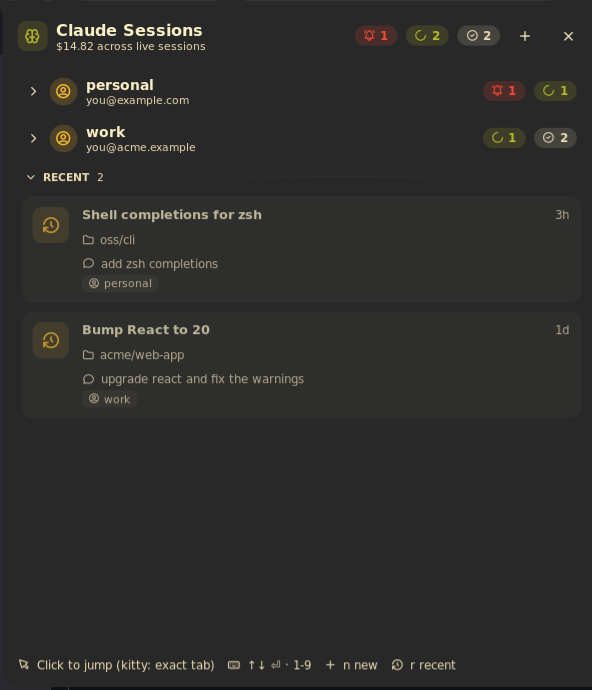
An account's name comes from its dir: ~/.claude is default, and ~/.claude-work is work. To rename one, use
Account names.
Launcher
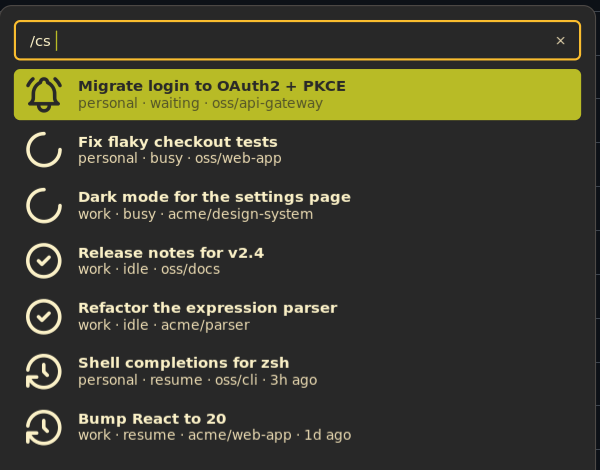
Type /cs followed by part of a session title or project path, for example /cs api. Live sessions are listed
first: activating one jumps to it. Activating a recent session resumes it in a new terminal.
Settings
Open them from Settings → Plugins → Claude Sessions.
| Setting | Type | Default | Description |
|---|---|---|---|
notify_waiting |
bool |
true |
Desktop notification when a session starts waiting for input or a permission. |
notify_finished |
bool |
true |
Desktop notification when a session goes from working to idle. |
finished_min_minutes |
int |
2 |
Only send the "finished" notification for turns at least this many minutes long. |
hide_idle_hours |
int |
0 |
Hide live sessions that have been idle longer than this many hours. 0 shows all. |
recent_count |
int |
8 |
Closed sessions listed under Recent and in the launcher. 0 disables Recent. |
bar_style |
select |
dots |
dots: one dot per session. counts: waiting count and busy/total. |
bar_limits |
select |
5h |
Plan usage shown on the bar after each account's dots: 5h, 7d, 5h_7d, all (every window, including per-model ones like Fable 7d) or none. |
bar_limits_style |
select |
bar |
How each limit is drawn on the bar: a linear bar or a circular ring. |
config_dirs |
string_list |
empty | Claude config dirs (CLAUDE_CONFIG_DIR) to always show, one per account. Dirs of running sessions are detected automatically. |
account_labels |
string_map |
empty | Display name per config dir, e.g. ~/.claude-work → Work. (Advanced) |
work_root |
folder |
empty | Project paths under this folder are shown relative to it (e.g. ~/Work). Empty shows full paths. |
context_window |
int |
1000000 |
Context window size in tokens, used to draw the context gauge. |
IPC
# Toggle the panel from the bar widget on the focused output (handy for a compositor keybind)
noctalia msg plugin lfdominguez/claude-sessions:bar focused click

# Re-scan sessions and plan limits now
noctalia msg plugin lfdominguez/claude-sessions:poller all refresh
Notes
Privacy and data access
Everything is read locally. The only network access is the optional plan-limits call described below.
| What | Where it comes from |
|---|---|
| Accounts | ~/.claude, the config_dirs setting, and the CLAUDE_CONFIG_DIR of running claude processes, found by running.sh once a minute. The account email is read from .claude.json. |
| Live sessions | <config dir>/sessions/*.json, written by Claude Code and read every 2 seconds. Leftover files from crashed sessions are ignored by checking /proc/<pid>. |
| Session details | The session transcript in <config dir>/projects/, read by details.sh only when it changes. |
| Last prompt | <config dir>/history.jsonl |
| Cost | Estimated from token usage and pricing-cache.json. |
| Terminal | The session process's environment (/proc/<pid>/environ), checked once for KITTY_PID, KITTY_WINDOW_ID and TERM_PROGRAM. Nothing else from it is kept. |
| Plan limits | See below. |
Plan limits are fetched separately for each account. If the
claude-dashboard Claude Code plugin is installed and the account's
cache file is less than 5 minutes old, it is used as-is. That file is ~/.cache/claude-dashboard/cache-<hash>.json,
where the hash is the first 16 hex characters of the SHA-256 of the account's token, computed locally the same way
claude-dashboard does. Otherwise limits.sh calls https://api.anthropic.com/api/oauth/usage, at most once every
5 minutes per account, with that account's own OAuth token from <config dir>/.credentials.json. The token is:
- only read, never refreshed or written;
- passed to
curlon stdin, so it doesn't appear in the process list; - never logged or handed to the plugin's Luau code.
If the token has expired, the call is skipped until Claude Code refreshes it.
Processes it runs:
jq,grep,tail,findandsha256sumto extract data;pgrep(inrunning.sh) to find runningclaudeprocesses;kitty @,hyprctl,niri msgorswaymsgto focus windows and open tabs;xdg-open;kill -TERM <pid>when you stop a session;claude --resumewhen you resume one.
Files written: accounts.json in the plugin's data dir, which lists the config dirs seen so far.
Troubleshooting
- Clicking a kitty session doesn't switch tabs. Remote control isn't enabled for that kitty. Add the two lines
above to
kitty.confand restart kitty; windows opened before the change keep the old behaviour. - Plan limits are missing. Make sure Claude Code is logged in. If you rely on
claude-dashboard, its cache only refreshes while a session is redrawing its status line. - Logs. Script errors are logged to
~/.cache/noctalia/noctalia.logunder[luau].
Versions
| Version | Plugin API | Updated |
|---|---|---|
| v1.5.2 latest | 24 | Oct 1, 2026 |
Older versions stay installable on a Noctalia release whose plugin API is below the latest version's.