 Noctalia
About
Claude Operator
Every Claude Code session on one switchboard. Each session is a lit line: the bar's lamps show which are working and which need you (blinking), and one gauge shows your plan windows and where your current rate takes them. The panel lets you read Claude's last reply without switching windows, jump to any session's terminal, resume and search every saved session, forecast your limits, see when and where your usage goes, and manage CLAUDE.md files and Claude Code plugins. A desktop widget puts the board on a second monitor.
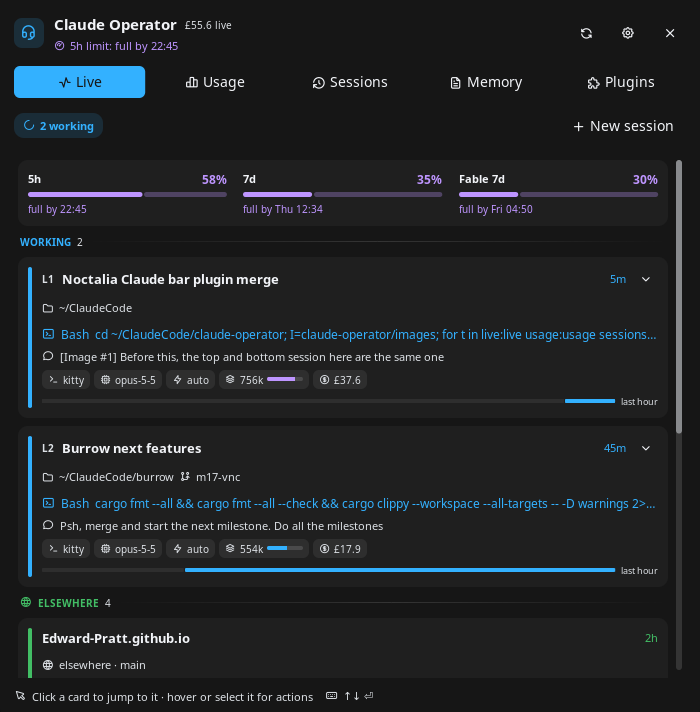
The Live tab: each running session is a numbered line with its lamp, current tool, last prompt, cost and last hour.
Claude Operator merges claude-cockpit (nightwatch75) and claude-sessions (lfdominguez) into one plugin with one data service, and fixes several bugs they had.
Plugin
| Field | Value |
|---|---|
| ID | edward/claude-operator |
| Entries | Bar widget: widget; desktop widget: desktop; panel: panel; service: service; launcher provider: search |
| Launcher Prefix | /co |
Requirements
Noctalia 5.4.0 or newer (
plugin_api = 43).Claude Code 2.1 or newer, logged in. It writes the per-session state files this plugin reads, and its OAuth token gives the plan limits.
claudeitself, found onPATHor in~/.local/bin, for resuming sessions and the Plugins tab.bash,jqandcurl.Standard tools every distribution ships:
find,grep,sed,awk,tac,stat,sort,head,tail,tr,cut,xargs,date,basename,dirname,readlink,cat,mkdir,mv,rm,pgrep,kill.xdg-opento open folders, transcripts and claude.ai links.Optional: kitty with remote control, to land on the exact tab of a session and to open new or resumed sessions as kitty tabs. Add to
kitty.confand restart kitty:allow_remote_control socket-only listen_on unix:@kitty-{kitty_pid}Optional, to jump to a session's window: Hyprland (
hyprctl, Lua or classic config), niri (niri), sway (swaymsg) or Umbriel (umbriel), the compositors whose window list names each window's process. On GNOME, KDE, river, labwc and others everything else works, and clicking a card says it cannot find the window. Without a compositor window list, new sessions still open as tabs in the newest kitty.Optional: tmux. A session inside tmux gets its pane selected, then the terminal of the attached client is focused (the most recently active one).
Any terminal works. Cards name it: kitty, Alacritty, WezTerm, Ghostty, Konsole, foot, VTE terminals, or whatever sets
TERM_PROGRAM, prefixed withtmux ·inside tmux.GNU coreutils, findutils, grep and sed, as on every mainstream distribution (the scripts use
find -printf,stat -canddate -d); BusyBox alone is not enough.Optional:
codeorzedto open CLAUDE.md files, or set Editor command.
Usage
Bar widget
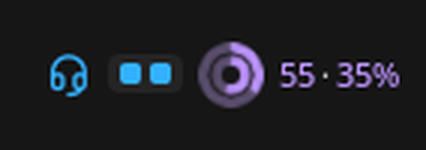
Add Claude Operator from the bar's widget picker. It shows:
- The glyph, which turns into a red bell while a session waits for a permission or an answer (on this machine or, through Remote Control, on another one).
- A lamp board: one lamp per running session, red and blinking while it needs you, accent
while working, dim when idle. After 8 it shows
+N. Set Bar style to Counts forwaiting busy/totalinstead. - One nested gauge for the plan windows (pick them with Bar limits): the 5-hour
window inside the 7-day one, each with a solid arc for what is used and a faint arc for
where the current rate takes it by the reset; then their percentages, inside out
(
46·34%). Bar limits style also offers bars or plain percentages. A window turns to the warning colour when the current rate takes it past 85% (or to 100% before the reset), and red when the limit is under an hour away (5-hour window) or a day away (weekly), or reached. Numbers kept from before an expired token are dimmed.
Hover it for every session, the plan, where each window is heading, and the cost of today and the last 7 days. Click it to open the panel.
Panel
noctalia msg panel-toggle edward/claude-operator:panel
It opens attached to the bar. To float it instead, set Placement to Floating (and Position to where you want it) in the panel section of the plugin's settings, which noctalia provides for every plugin panel.
The header always leads with the most urgent thing on the board: a session that needs you, a limit about to be hit, or how many lines are working.
Live: plan limits, then running sessions grouped into Needs you, Working and Idle. Each session is a numbered line (
L1,L2…) with a lamp down its edge that blinks while it needs you. A card shows the title, folder and branch, the tool it is running or what it waits for, todo progress, your last prompt, chips for terminal, model, permission mode, context use, cost, subagents, helpers (Claude sessions started from inside this one, such as a hook's review run) and last turn time, and a strip of its last hour (working, waiting, idle). The chevron opens Claude's last reply, rendered, and the questions of a pending AskUserQuestion, so you can see what it wants without switching windows. Click a card to jump to its terminal. Hover it, or select it with the keyboard, for its actions: open on claude.ai (Remote Control), open a shell there, open the folder, copy a resume command, open the transcript, and stop the session (click twice). Elsewhere lists your Remote Control sessions on other machines. Recent lists closed sessions to resume. New session starts Claude in a pinned or recent project. Click the limits strip to open Usage.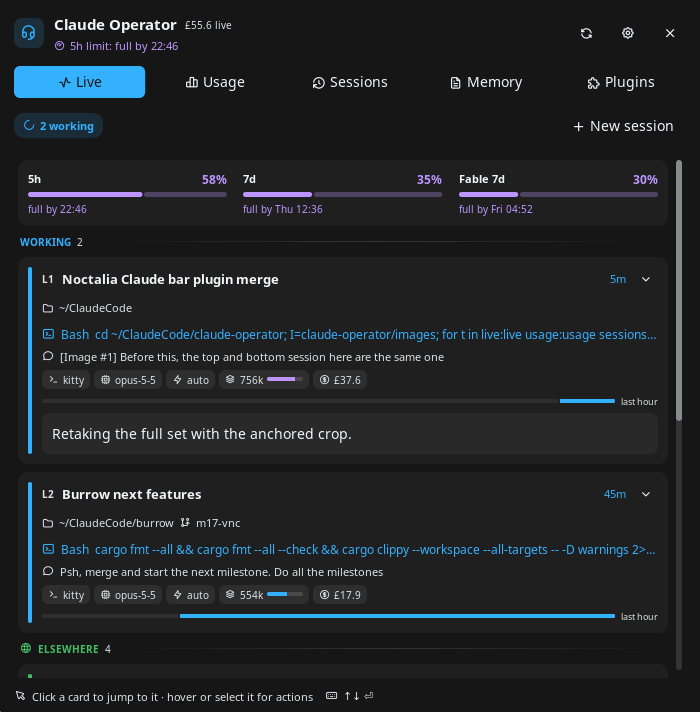
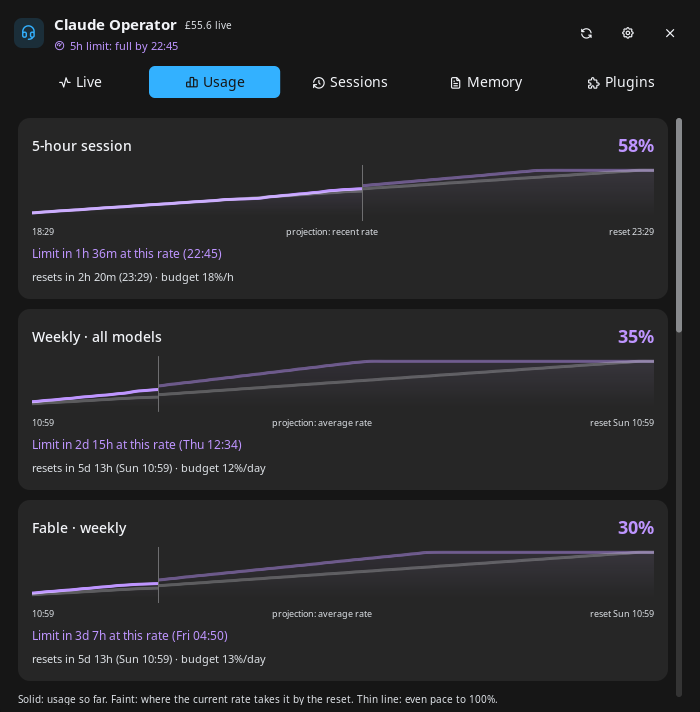
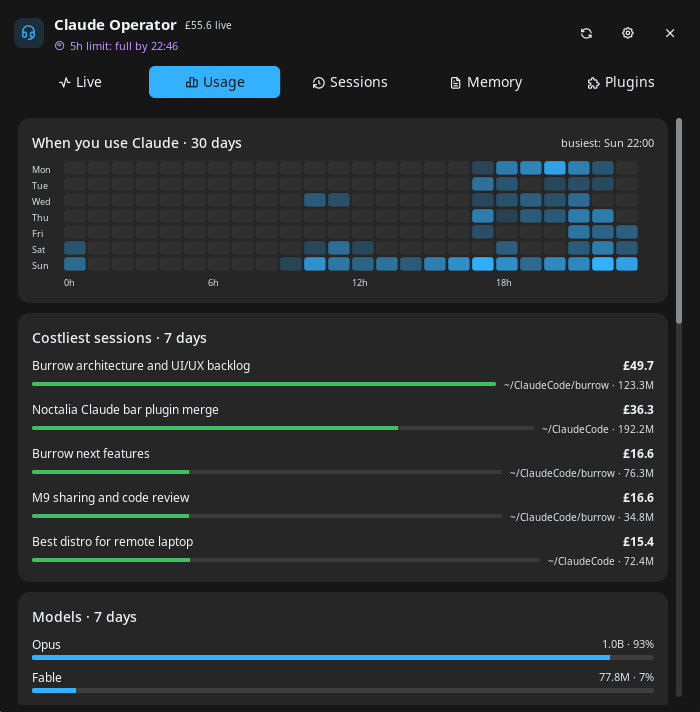
Usage: each plan window as a forecast graph: usage so far, then (faint) where the current rate takes it by the reset, against an even-pace line to 100%. Under it: when you would hit the limit at this rate (or roughly where you will end up), the reset time, and the budget per hour or day that would last until the reset. The 5-hour window uses the last hour's rate once there is enough of it; weekly windows use their average so far, after the first 6 hours. Then estimated cost and tokens for today, 7 days, 30 days and all time (kept after Claude Code deletes old transcripts, so it grows from install), the last 7 days day by day, a 30-day weekday-by-hour heatmap of when you use Claude, the five costliest sessions and the models used.
Sessions: every saved session, grouped by project (worktrees read as
repo › worktree), pinned projects first. Runs started through the Agent SDK (a hook or script callingclaude) are left out, here and in Recent and the launcher. Filter by title, prompt or path, sort by date or name, show only empty sessions. The pin on a project keeps it at the top here and in New session. Click a session to resume it. Each row can open or create the project's CLAUDE.md, preview the prompt, or delete the session. The bin button deletes every empty session; running ones are always kept.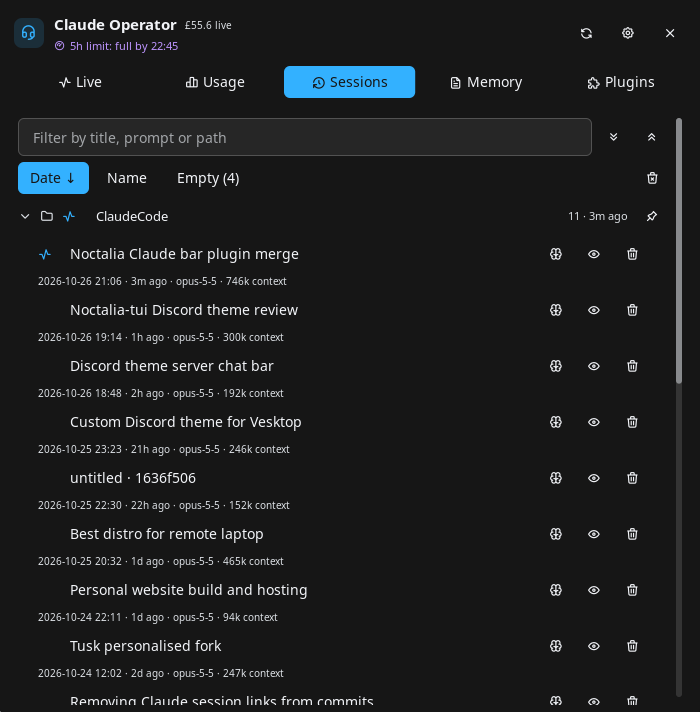
Memory: the global
~/.claude/CLAUDE.md, every CLAUDE.md under your home folder, and a row to create one for each project that has sessions but no file.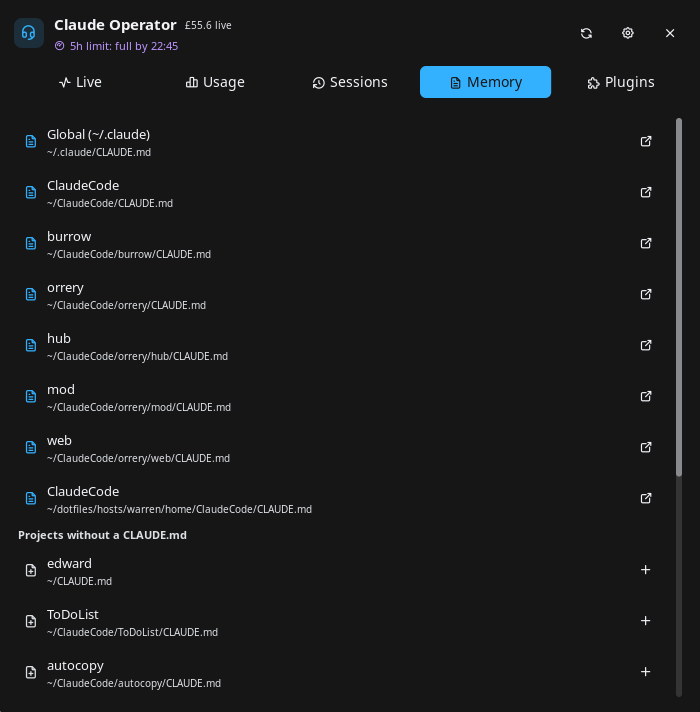
Plugins: installed Claude Code plugins by marketplace, plus bare skill folders in
~/.claude/skills. Enable, disable, update or uninstall a plugin; refresh or remove a marketplace; Check updates marks newer versions without installing them, and Update all refreshes every marketplace and updates every user-scope plugin. The install box takesplugin@marketplace,owner/repo, a git URL or a path. Restart Claude Code to apply plugin changes.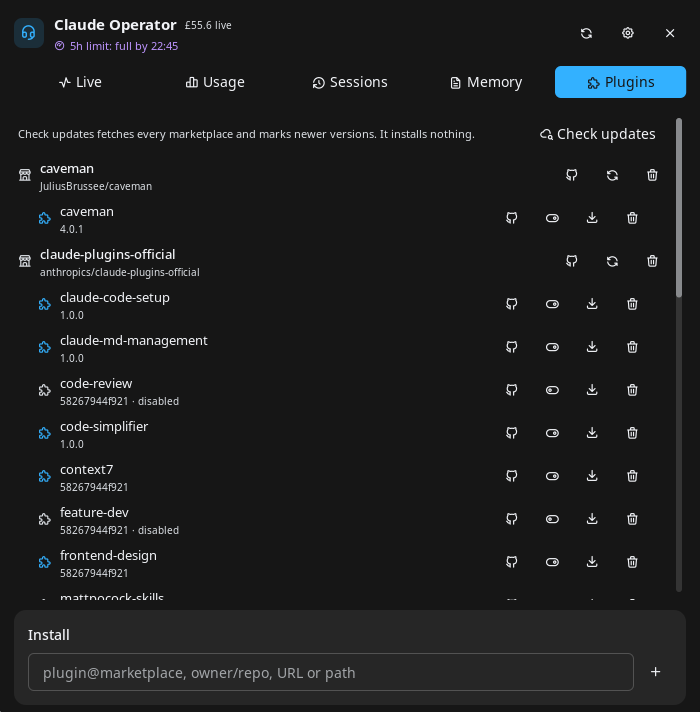
Keys: ↑ / ↓ select a card or row (hold to repeat), Return activates it, Esc
closes. Letters always go to the text fields.
Launcher
Type /co and part of a session title or project path, for example /co burrow. Live
sessions come first: activating one jumps to its terminal. Then Remote Control sessions
elsewhere, which open on claude.ai, then recent sessions, then every other saved session,
all of which resume in a terminal.
Desktop widget
Add Claude Operator in the desktop widgets editor (noctalia msg desktop-widgets-edit),
for example on a second monitor. It shows a large gauge with each plan window's outlook,
the first five lines (click one to jump to its terminal) and the status line.
Settings
| Setting | Type | Default | Description |
|---|---|---|---|
notify_waiting |
bool |
true |
Notify when a session starts waiting for a permission or an answer. |
notify_finished |
bool |
true |
Notify when a session goes from working to idle. |
notify_limits |
bool |
true |
Notify once per window when the current rate reaches the 5-hour limit within the hour, or a weekly limit within a day. |
finished_min_minutes |
int |
2 |
Only notify about finished turns at least this many minutes long. |
show_elsewhere |
bool |
true |
List your live Remote Control sessions on other machines, checked once a minute. |
hide_idle_hours |
int |
0 |
Hide live sessions idle longer than this many hours. 0 shows all. |
recent_count |
int |
8 |
Closed sessions offered under Recent and in the launcher. 0 turns Recent off. |
limits_refresh_minutes |
int |
5 |
Minutes between plan-limit and usage refreshes (2–30). |
currency |
select |
usd |
Currency for cost estimates: usd, eur, gbp, jpy, cny, chf, aud, cad, inr. |
currency_api_url |
string |
https://api.frankfurter.dev/v1/latest |
Exchange-rate API for non-USD currencies. (Advanced) |
terminal |
string |
empty | Terminal for new and resumed sessions, e.g. ghostty. Empty opens a kitty tab when kitty remote control is on, else Noctalia's terminal. |
editor_command |
string |
empty | Command that opens a CLAUDE.md. Empty tries code, then zed. |
work_root |
folder |
empty | Project paths under this folder are shown relative to it. |
glyph |
glyph |
headset |
Bar widget glyph. |
bar_style |
select |
dots |
dots: one dot per session. counts: waiting count, then busy/total. |
bar_limits |
select |
5h_7d |
Windows on the bar: 5h, 7d, 5h_7d, all (includes per-model weeks such as Fable) or none. |
bar_limits_style |
select |
gauge |
How the windows are drawn: gauge (nested rings), bar or text. |
IPC
# Refresh limits, usage, Recent, Remote Control and the session index now
noctalia msg plugin edward/claude-operator:service all refresh

# Switch the panel to a tab: live, usage, sessions, claudemd or plugins
noctalia msg plugin edward/claude-operator:panel all tab sessions

# Toggle the panel from the widget on the focused output (for a keybind)
noctalia msg plugin edward/claude-operator:widget focused click
Notes
What it reads
| What | Where from | How often |
|---|---|---|
| Running sessions | <config dir>/sessions/<pid>.json, written by Claude Code. Files of crashed sessions, or whose pid was reused, are skipped. The .key files beside them are never read. |
every 2 s, in Luau, no processes |
| Session details | The session's transcript in <config dir>/projects/, by scripts/details.sh |
only when the transcript changes |
| Terminal | The session process's environment (/proc/<pid>/environ), checked once for TERM_PROGRAM, TMUX and a few terminal-specific variables (KITTY_WINDOW_ID, ALACRITTY_WINDOW_ID, ...). Only the terminal's name is kept. Focusing reads KITTY_*, TMUX and TMUX_PANE again. |
once per session |
| Accounts | ~/.claude, plus the CLAUDE_CONFIG_DIR of running claude processes (or a dir bind-mounted over ~/.claude, from /proc/<pid>/mountinfo), by scripts/running.sh. The account email comes from .claude.json. |
every minute |
| Recent sessions, usage history | Transcripts in <config dir>/projects/ |
every minute / every limits_refresh_minutes |
| Session browser | Transcripts, summarised once per size and mtime into the data dir | when the Sessions tab opens or refreshes |
| CLAUDE.md files | Your home folder, skipping VCS, dependency and cache dirs, hidden tool dirs, Claude Code worktrees and remote mounts | when the Memory tab opens or refreshes |
Network
https://api.anthropic.com/api/oauth/usage: plan limits, everylimits_refresh_minutes, with the account's own OAuth token from<config dir>/.credentials.json.https://api.anthropic.com/v1/code/sessions: your Remote Control sessions on other machines, once a minute per account, ifshow_elsewhereis on. This is the internal endpoint Claude Code uses for its own session list, not a public API, so an update can break it; the Elsewhere group then disappears and the reason goes to the log.- The LiteLLM price table on
raw.githubusercontent.comand the exchange-rate API, once a day, with no credentials.
The OAuth token is only read, never refreshed or written: Claude Code owns it. It is
passed to curl on stdin, so it never appears in the process list, and it never
reaches the plugin's Luau code or the log. While it is expired (Claude Code refreshes
it on its next start), the last known limits stay visible, dimmed, with their age.
Files written
In the plugin data dir (~/.local/state/noctalia/plugins/data/edward/claude-operator/):
pricing.json (prices and exchange rates), limits.json (last known limits and their
samples over each window), accounts.json (config dirs seen), pins.json (pinned
projects), sessions/ (session index cache), usage/ (usage history cache), gauges/
(gauge images) and heat/ (the heatmap image). Nothing is written under ~/.claude.
Processes and deletes
It runs its own scripts/ through bash, kitty @, tmux, hyprctl, niri msg,
swaymsg or umbriel to focus windows, panes and tabs (window ids and pids only), claude --resume and
claude plugin, your editor, and xdg-open. Stopping a session sends it kill -TERM.
Deleting a session removes its transcript and its subagent folder, always after an
inline confirm.
Cost
Costs are estimates from token counts and public per-model prices, for subscription users a measure of value rather than a bill.
Troubleshooting
- Clicking a kitty session does not switch tabs: kitty remote control is off for that kitty. Add the two lines above and restart kitty.
- Limits are dimmed with "OAuth token expired": start Claude Code once; it refreshes the token and the next refresh picks it up.
- "rate limited by Anthropic, next try …": the usage endpoint allows few calls per token, shared with anything else that polls it (Claude Code statusline tools, other usage plugins). The plugin waits as long as the server asks, or backs off from 10 minutes to an hour, and shows the last known numbers meanwhile. Disable other plugins that poll the same limits.
- Plugins tab shows an error: the message and the log line (
claude-operator: claude plugin …) say whichclaude plugincall failed and why. - Logs:
~/.cache/noctalia/noctalia.log, lines startingclaude-operator:.
License
MIT. Portions derived from claude-cockpit (nightwatch75), claude-sessions (lfdominguez) and noctalia-v5-claudecode (jrohland), all MIT; see LICENSE.
Versions
| Version | Plugin API | Updated |
|---|---|---|
| v0.7.3 latest | 43 | Oct 27, 2026 |
Older versions stay installable on a Noctalia release whose plugin API is below the latest version's.