 Noctalia
About
Claude Cockpit
Watch your Claude Code sessions and plan limits from the bar. One panel shows the running sessions, usage and cost, every past session, your CLAUDE.md files, and the installed skills and mods.
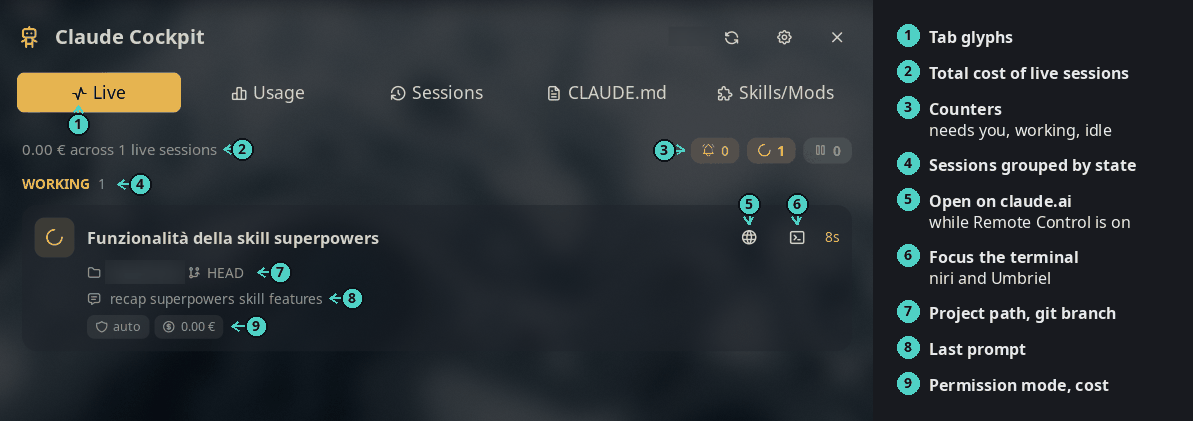
The Live tab: every running session, grouped by what it needs from you.
Plugin
| Field | Value |
|---|---|
| ID | nightwatch75/claude-cockpit |
| Entries | Bar widget: widget; panel: panel; service: service |
The headless service fetches usage and polls the live sessions. The
widget and the Live and Usage tabs only show what it publishes.
Requirements
- noctalia v5.3.0 or newer (
plugin_api = 33). The Sessions tab needsrevealKeyonui.scroll, which keeps the keyboard selection in view. An older noctalia keeps getting the last version it can load. bash,jqandcurl.- The base tools the scripts call:
find,stat,grep,tac,awk,head,tail,rm,mkdir,mv. Every distribution ships them. claudeonPATHfor the Skills/Mods tab, and a logged-in Claude Code (~/.claude/.credentials.json) for the Usage tab.xdg-opento open a project page.- Optional:
niri,hyprctl(Hyprland) orumbrielto focus a session's terminal from the Live tab. - Optional:
codeorzedto open a CLAUDE.md, or seteditor_command.
Usage
Add Claude Cockpit to a bar from the Add-widget picker. Click it to open the panel, or:
noctalia msg panel-toggle nightwatch75/claude-cockpit:panel
Bar widget
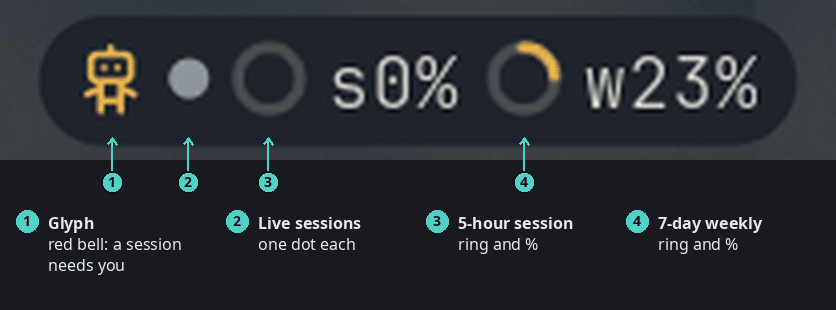
Activity mode, the default. The tooltip lists the live sessions and the usage figures.
- The glyph turns into a red bell when a session waits for you.
- One dot per running session: red needs you, accent is working, grey is
idle. After 8 dots it shows
+N. - Rings and percentages show the 5-hour session and the 7-day weekly window. They turn amber or red when usage runs ahead of the clock.
Set display_mode to classic for the glyph and percentages only.
Live
See the screenshot at the top. Sessions are grouped into Needs you, Working and Idle. Each card shows the title, the time in its state, the path and git branch, what it waits for, the last prompt, the model, the context size and the cost. Click a card to focus its terminal (niri, Hyprland and Umbriel). The globe opens the session on claude.ai while Remote Control is on.
Usage
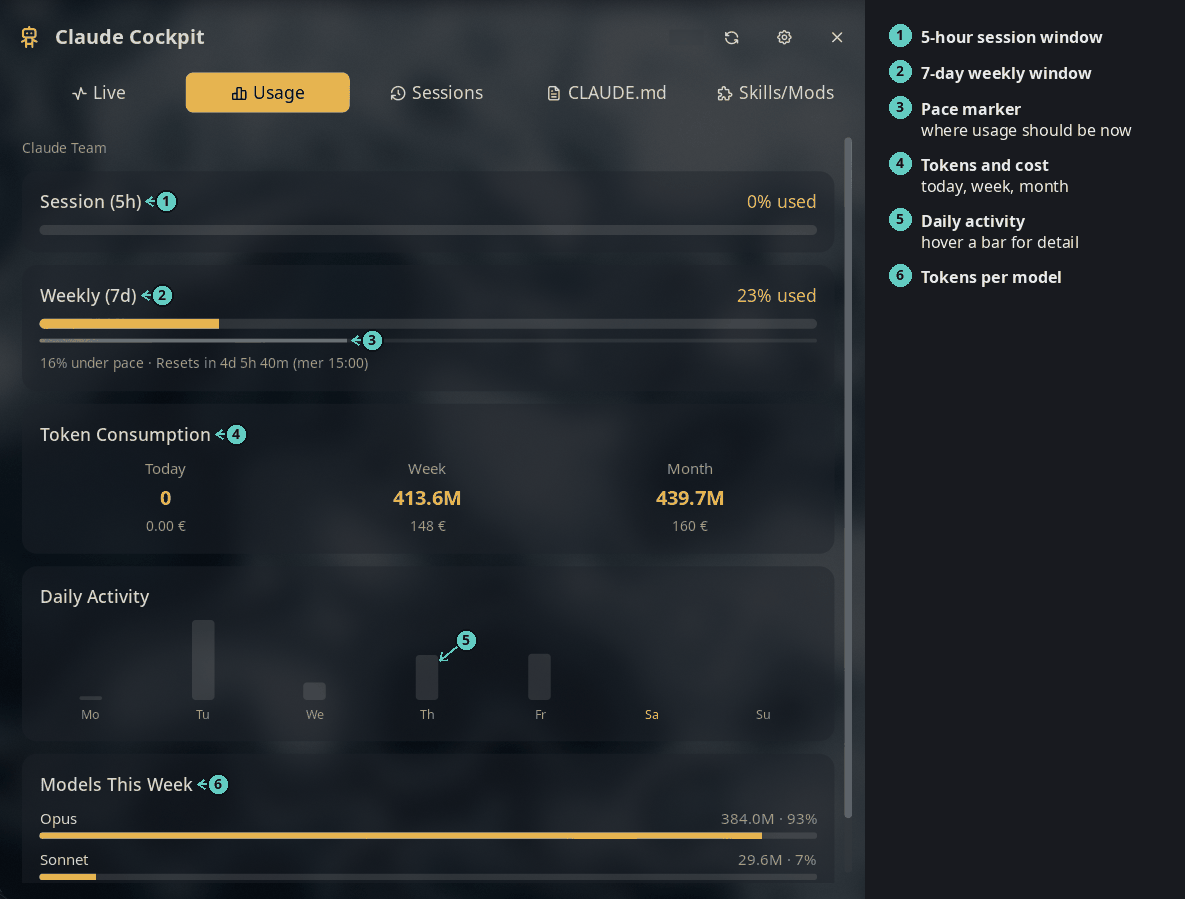
Plan limits, token use and cost, daily activity and models.
Cost is an estimate from token counts and public prices, in the currency you choose.
Sessions
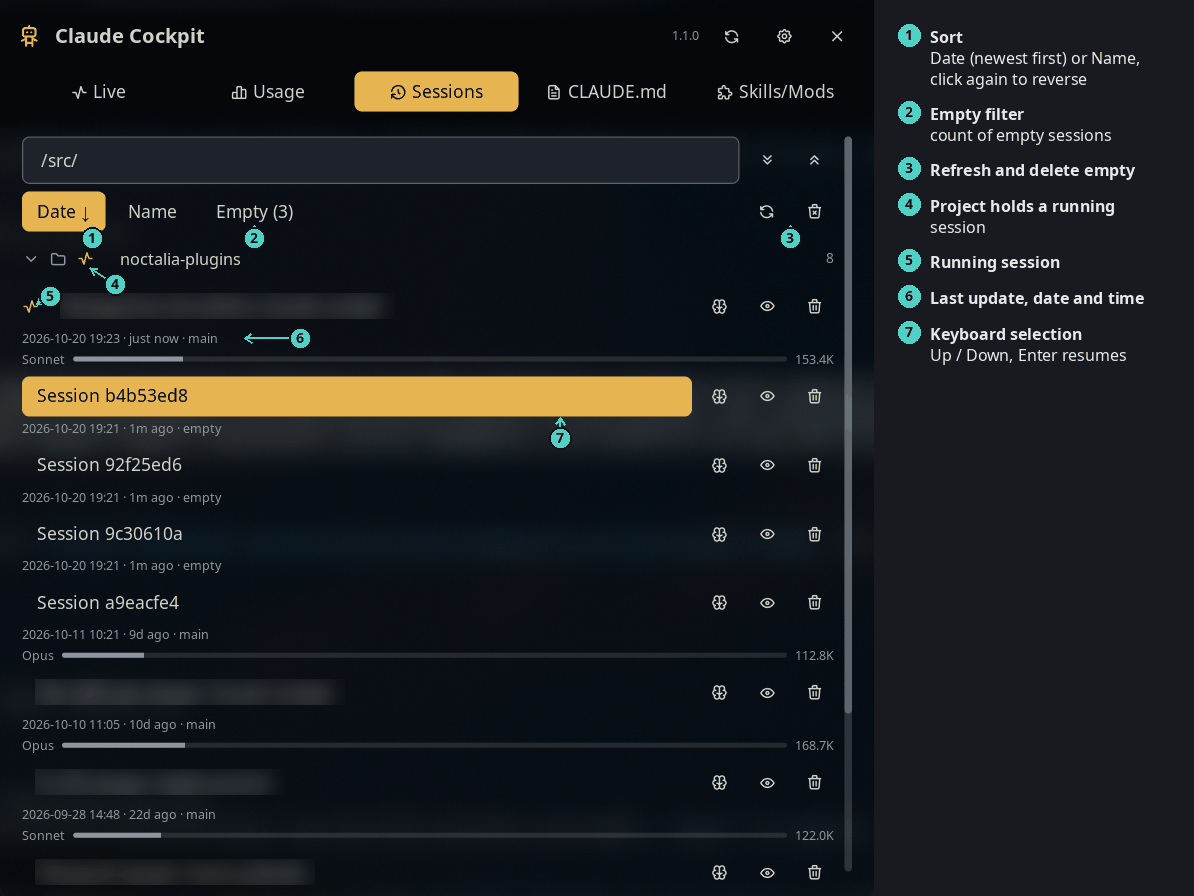
Every past session, grouped by project. Session titles are blurred in this screenshot.
Click a session to resume it (claude --resume <id>) in a terminal, in its
project directory. The search box filters by title, prompt or path.
| Key | Action |
|---|---|
| ↑ / ↓ | Move the selection through projects and sessions. Hold to repeat. |
Return or keypad Enter |
Resume the selected session, or open or close the selected project. |
The list scrolls to keep the selection in view. The keys work on this tab only.
Each row shows the date and time of the last update, then the time since. A glyph marks a running session, and the project that holds one, even when the project is closed.
Buttons on the filter row:
- Date and Name sort the projects and their sessions. Date puts the newest first, Name goes from A to Z. Click the active button again to reverse the order.
- Empty (n) shows only the empty sessions. Claude Code leaves one behind when you open it and close it before you send a prompt. An empty session has an empty tag, and clicking it does nothing, because there is nothing to resume.
- The refresh button reads the sessions again.
- The bin button deletes every empty session, after a confirm. A running session is never deleted, even when it has no prompt yet.
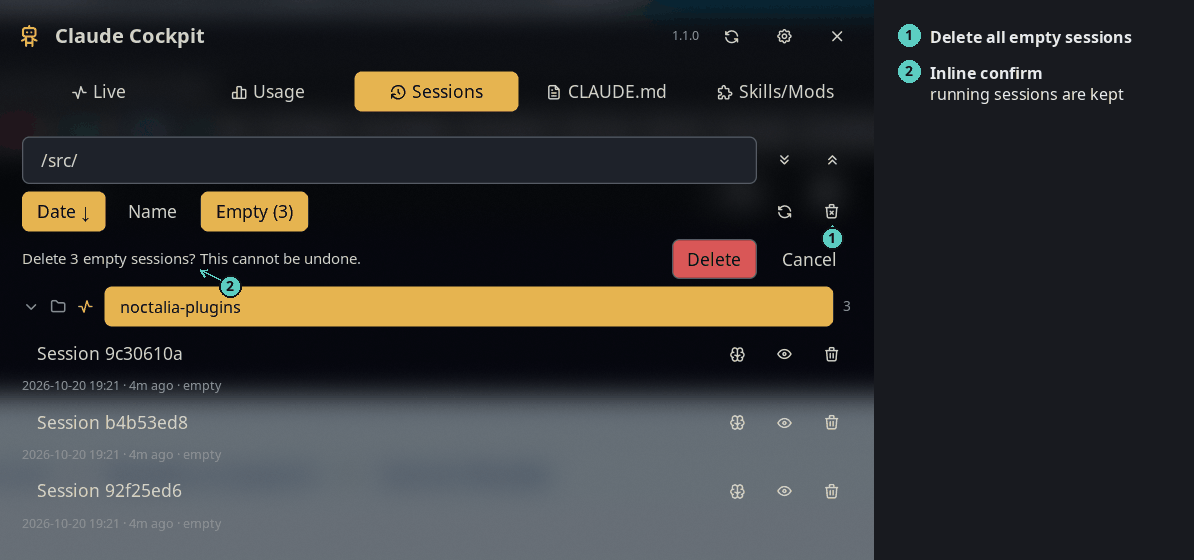
The empty filter and the delete confirm.
CLAUDE.md
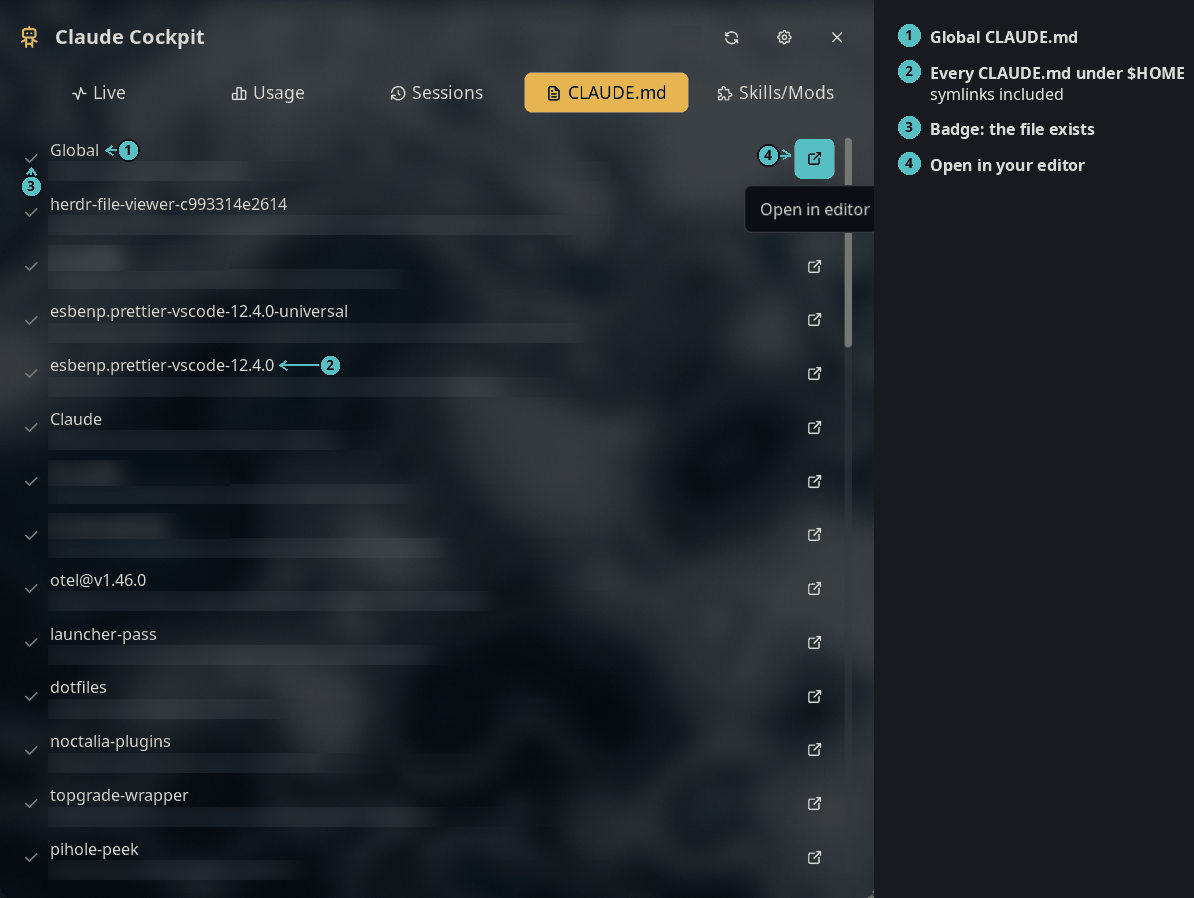
Every CLAUDE.md in your home directory. Paths are blurred in this screenshot.
The list also has a row for each session project without a CLAUDE.md, so
you can create one. Network mounts and noise folders (.git,
node_modules, .cache, .venv) are skipped.
Skills/Mods
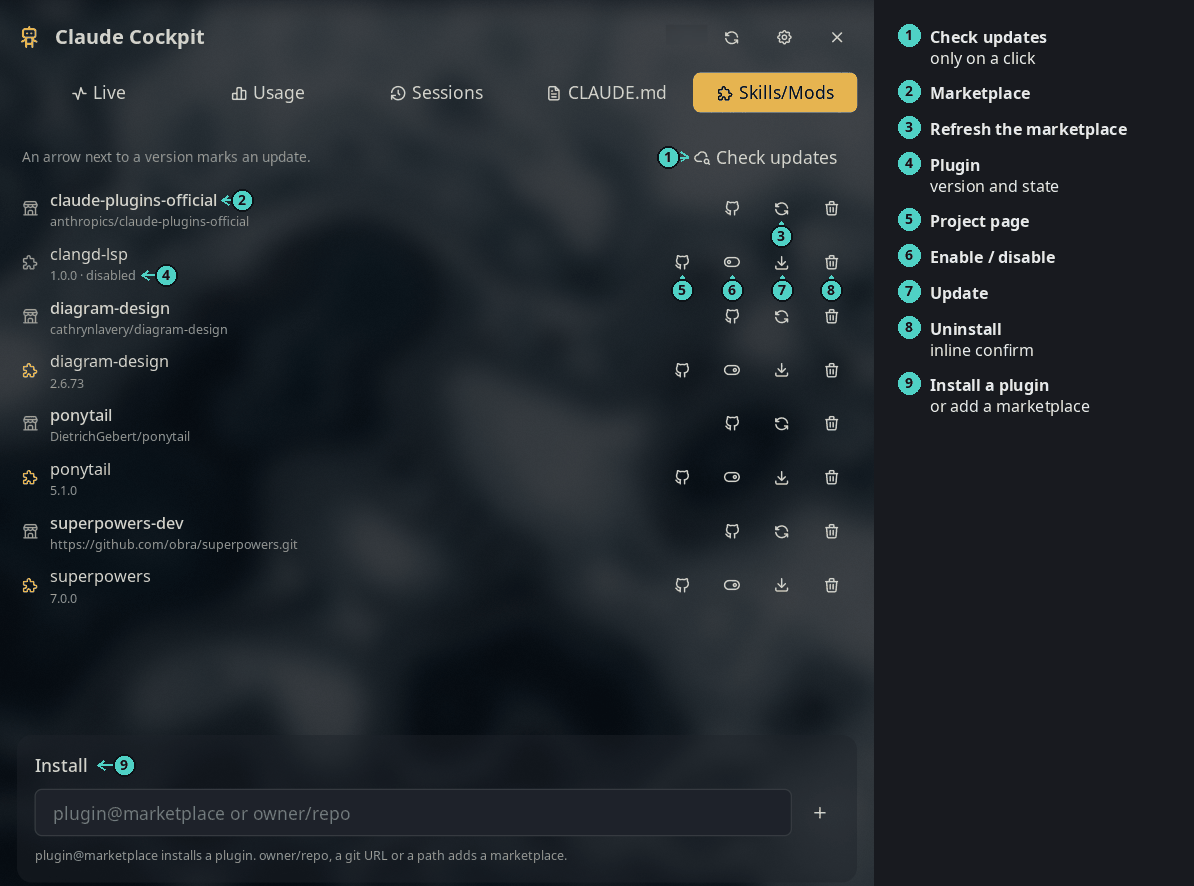
Installed plugins grouped by marketplace, with the install box at the bottom.
- Skills and mods are Claude Code plugins, so this tab drives
claude plugin. Bare skill folders in~/.claude/skillsare listed too. You can only remove them. - Check updates fetches every marketplace and marks a plugin with a
newer version as
old → new. It installs nothing. - Removing a marketplace also uninstalls its plugins.
- The install box takes
plugin@marketplaceto install a plugin, orowner/repo, a git URL or a path to add a marketplace. - Restart Claude Code to apply plugin changes.
Settings
| Setting | Type | Default | Description |
|---|---|---|---|
usage_refresh_interval |
int |
2 |
Minutes between usage fetches (2–15). |
currency |
select |
auto |
Cost currency: auto follows the locale, or one of usd, eur, gbp, jpy, cny, chf, aud, cad, inr. |
currency_api_url |
string |
https://api.frankfurter.dev/v1/latest |
Exchange-rate API for non-USD currencies. |
terminal |
string |
"" |
Terminal to resume a session in. Empty uses $TERMINAL, then the usual emulators. |
editor_command |
string |
"" |
Command to open a CLAUDE.md. Empty tries code, then zed. |
display_mode |
select |
activity |
Widget mode: activity (dots, rings, percentages) or classic (glyph and percentages). |
glyph |
glyph |
robot |
Widget glyph. |
usage_percent_display |
select |
both |
Windows the widget shows, in both modes: session (sNN%), weekly (wNN%), both, or none. |
Notes
What the plugin touches:
- Reads
~/.claude/sessions/*.jsonand the transcripts of running sessions, every 2 seconds, only while the widget is in activity mode or the Live or Sessions tab is open. A transcript is parsed again only when it changes. The Usage and Sessions tabs read the other transcripts in small slices. - Reads
~/.claude/.credentials.jsonfor the token of the usage query. - Writes two caches you can delete:
~/.claude/pricing-cache.jsonand~/.claude/usage-cache.json. In the plugin data dir:live/(session stats) andrings/(widget ring images). - Network: the Anthropic usage API, the LiteLLM price table and the exchange-rate API, all over HTTPS. The Sessions and CLAUDE.md tabs make no network calls.
- Spawns the plugin's own scripts through
bash,claude pluginon a click in the Skills/Mods tab, your terminal, your editor,xdg-open, andniri msg,hyprctlorumbriel msgto focus a window (window ids and pids only, never titles). - Deletes, always after an inline confirm: a session transcript (trash
glyph on its row), all empty sessions at once (bin button on the filter
row, running sessions kept), a plugin or marketplace (through
claude plugin), a local skill folder (a symlink loses the link only). - No rename: Claude Code cannot rename a session after it starts.
The Usage engine, get-claude-usage, is copied (MIT) from
jrohland/claudecode,
reading only the default ~/.claude account. See its header comment and
LICENSE.
Localized in English. Translations are welcome through Noctalia Translate.
License
Versions
| Version | Plugin API | Updated |
|---|---|---|
| v1.1.4 latest | 43 | Oct 25, 2026 |
| v1.1.3 | 33 | Oct 23, 2026 |
| v1.0.0 | 31 | Oct 10, 2026 |
| v0.7.0 | 24 | Oct 9, 2026 |
Older versions stay installable on a Noctalia release whose plugin API is below the latest version's.