 Noctalia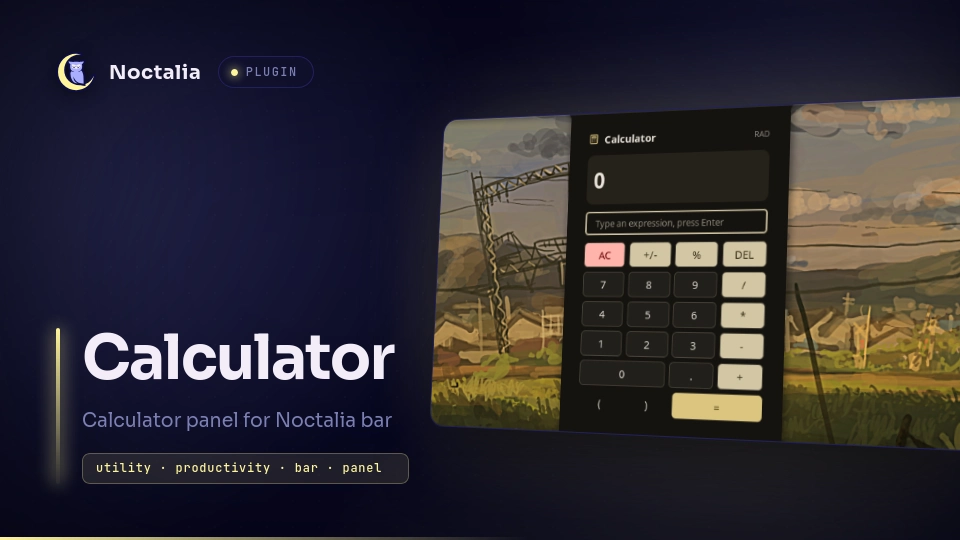
About
Calculator
A calculator for the Noctalia bar. It evaluates whole expressions with operator precedence, offers both a keypad and a typed input line in its panel, and keeps the last result visible in the bar.
Plugin
| Field | Value |
|---|---|
| ID | yuuto/calculator |
| Entries | Bar widget: bar; panel: panel |
The panel entry owns the calculator model and publishes it through Noctalia's
per-plugin state channel. The bar widget is a thin client: it reads that state
and opens the panel.
Usage
Add the bar bar widget to your bar. It shows a calculator glyph, plus the last
result once there is one. Left click opens the panel, right click clears the
calculator. On a vertical bar only the glyph is shown, with the current
expression as its tooltip.
The panel evaluates as you type. The small line shows the expression, the large line the live result, and the copy button next to it puts the result on the clipboard.
Enter expressions either with the keypad or by typing into the input line, where
Enter evaluates. Pressing = keeps the result in the input, so the next
operator continues from it. The keypad uses plain text labels (AC, +/-,
DEL, *, /) rather than symbol glyphs, so it renders with any bar font.
Open the panel over IPC:
noctalia msg panel-toggle yuuto/calculator:panel
Expression syntax
Operators are +, -, *, / and ^, with parentheses and the usual
precedence; ^ is right associative. A trailing % divides by 100, so
200*15% is 30. The typed input also accepts ×, ÷ and −.
Available constants: pi, tau, e.
Available functions: sin, cos, tan, asin, acos, atan, atan2,
sinh, cosh, tanh, ln, log, log2, log10, exp, sqrt, cbrt,
abs, floor, ceil, round, trunc, sign, mod, pow, hypot, min,
max.
log(x) is base 10; log(x, b) is base b. mod(a, b) is the remainder, since
% means percent here. The trigonometric functions follow the angle unit
setting, shown in the panel header as RAD or DEG.
Settings
Plugin
| Setting | Type | Default | Description |
|---|---|---|---|
precision |
int |
8 |
Maximum decimals used when formatting results, 0 to 10. |
angle_unit |
select |
rad |
Angle unit for the trigonometric functions. |
Bar Widget
| Setting | Type | Default | Description |
|---|---|---|---|
show_bar_value |
bool |
true |
Shows the last result next to the calculator glyph. |
max_bar_length |
int |
9 |
Longer results are shortened with a trailing ~. |
IPC
Beyond opening the panel, the panel entry accepts three events. The all
target addresses every live instance.
noctalia msg plugin yuuto/calculator:panel all eval "2+3*4"
noctalia msg plugin yuuto/calculator:panel all insert "+8"
noctalia msg plugin yuuto/calculator:panel all clear
eval replaces the expression and evaluates it, insert appends to the current
expression, and clear resets the calculator.
Notes
Expressions are tokenized and parsed by the plugin itself, so evaluating never
runs a shell command and no external tool is required. Results reach the
clipboard through noctalia.copyToClipboard.
The panel keeps its model in the plugin state channel rather than in script locals, so clearing from the bar widget and reopening the panel stay in sync.
Credits
Keypad layout and feature set are modelled on the v4 Quickshell calculator plugin by pir0c0pter0 (MIT).
Versions
| Version | Plugin API | Updated |
|---|---|---|
| v1.0.0 latest | 3 | Jul 26, 2026 |
Older versions stay installable on a Noctalia release whose plugin API is below the latest version's.