 Noctalia
About
Bookmarks
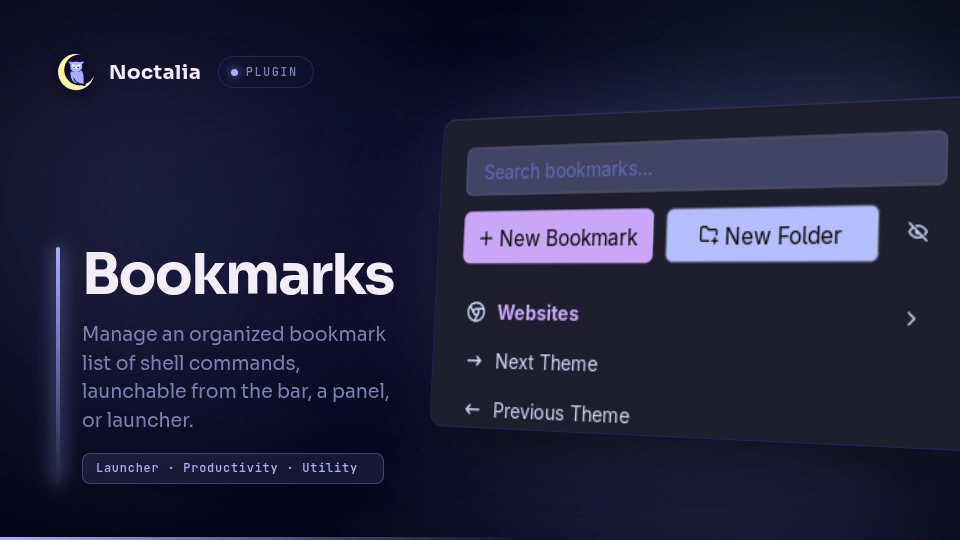
A user-managed bookmarks plugin for Noctalia. You can add bookmarks by selecting a glyph, a label, and a shell command to execute. You can backup your bookmarks as well!
Plugin
| Field | Value |
|---|---|
| ID | dunarand/bookmarks |
| Entries | Bar widget: bar; panel: panel; Launcher provider: provider; |
| Launcher Prefix | /bk |
Requirements
- Noctalia v5.3.0 or higher
IPC & Keybinds
Open the bookmarks panel:
noctalia msg panel-toggle dunarand/bookmarks:panelOpen the bookmarks panel in search mode (immediately puts you into search mode) so that you can use your bookmarks panel as a launcher:
noctalia msg panel-toggle dunarand/bookmarks:panel search
You can interact with the bookmarks list via keybinds:
| Keybind | Purpose |
|---|---|
CTRL + J or Down Arrow |
Select the next (below) item |
CTRL + K or Up Arrow |
Select the previous (above) item |
CTRL + H or Left Arrow |
Return to the root level when in a folder |
CTRL + L or Right Arrow |
Get into a folder |
CTRL + F |
Search bookmarks |
CTRL + N |
New bookmark |
CTRL + SHIFT + N |
New folder |
CTRL + E |
Edit the selected bookmark or folder |
CTRL + D (double press) |
Delete the selected bookmark or folder |
CTRL + SHIFT + K or CTRL + SHIFT + Up Arrow |
Move the selected item one up |
CTRL + SHIFT + J or CTRL + SHIFT + Down Arrow |
Move the selected item one down |
Enter / Return |
Execute the selected bookmark's command / Navigate into a folder |
Usage
The plugin ships a bar widget, a panel, and a launcher provider. The bar widget just launches the panel. The panel is able to be toggled via IPC. For example, in Hyprland v0.55 or higher, you can assign it to a keybind as follows:
hl.bind(
    "SUPER + SHIFT + B",
    hl.dsp.exec_cmd("noctalia msg panel-toggle dunarand/bookmarks:panel")
)
Bookmarks and folders are listed in the main panel.
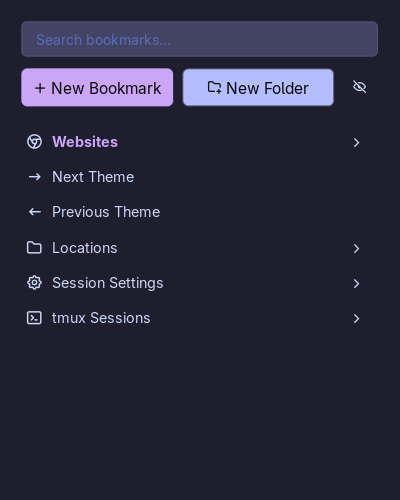
You can create or edit bookmarks by assigning them a glyph, a label, a command, and an optional description.
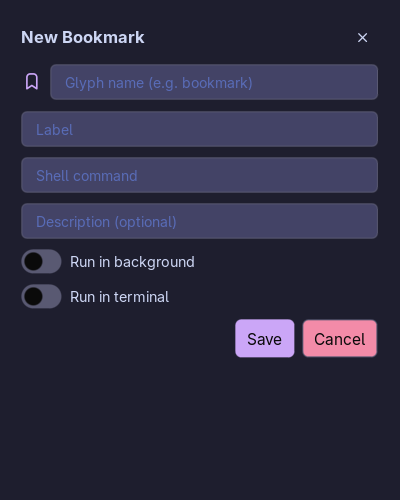
"Run in background" toggle runs the bookmark command as a detached background process that outlives the bookmarks panel, without waiting for the command to finish.
For example, for a command like
xdg-open "$HOME", toggling "Run in background" will launch the application independently in the background."Run in terminal" switch executes the command with the default terminal. These switches are mutually exclusive so you can only choose one. Toggling on a switch will result the other to turn off.
You can create folders and nest other bookmarks within folders.
Folders cannot nest other folders. This is by design and it'll not change unless I find a genuine use case. You can edit folders by clicking on the "pen" icon next to its name.
You can press the "eye" icon to enter edit mode where you can edit, delete, and reorder bookmarks.
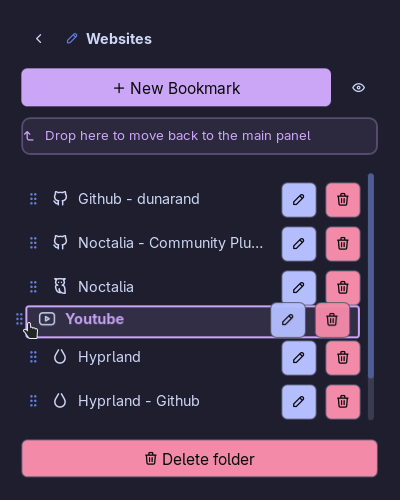
You can also use your launcher to query your bookmarks with the
/bkprefix.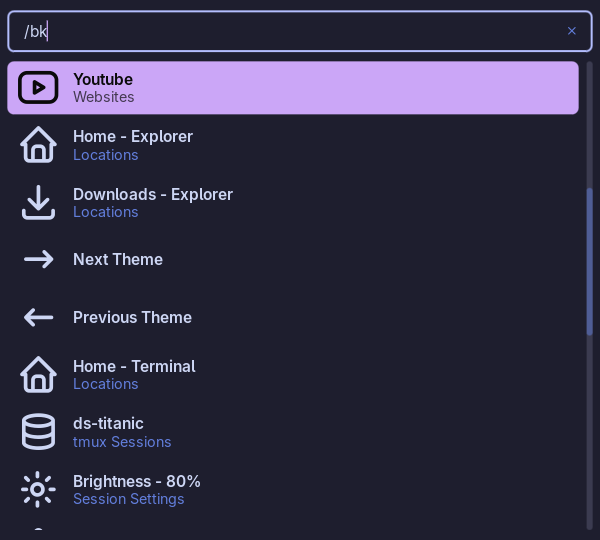
- Queries are folder-aware, meaning if you nested a bookmark inside a folder, the folder name will be displayed as well.
Bookmarks Data
The saved bookmarks are written to $NOCTALIA_STATE_HOME/plugins/data/dunarand/bookmarks/data.json.
By default, $NOCTALIA_STATE_HOME should point to ~/.local/state/noctalia. You can point to a
different location for saving and backing up your bookmarks. This setting is configurable via
plugin settings under Settings -> Plugins. Only JSON format is accepted.
You can manage the bookmark data via external scripts.
Root
[ <entry>, <entry>]
The root is a JSON array of entries. Order in the array is display order (used directly by drag-and drop reordering).
Entry
Two types of entries exist: bookmark and folder.
Bookmarks
{
  "type": "bookmark",
  "glyph": "bookmark",
  "label": "My Bookmark",
  "cmd": "firefox",
  "description": "Opens Firefox",
  "runInBackground": false,
  "runInTerminal": false
}
| Key | Type | Required / Default | Notes |
|---|---|---|---|
type |
string | "bookmark" |
|
glyph |
string | falls back to "bookmark" if empty/missing |
|
label |
string | required, enforced at save time | "" fails validation |
cmd |
string | required for bookmarks | shell command to execute, enforced at save time |
description |
string | optional, defaults to "" |
shown in the hover tooltip |
runInBackground |
boolean | optional, defaults to false |
mutually exclusive with runInTerminal in the UI but the schema itself doesn't enforce that |
runInTerminal |
boolean | optional, defaults to false |
Folders
{
  "type": "folder",
  "glyph": "folder",
  "label": "My Folder",
  "items": [ <bookmark>, <bookmark>, ... ]
}
| Key | Type | Required/Default | Notes |
|---|---|---|---|
type |
string | "folder" |
|
glyph |
string | falls back to "folder" if empty/missing |
|
label |
string | required | |
items |
array | optional, treated as {} if missing, folder.items=folder.items or {} |
contents — bookmarks only, one level of nesting |
Settings
The bar widget has the following settings:
| Setting | Type | Default | Description |
|---|---|---|---|
glyph |
glyph |
bookmark |
Glyph displayed on the bar |
tooltip |
string |
Bookmarks |
Tooltip displayed on the bar |
text |
string |
Bookmarks |
Widget text displayed on the bar |
The plugin itself has the following settings:
| Setting | Type | Default | Description |
|---|---|---|---|
data_path |
file |
data.json file to store the saved bookmarks. Leave empty to use the default location. | |
enable_bk_provider |
bool |
true |
Enable bookmarks launcher provider |
bk_sort_by |
select |
"history" |
Provider's sorting strategy. Options: "history", "usage_count" |
Changelog
v1.3.0
- Added
/bklauncher provider - Changed the following keybinds (check IPC & Keybinds section for what they do)
- CTRL + N changed to CTRL + J
- CTRL + P changed to CTRL + K
- CTRL + S changed to CTRL + F
- Added the following keybinds (check IPC & Keybinds section for what they do)
- CTRL + H or Left Arrow
- CTRL + L or Right Arrow
- CTRL + N
- Index tracking on root level for keyboard-centric usage
- Previously, when using a keyboard to navigate, going into a folder would reset the selected entry's index to 1 causing fat fingers to be annoying
v1.3.1
- Fixed a bug where hovering over a bookmark would trigger scrolling event in populated lists
- It was also causing the scroll bar to render incorrectly
- The fix introduces a new bug where navigating items via keybinds doesn't trigger scrolling. This issue will be fixed in future
v1.3.2
- Fixed the issue where keyboard navigation would not auto-scroll. The issue has been fixed with changes introduced with Noctalia v5.3.0 plugin API 33 so newer versions of bookmarks, including this patch, now requires Noctalia v5.3.0 or higher
v1.4.0
- Added keyboard shortcuts for managing bookmarks without touching the mouse:
CTRL + SHIFT + Nto create a new folderCTRL + Eto edit the selected bookmark or folderCTRL + Dto delete the selected item (requires a quick double press so you don't delete things by accident)CTRL + SHIFT + K/CTRL + SHIFT + UpandCTRL + SHIFT + J/CTRL + SHIFT + Downto reorder items up and down
- Overhauled edit mode layout and styling:
- Fixed row heights and spacing so entries don't blow up in size compared to normal view
- Folders in edit mode no longer have the clunky red border box and badge styling
- Shrunk action buttons into compact ghost buttons that fit neatly on the right
- Replaced the
?info button andshow_info_buttonsetting with native row hover tooltips - Modernized the search bar and glyph input fields
- Dropped the
nohupdependency for running bookmarks in the background, switching to Noctalia's native fire-and-forget async runner - Added a direct settings shortcut button to the panel header
- Fixed a UI glitch where ghost boxes or action buttons would bleed over when switching views
- Fixed an
unknown fontWeight 'regular'warning in the console
Versions
| Version | Plugin API | Updated |
|---|---|---|
| v1.4.1 latest | 43 | Oct 25, 2026 |
| v1.4.0 | 33 | Oct 24, 2026 |
| v1.3.1 | 13 | Aug 5, 2026 |
Older versions stay installable on a Noctalia release whose plugin API is below the latest version's.