
About
Beeminder
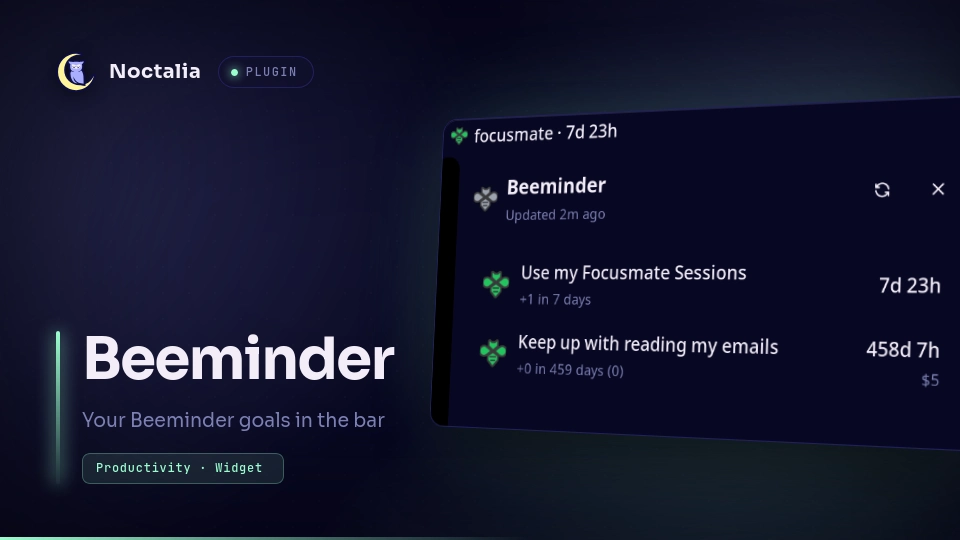
Shows your Beeminder goals in the bar. A bee modeled on the Beeminder logo changes color as your next deadline gets closer, and a panel lists every goal with what you need to do to stay on track.
Plugin
| Field | Value |
|---|---|
| ID | giodamelio/beeminder |
| Entries | Bar widget: bar; panels: goals, menu; service: poller |
Requirements
- A Beeminder account and its personal auth token.
xdg-openonPATH, used to open your profile and goal pages in the default browser.
Usage
Connect your account
- While logged in to Beeminder, open https://www.beeminder.com/api/v1/auth_token.json and copy the
auth_tokenvalue. - Add the
barwidget to a bar, then left-click the red bee. With no token set, this opens the plugin settings. - Paste the token into Personal Auth Token. The bee updates as soon as the settings are saved.
Read the bee
The bee takes its color from the most urgent goal that is not frozen, won or ignored:
| Bee | Meaning |
|---|---|
| Red | Due today (a beemergency) |
| Orange | Due tomorrow |
| Blue | Two days of buffer |
| Green | Three or more days of buffer |
| Gray | No active goals, or Beeminder reports the goal as gray |
Red with ! |
No token, the token was rejected, or the last request failed |
| Faded gray | Loading |
Open the goals panel
Left-click the bee to open the goals panel. It lists every goal, most urgent first, with its title, what you need to do to stay on track, the time left before it derails and the amount pledged. Frozen and won goals appear faded. Click a goal to open its page on beeminder.com. Use the refresh button to fetch your goals immediately.
noctalia msg panel-toggle giodamelio/beeminder:goals
Open the menu
Right-click the bee to open a small menu with Open profile, Refresh now and Settings.
noctalia msg panel-toggle giodamelio/beeminder:menu
Show several instances
Each bar widget instance has its own Bar Text, Show Bee and Quiet Until Due settings, so you can place
several side by side, for example one bee followed by a countdown and an amount at risk. All instances share one
poller, so extra instances make no extra API calls.
Settings
Plugin settings, shared by every instance:
| Setting | Type | Default | Description |
|---|---|---|---|
auth_token |
string |
"" |
Your Beeminder personal auth token. |
refresh_minutes |
int |
5 |
Minutes between fetches, from 1 to 120. Countdowns keep updating between fetches. |
ignored_goals |
string_list |
[] |
Goal slugs left out of the bar text and the bee's color. They still appear in the goals panel. |
Widget settings, set separately on each bar instance:
| Setting | Type | Default | Description |
|---|---|---|---|
bar_text |
select |
next_goal_countdown |
What to show next to the bee. See the options below. |
show_bee |
bool |
true |
Show the bee icon. The bee still appears on errors, or when there is no text to show. |
quiet_until_due |
bool |
false |
Hide the bar text until at least one goal is due today. |
The bar_text options:
| Option | Example | Shows |
|---|---|---|
| Next Goal Countdown | workout · 4h 12m |
The goal that derails soonest, with a live countdown to its deadline. |
| Next Goal Requirement | workout +1 within 1 day |
The most urgent goal and Beeminder's summary of what it takes to stay on track. |
| Time Until Next Derailment | 4h 12m |
Only the time left before your next derailment. |
| Beemergencies | 2 due |
How many goals are due today. |
| Money on the Line | $15 |
The total pledged on goals due today. |
| Safety Margin | 0d |
The fewest safe days left across your goals. |
| Just the Bee | No text. |
Notes
- The
pollerservice requestshttps://www.beeminder.com/api/v1/users/me/goals.jsoneveryrefresh_minutes, andhttps://www.beeminder.com/api/v1/users/me.jsononce per token to learn your username for profile and goal links. These are the plugin's only network requests. - Beeminder only accepts the personal auth token as a URL query parameter, so the token is part of each request URL. The token is stored in plain text in your Noctalia config, like every other plugin setting.
- The only process the plugin starts is
xdg-open, with ahttps://www.beeminder.com/URL, when you open your profile or a goal. - The plugin writes no files.
- The bee icons are based on the Beeminder logo. Beeminder is a trademark of Beeminder Inc., and this plugin is not affiliated with Beeminder.
Versions
| Version | Plugin API | Updated |
|---|---|---|
| v1.0.0 latest | 24 | Oct 8, 2026 |
Older versions stay installable on a Noctalia release whose plugin API is below the latest version's.