
About
Battery & Power Management
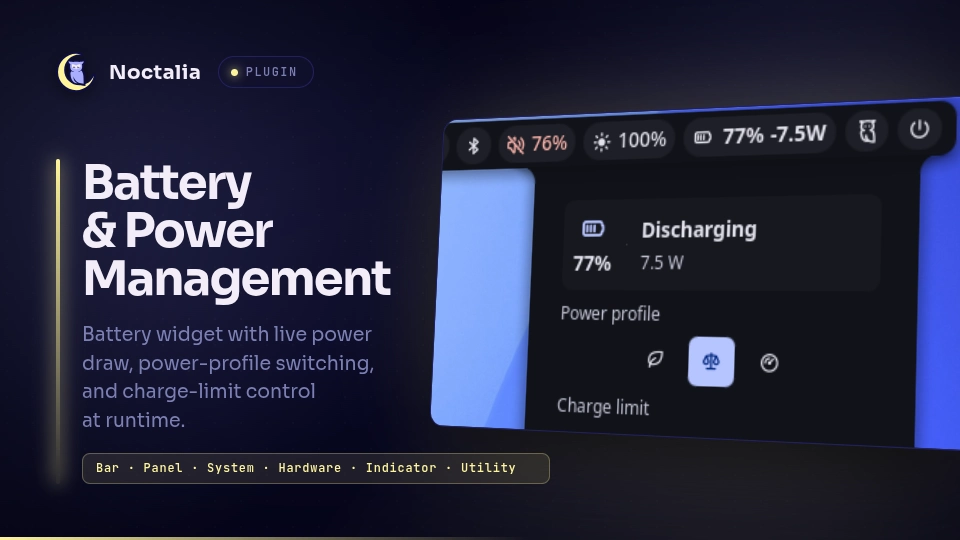
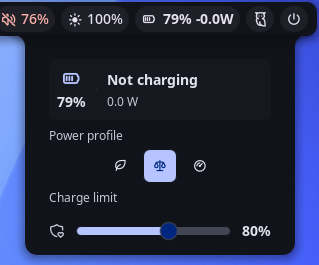
A battery status widget and control panel for Noctalia v5. The bar widget shows charge percentage, live power draw in watts, and the active power profile. Clicking it opens a panel to switch the system power profile and set the battery charge-stop threshold — no root needed at runtime.
Ported from the Noctalia v4 (Quickshell/QML) plugin of the same name to the v5 Luau plugin runtime.
Plugin
Manifest id piero-93/battery-power-management. It ships three entries that
share one state snapshot (no Lua memory is shared between them):
service— the headless entry: polls the battery, power profile, and charge threshold, and performs every system read/write.widget— the bar widget: battery glyph,NN% ±W.W, and an optional profile glyph. Click it to open the panel.panel— the control surface: power-profile switch and charge-limit slider. Toggle it from a keybind with:noctalia msg panel-toggle piero-93/battery-power-management:panel
Features
- Live bar widget — battery glyph,
NN% ±W.W, and an optional profile glyph (leaf / scale / gauge), tinted by charge and profile state. - Power profiles — one-tap switch between Power-saver / Balanced / Performance
via
powerprofilesctl. - Charge threshold — a slider to cap charging (50–100%) on hardware that
exposes
charge_control_end_threshold(ThinkPad, ASUS, and others). - Time remaining — time-to-empty / time-to-full via
upower.
Requirements
| Tool | Used for | If missing |
|---|---|---|
powerprofilesctl |
read/set power profile | profile controls are hidden |
upower |
time-to-empty/full | time remaining is hidden (watts shown instead) |
powerprofilesctl ships with
power-profiles-daemon;
upower is packaged as upower on every major distro.
The service reads sysfs and runs the two tools above through a shell, so sh
and cat must be on PATH — both ship with every distro (coreutils and the
system shell), so there is nothing to install. The bundled setup script
additionally uses sudo, bash, dirname, getent, groupadd, usermod,
chgrp, chmod, and udevadm, all part of coreutils, shadow-utils, and
systemd/udev.
The charge-threshold slider additionally needs the sysfs attribute
charge_control_end_threshold to be present and writable by your user — see
Setup.
Usage
Install the plugin from Noctalia's plugin manager, then add the Battery & Power Management widget from the bar's Add-widget picker.
Contributors only — to run it from a checkout instead, register that checkout as a development source:
noctalia msg plugins source add dev path /path/to/community-plugins
noctalia msg plugins enable piero-93/battery-power-management
.luau edits hot-reload; plugin.toml changes apply on the next config reload.
Setup (optional — charge threshold only)
Writing the charge limit needs write access to a root-owned sysfs file. The included script sets that up once, without giving the plugin root at runtime:
cd ~/.local/share/noctalia/plugins/battery-power-management/scripts
sudo ./setup-threshold-permissions.sh        # or: sudo ./setup-threshold-permissions.sh BAT1
Without an argument the rule matches BAT*, covering every battery in the
machine; pass a device name to scope it to one. The script is idempotent, and it
makes these changes to your system:
| Change | Detail |
|---|---|
| Creates a group | battery_ctl, and adds you to it with usermod -aG |
| Installs a udev rule | /etc/udev/rules.d/99-noctalia-battery-power-management.rules — chgrp battery_ctl + chmod 0664 on charge_control_end_threshold |
The group is shared with the separate battery-threshold plugin on purpose (same
capability, same semantics), but the rule filename is plugin-specific so the two
never overwrite each other.
Then log out and back in. If you skip this setup, everything else still works; only the threshold slider is affected (it shows a notification on write failure).
NixOS
/etc/udev/rules.d is generated from system config on NixOS, so the script exits
instead of writing to it. Add the equivalent declaratively:
users.groups.battery_ctl = { };
users.users.<you>.extraGroups = [ "battery_ctl" ];
services.udev.extraRules = ''
  ACTION=="add|change", SUBSYSTEM=="power_supply", KERNEL=="BAT*", RUN+="${pkgs.coreutils}/bin/chgrp battery_ctl /sys$devpath/charge_control_end_threshold", RUN+="${pkgs.coreutils}/bin/chmod 0664 /sys$devpath/charge_control_end_threshold"
'';
Settings
| Setting | Type | Default | Description |
|---|---|---|---|
| Colorize by profile | bool | true |
Tint the widget by active profile |
| Power-saver color | color | secondary |
Accent for the Power-saver profile |
| Performance color | color | error |
Accent for the Performance profile |
| Show profile icon | bool | true |
Show the profile glyph in the widget |
| Show balanced icon | bool | false |
Also show the glyph on Balanced |
| Battery device | string | BAT0 |
sysfs battery name (BAT0, BAT1, …) |
What it does to your system
For review transparency (this plugin is trusted, unsandboxed Luau):
- Reads
/sys/class/power_supply/<device>/ueventand/sys/class/power_supply/<device>/charge_control_end_thresholdevery 5 s. - Runs
powerprofilesctl getandupower -i /org/freedesktop/UPower/devices/battery_<device>on every third poll (~15 s), each guarded bycommandExists, pluspowerprofilesctl set <profile>when you pick a profile. - Writes the threshold to
/sys/class/power_supply/<device>/charge_control_end_thresholdonly when you move the slider. - All of the above go through
noctalia.runAsync, which executes via/bin/sh -c, so each poll spawns a shell (and acatfor the sysfs read). The configurable device name is reduced to a single path segment and shell-quoted before use; the threshold is clamped to 50–100. - No network access.
- The setup script is never invoked by the plugin; you run it yourself with
sudo. Its system changes are listed in Setup above.
License
GPL-3.0
Versions
| Version | Plugin API | Updated |
|---|---|---|
| v1.0.0 latest | 3 | Aug 17, 2026 |
Older versions stay installable on a Noctalia release whose plugin API is below the latest version's.