 Noctalia
About
Bangumi Progress
Track anime from bgm.tv on the Noctalia desktop. See newly aired episodes, browse every collection status, and update watched progress without leaving the panel.
Browser sign-in uses the shared Bangumi application included with the plugin. Users authorize their own accounts in the browser; no API application registration or client configuration is needed. Personal access tokens and public username access remain available.
Plugin
| Field | Value |
|---|---|
| ID | mirei124/bangumi-progress |
| Entries | Desktop widget: tracker; bar widget: bar; panel: library; service: api |
Requirements
- Network access to
api.bgm.tvand cover hosts such aslain.bgm.tv; browser sign-in also contactsbgm.tv. - Browser sign-in requires
python3andxdg-openonPATH; the application profile is bundled. - A saved browser sign-in or a Bangumi personal access token is required to update progress or read private entries. A username alone provides read-only access to public collections.
xdg-openopens subject and profile pages and the browser sign-in page.
Usage
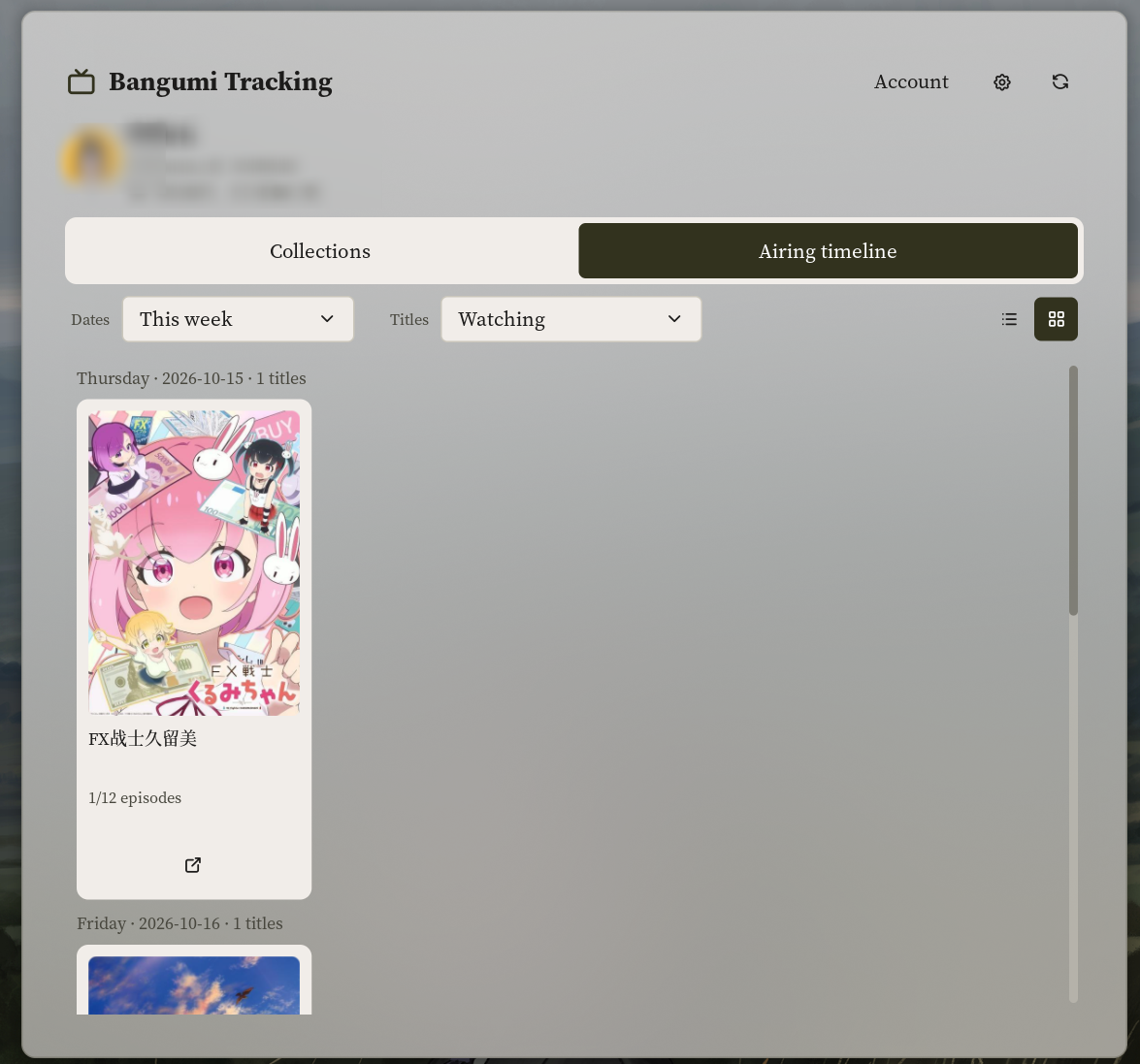
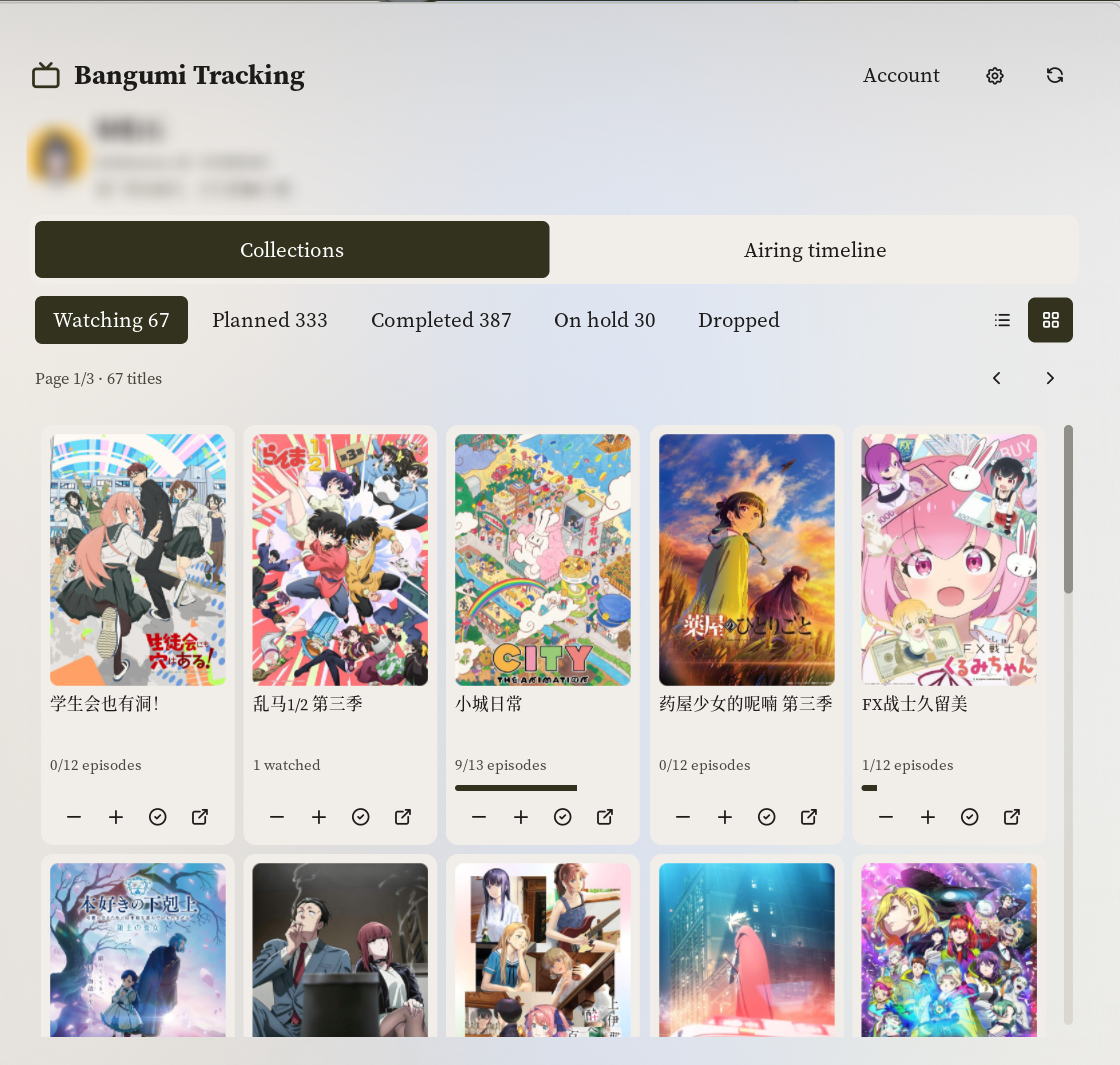
Previews show the airing timeline and collection cover grids. Account profile information is blurred in these user-provided screenshots.
- Enable Bangumi Progress in Settings → Plugins.
- Enter a personal access token or a Bangumi username in plugin settings. Alternatively, open Account → Sign in with Bangumi and authorize access in your browser; ordinary users do not register an API application.
- Add the
trackerdesktop widget and/or thebarbar widget to your layout.
The tracker desktop widget lists currently watching anime with cover art, watched progress, aired progress, and total episodes. Titles with newly available unwatched episodes are pinned first. Use its paging controls when the list exceeds the configured number of visible entries, and use an entry's open button to visit its Bangumi page.
By default, the bar widget displays the number of episodes that became available and remain unwatched since the last progress action. The first calculation establishes a baseline and displays 0. Its Bar number setting can instead show one of the five collection counts, today's Watching/full calendar count, or only the icon:
- Left-click the widget to open the
librarypanel. - Right-click it to open your Bangumi profile.
- Hover over it to see what the selected number means and whether the data is cached.
The airing timeline groups each date into a large outlined card with a weekday/date header and title-count badge. Today has a separate accent badge. Its subject cards use the selected list/grid layout inside the same inset; optional empty dates keep a compact header-only card.
All panel sections share one scroll viewport, so the header, navigation, toolbars, dates and card rows keep the same horizontal bounds when a scrollbar appears. The header and navigation scroll with the content. Status buttons have equal widths; list actions use fixed columns, and grid titles, progress and actions use uniform slots.
The library panel uses five status buttons to browse Watching, Planned, Completed, On Hold, and Dropped collections. Use the list/grid buttons beside the pagination controls to choose a list or cover grid. Compact, Balanced and Comfortable density adjust artwork and spacing, with five, four and three grid columns respectively. Both layouts default to 24 titles per page so large collections remain responsive and all entries stay reachable. The plugin remembers your layout locally by default; settings can choose an explicit starting layout, opening view and page size. Newly available unwatched titles are pinned first and marked with a red dot in the Watching collection. Cards show watched progress and keep their action buttons aligned. Use + or - to change episode progress, the completion button to mark all main-story episodes as watched, and the open button to visit the subject page. The header shows the current profile with optional avatar, username/ID and a two-line bio. Use the settings icon to customize these fields, cover visibility, metadata and progress bars. Open Account for sign-in and manual settings; account actions are collapsed by default, while pending sign-in and errors remain visible.
Toggle the panel directly with:
noctalia msg panel-toggle mirei124/bangumi-progress:library
The api service runs in the background. It refreshes collections, resolves aired episode counts, downloads covers, persists cache data, and processes progress changes requested by the panel.
Collection reads and progress changes run separately so a refresh cannot replace a successful progress update. Progress controls are temporarily disabled during collection reads and until a progress action finishes. A category selected while the service is busy is loaded when it becomes ready; unread categories are not presented as empty. Titles with an unknown total episode count still resolve episode metadata for update indicators and the completion action.
Episode results, update indicators and badge baseline writes are batched with a fixed one-second deadline, with the remaining batch flushed when the queue finishes. User progress changes persist immediately. Existing cover files are reused before any download is queued. The panel prefetches at most the first 32 collection covers while open with covers enabled; its current page has priority. The desktop widget requests only its displayed entries. A closed panel or hidden collection covers do not trigger background collection-cover downloads.
Airing timeline
Open Airing timeline in the panel and use its date selector to browse Today or This week. The default Watching filter matches the public Bangumi calendar against your loaded Watching collection. All calendar shows every matching calendar entry, including titles you do not follow. Collection browsing remains the default panel view. Both the date range and title filter use selectors. Days without matching titles are hidden by default; an entirely empty selection shows one message. Settings can enable compact empty-day headings and extra details, and choose the initial date range and filter. Use the list/grid buttons to switch between rows and cover cards within each date group. Timeline layout is remembered independently of Collections, with its own starting-layout setting. The timeline also has its own density and cover-visibility settings; its density follows Collections by default. Cards divide the available row width evenly, keeping their artwork within the navigation width.
The timeline is a weekday reference from Bangumi, not a confirmed episode release schedule. Dates use your local calendar, with Monday as the first day of the week; Bangumi does not specify a timezone for its weekday data. Each row can show the subject's premiere date when timeline details are enabled. Titles whose premiere is later than the displayed day are excluded. An unknown premiere date receives an explicit label when details are shown. Titles absent from the calendar can be counted as unlisted in the optional details; they are not assumed to have ended. No episode number, release time, countdown, or streaming availability is inferred.
Opening the timeline loads the public calendar on demand. Successful data uses the configured refresh interval; the refresh button and Retry calendar request a fresh copy. Failed refreshes preserve the previous calendar and show its update time. The timeline reuses existing local covers and downloads missing artwork for titles in the selected dates and filter, saving it to the same local cover cache. It does not scan episode lists for the calendar. Its subject buttons open Bangumi pages without changing collection progress.
Open the timeline directly with:
noctalia msg panel-open mirei124/bangumi-progress:library timeline
Browser sign-in
Sign in with Bangumi opens the browser and starts a temporary callback listener on 127.0.0.1:47871. Complete authorization within 180 seconds, or use Cancel in the panel. The listener closes when the operation finishes, is cancelled, or times out. Account checking and token refresh show a waiting status without a Cancel button.
Incomplete callback requests have a two-second total read limit and a bounded header size. Cancellation and the overall login deadline remain active while a request is arriving. Session writes atomically replace the file and synchronize both its contents and parent directory before reporting success.
If sign-in has already finished when you select Cancel, the plugin shows the connected account and explains that sign-in completed. Use Disconnect to remove that saved login.
An existing personal token remains the default until you explicitly sign in through the browser. After successful browser sign-in, the saved OAuth session takes precedence over the manual token and username. Under Account, Switch account starts another browser authorization. Manual settings opens plugin settings while preserving the current OAuth session; it does not log out. To disconnect browser sign-in, use Disconnect and confirm in the panel. Disconnect removes the local OAuth session and uses an already configured manual token or username; without manual settings the plugin becomes signed out. This clears local credentials only and does not claim to revoke access at Bangumi. To revoke access remotely, use Bangumi's own application authorization controls.
Temporary token-refresh failures retain the same account's cached collections, episode data and newly-unwatched badge state. Once credentials expire, cached items remain visible read-only and progress controls are disabled. The service retries temporary failures automatically; Account → Retry refresh also lets you retry immediately. Revoked authorization or a changed application requires signing in again, without erasing the cached display first.
Disconnect clears account data only after the helper confirms success. If it fails or times out, the plugin checks the saved session and restores usable access when possible. Otherwise it keeps the cached account read-only with recovery controls; it does not silently switch to a different manual account.
Shared application and maintainer migration
oauth-client.shared.json is a tracked application profile shipped with the
plugin. It supplies the shared App ID, App Secret and registered loopback
callback. These identify the desktop application; they are intentionally
readable by anyone installing or inspecting it and are not a user's access
or refresh token. No attempt is made to hide them or claim client-side secrecy.
User tokens are stored separately in the private plugin data directory and
are never included in the source or application profile.
Ordinary users only select Sign in with Bangumi and authorize their own Bangumi account. They do not copy configuration files or register an application.
To replace the shared application with one owned by the maintainer:
- Register a Bangumi application under the maintainer's account with the callback
http://127.0.0.1:47871/callback. - For local verification, copy
oauth-client.example.jsontooauth-client.jsonand fill inclient_id,client_secretand the identicalredirect_uri. This optional local override remains Git-ignored and takes precedence over the shared profile. An invalid override does not silently use another app. - After verification, replace the three fields in the tracked
oauth-client.shared.jsonand ship that change to users. Keeping them only in a local override does not configure community installations. Credentials put into the shared profile are public desktop application credentials. - Remove the local override when checking the shipped profile. Changing any profile field requires existing OAuth users to sign in again; sessions for the previous application are not reused. PAT and username modes are retained.
The example intentionally has empty credentials; the shipped shared profile is the working default. Bangumi's OAuth documentation requires the App Secret for token exchange and refresh. The helper uses the configured callback and expiry returned by Bangumi, without assuming a fixed lifetime. A shared application change or revocation can require users to reauthorize, so maintainers should announce such changes.
Settings
Upgrade defaults retain the original collection list, plain rows, account summary, cover images and metadata. Avatars, expanded profile details, bios, progress bars and card-style list rows are opt-in. Existing explicit settings are honored, and remembered layouts stay in the user's data directory rather than the plugin package. The panel keeps its title and TV icon; its height is 720 logical pixels to leave room for an optional profile header.
Plugin settings:
| Setting | Type | Default | Description |
|---|---|---|---|
access_token |
string |
empty | Personal access token used to read your own collection, including private entries, and update progress. Takes precedence over username; a successfully saved browser sign-in takes precedence over both. |
username |
string |
empty | Bangumi username used to read public collections anonymously when no browser session or personal token is set. |
refresh_minutes |
int |
30 |
Automatic refresh interval and cache lifetime in minutes, from 5 to 1440. Manual refreshes are not throttled. |
Panel appearance and content settings:
| Setting | Default | Behavior |
|---|---|---|
panel_default_view |
collections |
Open Collections or Airing timeline initially. |
collection_layout |
remember |
Remember the last list/grid choice, or select a starting layout. |
timeline_layout |
remember |
Independently remember or select the timeline's starting list/grid layout. |
timeline_density |
inherit |
Follow collection density, or independently choose Compact, Balanced or Comfortable. |
timeline_show_covers |
true |
Show and locally cache covers for the selected timeline dates and filter. |
appearance_density |
standard |
Compact, Balanced or Comfortable cover sizes and spacing. |
collection_row_style |
plain |
Original plain list rows, or optional cards. |
collection_page_size |
24 |
Titles per collection page, from 12 to 60. |
show_profile_avatar |
false |
Opt into displaying and locally caching the account avatar. |
show_profile_identity |
false |
Show expanded username and numeric ID beneath the nickname. |
show_profile_bio |
false |
Display up to two lines of the account bio, when available. |
show_collection_covers |
true |
Display cover images in list and grid layouts. |
show_collection_metadata |
true |
Show ratings and premiere dates in list view. |
show_progress_bar |
false |
Opt into collection progress bars. |
timeline_default_range |
today |
Start with Today or This week. |
timeline_default_filter |
watching |
Start with Watching or All calendar. |
timeline_show_empty_days |
false |
Include compact date headings for days without titles. |
timeline_show_details |
false |
Show premiere dates, update time and missing-schedule counts. |
Desktop widget settings, configured per tracker instance:
| Setting | Type | Default | Description |
|---|---|---|---|
show_covers |
bool |
true |
Show cover art beside each title. |
widget_width |
int |
320 |
Natural content width in logical pixels, from 220 to 800. |
visible_items |
int |
6 |
Number of entries displayed per page, from 1 to 20; this also determines the widget's natural height. |
Bar widget settings, configured per bar instance:
| Setting | Type | Default | Description |
|---|---|---|---|
glyph |
glyph |
device-tv |
Icon displayed by the bar widget. |
count_mode |
select |
newly_unwatched |
Newly unwatched episodes (original), icon only, one of the five collection counts, today's Watching schedule, or today's entire calendar. |
Change Bar number in the bar widget's settings. Collection counts refer to titles; today's modes count distinct titles scheduled for the local date, excluding future premieres. They are calendar references, not confirmation that a new episode has aired. The original mode counts newly unwatched episodes. Unknown values stay blank while loading instead of temporarily showing a different metric. Cached results are identified in the tooltip.
Keep the desktop widget box at its automatic size. Explicitly resizing it in the desktop editor may cause the host to scale its contents; use widget_width and visible_items instead.
IPC
Force the api service to refresh the Watching collection and every other collection category already loaded in the panel:
noctalia msg plugin mirei124/bangumi-progress:api all refresh
Refresh only the public airing calendar:
noctalia msg plugin mirei124/bangumi-progress:api all refresh_calendar
Clear the service's in-memory viewer, collection, episode-progress, and badge state:
noctalia msg plugin mirei124/bangumi-progress:api all logout
When browser sign-in is active, the logout event pauses authenticated requests and invalidates in-flight operations. It clears the private OAuth session, in-memory account state, cache.json, and badge-baselines.json only after the helper confirms success. If logout fails or times out, the service checks for a surviving session before restoring access; otherwise it keeps cached data read-only with a recovery action. It does not immediately fall back to a manually configured token. Manual PAT settings are not erased, so restarting the service can restore manual access. Calendar, profile, and cover files are retained. The panel's Manual settings action only opens plugin settings and preserves browser sign-in. Account → Disconnect requires inline confirmation before removing the local OAuth session; after confirmation the service uses configured manual access, or remains signed out when no manual token or username exists. Closing or reopening the panel, collapsing Account, cancelling, or changing identity clears the pending confirmation.
Notes
- Browser sign-in starts the local Python helper
scripts/bangumi_oauth.pyas a process and invokesxdg-open. The helper uses the fixedhttps://bgm.tv/oauth/authorizeandhttps://bgm.tv/oauth/access_tokenendpoints and verifies identity throughhttps://api.bgm.tv/v0/me. It sends authorization codes, application credentials, and refresh tokens only to the token endpoint; access tokens go toapi.bgm.tv. - OAuth session data is stored in
pluginDataDir/oauth/oauth-session.jsonusing atomic writes and owner-only file permissions (0600). Credentials are not published in the panel snapshot or logged. The bundled public application profile and optional private development override are separate from user session storage. - OAuth access and refresh credentials remain in the private session file. The helper uses the provider's returned expiry and saves a rotated refresh token when one is returned.
- The service sends the active access token to
api.bgm.tvas a Bearer token. A normal bgm.tv website login cookie cannot authenticate the v0 API. - It calls
/v0/me, collection, and episode endpoints onapi.bgm.tv, and downloads cover images from URLs returned by the API, normally onlain.bgm.tv. - The timeline makes a public
GET https://api.bgm.tv/calendarwithout sending a Bearer token. It starts no additional process and performs no remote writes. Public calendar data is saved separately ascalendar.json; account matching happens in the panel using the current collection. - Cache data is written under Noctalia's plugin data directory, normally
~/.local/state/noctalia/plugins/data/mirei124/bangumi-progress/, ascache.json,badge-baselines.json,calendar.json, and files undercovers/.collection-layout.txtandtimeline-layout.txtstore only the respective list/grid preferences. - Opening the panel can read the public
GET /v0/users/{username}profile without an authorization header. The response supplies the bio (sign) and avatar URL; complete/v0/medata is reused when available. Profile JSON and downloaded avatars are cached by account underprofiles/, usingrefresh_minutes. Disabling the avatar prevents new avatar downloads, and disabling all profile fields skips this optional read. A failed profile or avatar refresh preserves previous data and does not fail collection loading or sign-in. No additional external command or process is started for profiles. - Collection, identity, and episode caches use
refresh_minutes(30 minutes by default). Reopening the panel and restarting the service reuse fresh collection data; expired data remains visible during refresh and after a network failure. Same-account OAuth token rotation preserves cached collections; account changes remain isolated. The panel's refresh button and therefreshIPC event force a collection refresh; an expired browser session first attempts token renewal. - Existing display covers are attached before refreshed or restored collections are published, so local cache hits do not wait for occupied download slots. The currently visible collection page or calendar selection takes the next available slots ahead of queued background covers from another category; the two-transfer limit is unchanged. Unvisited categories are not fully predownloaded, so their first visit can still require network downloads.
- Successfully downloaded covers are saved locally and reused across panel opens, layout changes, and restarts. The grid uses medium-size artwork; legacy thumbnails upgrade on a later collection refresh. Other collection categories load their covers when browsed, with both layouts requesting the visible page instead of downloading the entire library at startup. Cover downloads and episode lookups are each limited to two titles concurrently.
- Completed episode lookups update the view immediately. Their cache writes share a fixed one-second batching window and flush when pending episode work finishes or before changing accounts. A failed lookup does not replace previously cached episodes. User progress changes still persist immediately.
- Downloaded cover paths update the view immediately. Cache writes are combined within a one-second window and flushed when the download queue finishes or before changing accounts, rather than rewriting the complete collection cache for every image.
- The service invokes
xdg-opento openhttps://bgm.tv/subject/<id>andhttps://bgm.tv/user/<username>in the default browser. - Anime progress is changed episode by episode through
PATCH /v0/users/-/collections/{subject_id}/episodes. Collection-levelep_statusupdates apply only to books, and the legacy collection update endpoint can reset an anime to Wish. - With an authenticated session, collection reads use the explicit username returned by
/v0/me; the-self-reference has been observed to return 404 for reads but works for writes.
License
MIT
Versions
| Version | Plugin API | Updated |
|---|---|---|
| v1.2.1 latest | 43 | Oct 25, 2026 |
| v1.2.0 | 15 | Oct 14, 2026 |
Older versions stay installable on a Noctalia release whose plugin API is below the latest version's.