 Noctalia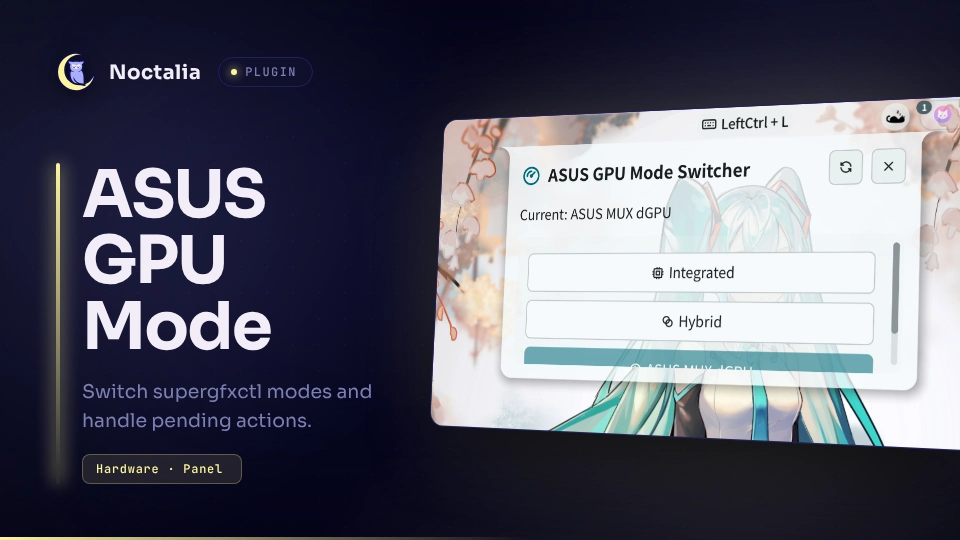
About
ASUS GPU Mode Switcher
ASUS GPU Mode Switcher adds a Control Center shortcut and a compact mode panel for supergfxctl. It shows the current and pending GPU modes, exposes supported ASUS switching targets, and explains any follow-up action.
Plugin
| Field | Value |
|---|---|
| ID | baizhu/asus-gpu-mode |
| Entries | Shortcut: gpu-mode-shortcut; panel: gpu-mode-panel |
Requirements
Install supergfxctl on PATH, enable its system service, and use supported ASUS laptop hardware. The available modes are reported by supergfxctl; unsupported modes are not shown.
GPU switching can terminate a graphical session or require a reboot. Save work before changing modes. The compatibility action matrix is based on tested behavior but firmware, GPU drivers, and hardware revisions can require different handling.
Usage
In Noctalia Settings, add ASUS GPU Mode Switcher (gpu-mode-shortcut) to the Control Center. The shortcut displays the current mode and, when present, the pending transition as Current → Pending. Select it to open the mode panel.
The panel offers every supported target among Integrated, Hybrid, ASUS MUX dGPU, VFIO, and ASUS eGPU. The current target is highlighted and a pending target is marked separately. Selecting the current mode while another mode is pending asks supergfxctl to cancel the pending transition.
A required-action button appears for pending changes. It can request the Integrated prerequisite directly; for logout or reboot actions it opens Noctalia's session panel so the user can explicitly choose what to do. The plugin never logs out or reboots the machine by itself.
Open or close the panel with this exact IPC command:
noctalia msg panel-toggle baizhu/asus-gpu-mode:gpu-mode-panel
Settings
| Setting | Type | Default | Description |
|---|---|---|---|
asus_gpu_debug |
bool |
false |
Enables troubleshooting logs for refreshes and mode requests. Normal operation is quiet. |
asus_gpu_patch_pending |
bool |
true |
Derives pending actions from the requested/current mode compatibility matrix instead of trusting unreliable pending-action output. |
asus_gpu_polling |
bool |
false |
Repeatedly refreshes status while the shortcut is loaded. With the default, status is refreshed only at startup and through panel activity. |
asus_gpu_polling_interval_ms |
int |
3000 |
Poll interval in milliseconds when polling is enabled; accepted range is 1000–60000 in 250 ms steps. |
Compatibility
For supergfxctl 5.2.7 and older, the plugin restores Integrated and Hybrid as available targets when the current mode is AsusMuxDgpu. Those releases can omit both modes from --supported even though the transitions are valid. The current mode, pending mode, pending action, and supported modes are read together so the shortcut and panel share one consistent status snapshot.
Processes and data access
The plugin starts only these local processes, using argument arrays without shell interpolation:
supergfxctl --version --get --supported --pend-action --pend-modeat shortcut startup, when the panel opens or refreshes, after a mode request, and at the configured interval when polling is enabled.supergfxctl --mode MODEafter the user selects or cancels a mode, whereMODEis one of the fixed mode identifiers supplied by the panel.noctalia msg panel-toggle sessiononly when the user selects a logout or reboot required-action button.
It performs no network requests and does not read or write files. Runtime status is shared only through Noctalia's in-memory plugin state and is cleared when the plugin stops.
Attribution
The GPU mode mappings, supergfxctl 5.2.7 compatibility handling, and pending-action matrix are derived from cod3d's MIT-licensed Noctalia v4 implementation. The Noctalia v5 Luau and UI port and subsequent modifications are by baizhu945. See LICENSE for the preserved MIT notice and port copyright.
Versions
| Version | Plugin API | Updated |
|---|---|---|
| v1.0.1 latest | 43 | Oct 25, 2026 |
| v1.0.0 | 24 | Sep 18, 2026 |
Older versions stay installable on a Noctalia release whose plugin API is below the latest version's.