
About
Asus Fans Controler EC
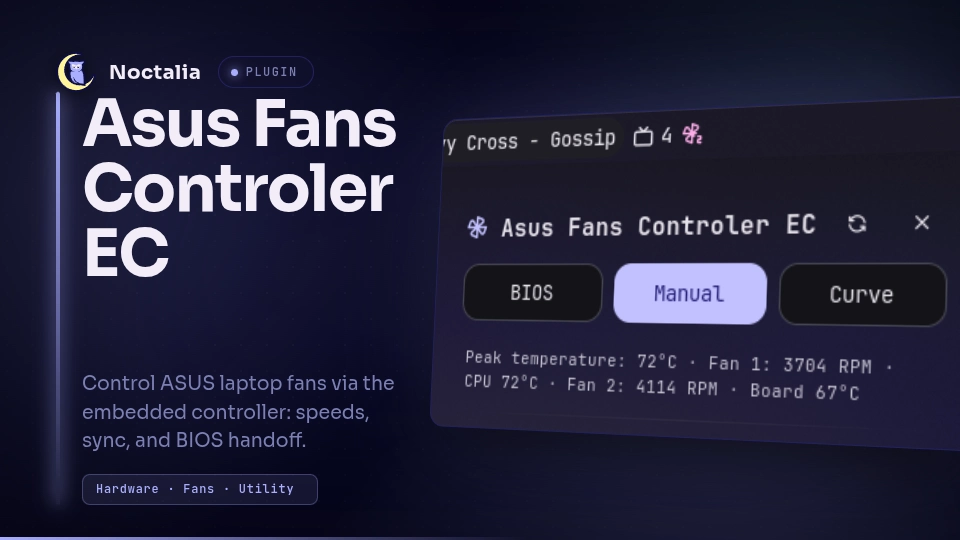
Control ASUS laptop fans through the embedded controller when the standard ACPI interface is missing. A bar widget shows live RPM and temperatures; a panel lets you switch between BIOS, manual, and curve control, sync or split fans, and hand control back to the BIOS.
Based on asus-fan-control-ec.
Plugin
| Field | Value |
|---|---|
| ID | cleboost/asus-fans-controller-ec |
| Entries | Bar widget: fan-control; panel: panel; service: service |
Features
- Live fan RPM polling with CPU, board, and peak temperature readouts
- Three explicit control modes — only one active at a time:
- BIOS (
auto) —setp -1, no plugin writes - Manual — fixed duty with sliders (
setp) - Curve — saved temperature curve applied every few seconds (
curve --once)
- BIOS (
- Synchronized or per-fan sliders in manual mode (
--fanwhen desynced) - Fan curve editor with graph, point selection, and persistent profile file
- IPC for scripting, keybinds, and automation
- Singleton service — widget and panel render shared
fan_statusstate
Requirements
- Install
asus-fan-control-econPATH(upstream, AUR:asus-fan-control-ec-git, or build from source) - Root access for writes — configure a passwordless privilege wrapper (see Privileges)
Before trusting writes on a new machine, validate hardware support:
sudo asus-fan-control-ec fan-info
Only continue when the output ends with
Result: VALIDATED against the MMIO aperture.
Tested hardware
| Model | Reporter |
|---|---|
| Asus TUF Gaming A17 | @Cleboost |
This table only reflects community testing with this plugin — it is not an
official compatibility guarantee from ASUS or the asus-fan-control-ec
authors.
If you validate the plugin on your laptop (fan-info validates, reads and
writes behave as expected), open a pull request to add your model to the
table. Do not wait or ask for permission first — a short PR with your machine
name and GitHub handle is enough.
Usage
Add the fan-control widget to a bar.
| Action | Effect |
|---|---|
| Left click | Open/close the control panel |
| Right click | Refresh RPM and temperatures |
Open the panel from the CLI:
noctalia msg panel-toggle cleboost/asus-fans-controller-ec:panel
noctalia msg settings-open-plugin cleboost/asus-fans-controller-ec
Control modes
| Mode | What it does |
|---|---|
| BIOS | Embedded controller manages fans. Plugin reads RPM only. |
| Manual | Sliders set a fixed duty (0–100%). Sync applies one value to all fans; desync uses --fan per slider. |
| Curve | The saved curve file drives fan duty from temperature while this mode is active. Edits are applied on the next tick. |
Use Release to BIOS in the panel (or set-mode bios) when you are done with
manual or curve control.
Persisted data
The service stores two files under Noctalia's plugin data directory:
| File | Contents |
|---|---|
fan-curve.conf |
Curve points (percent,temperature per line) |
control-mode.txt |
Last active mode (auto, manual, or curve) |
Settings
Plugin
| Setting | Type | Default | Description |
|---|---|---|---|
poll_interval |
int |
2000 |
Fan polling interval in milliseconds (250–60000). |
privilege_command |
string |
sudo -n |
Prefix applied to every asus-fan-control-ec call. |
Bar widget
| Setting | Type | Default | Description |
|---|---|---|---|
show_label |
bool |
false |
Show Auto, Manual, Curve, or the current percent beside the glyph. |
Privileges
The plugin calls asus-fan-control-ec on PATH with the configured privilege
prefix. A typical sudoers rule uses the resolved binary path:
# /etc/sudoers.d/asus-fan-control-ec
youruser ALL=(root) NOPASSWD: /usr/bin/asus-fan-control-ec
Set Privilege command to sudo -n (default) or pkexec if you prefer
polkit prompts.
IPC
IPC is handled by the service entry (service.luau). Dispatch format:
noctalia msg plugin <plugin-id>:<entry> <target> <event> [payload]
For this plugin:
noctalia msg plugin cleboost/asus-fans-controller-ec:service all <event> [payload]
:serviceis required —onIpclives only in the service entry.alladdresses every plugin instance (use this from scripts and keybinds).[payload]is a single positional token (no spaces). Pass a number or mode name as one word.
Examples
# Refresh RPM and temperatures
noctalia msg plugin cleboost/asus-fans-controller-ec:service all refresh

# Control mode
noctalia msg plugin cleboost/asus-fans-controller-ec:service all set-mode bios
noctalia msg plugin cleboost/asus-fans-controller-ec:service all set-mode manual
noctalia msg plugin cleboost/asus-fans-controller-ec:service all set-mode curve
noctalia msg plugin cleboost/asus-fans-controller-ec:service all switch

# Fan speed (enters manual mode automatically if needed)
noctalia msg plugin cleboost/asus-fans-controller-ec:service all set_speed 65
noctalia msg plugin cleboost/asus-fans-controller-ec:service all increment
noctalia msg plugin cleboost/asus-fans-controller-ec:service all decrement
noctalia msg plugin cleboost/asus-fans-controller-ec:service all increment 10
noctalia msg plugin cleboost/asus-fans-controller-ec:service all decrement 10

# Query snapshots (see "Query commands" below)
noctalia msg plugin cleboost/asus-fans-controller-ec:service all get-temp
noctalia msg plugin cleboost/asus-fans-controller-ec:service all get-fans refresh
Event reference
| Event | Payload | Action |
|---|---|---|
refresh |
— | Re-read fan RPM; also refreshes PWM info and temperatures. |
set-mode, set_mode |
bios, manual, curve |
Set control mode. auto is accepted as an alias for bios. |
switch |
— | Cycle modes: bios → manual → curve → bios. |
set_speed, set_percent |
0–100 |
Set fan duty for all fans (setp). |
increment, speed_up |
optional step (default 5) |
Increase duty by step, clamped to 100. |
decrement, speed_down |
optional step (default 5) |
Decrease duty by step, clamped to 0. |
get-temp, get_temp |
optional refresh |
Publish temperature snapshot (see below). |
get-fans, get_fans |
optional refresh |
Publish fan snapshot (see below). |
Speed commands always target all fans. They switch to manual mode first when the plugin is in BIOS or curve mode.
Query commands (get-temp, get-fans)
Plugin IPC is fire-and-forget: noctalia msg plugin … always answers
ok: dispatched N and does not print the query result on stdout. These events
instead:
- Update shared state keys
fan_ipc_tempandfan_ipc_fans - Write JSON files in the plugin data directory:
get-temp.jsonget-fans.json
- Log the same JSON line through the plugin
print()output
Use the cached values from the last poll by default. Pass refresh to re-read
hardware before publishing:
noctalia msg plugin cleboost/asus-fans-controller-ec:service all get-temp
noctalia msg plugin cleboost/asus-fans-controller-ec:service all get-fans refresh
Example get-temp.json:
{
  "available": true,
  "cpu": 84,
  "board": 68,
  "max": 84
}
Example get-fans.json:
{
  "available": true,
  "controlMode": "manual",
  "synced": true,
  "busy": false,
  "fanCount": 2,
  "fans": [
    { "index": 0, "rpm": 5324, "percent": 65 },
    { "index": 1, "rpm": 5827, "percent": 65 }
  ]
}
Read the files from a script after dispatching the IPC event (the write is immediate for cached data, or completes after the optional refresh):
noctalia msg plugin cleboost/asus-fans-controller-ec:service all get-temp refresh
cat "$(find ~/.local/share/noctalia -path '*/cleboost/asus-fans-controller-ec/get-temp.json' 2>/dev/null | head -1)"
Keybind example (Hyprland)
bind = , XF86Launch6, exec, noctalia msg plugin cleboost/asus-fans-controller-ec:service all increment
bind = , XF86Launch7, exec, noctalia msg plugin cleboost/asus-fans-controller-ec:service all decrement
bind = , XF86Launch8, exec, noctalia msg plugin cleboost/asus-fans-controller-ec:service all switch
bind = , XF86Launch9, exec, noctalia msg plugin cleboost/asus-fans-controller-ec:service all set-mode bios
Notes
- This plugin writes to undocumented embedded-controller registers through
asus-fan-control-ec. Use it only on supported hardware. - Setting 0% can stop the fans entirely. The safe way back to automatic
cooling is Release to BIOS /
set-mode bios(setp -1). - Per-fan writes (
--fan) still put the EC into global manual mode — check both fans after changing only one. - Temperature mapping: fan 1 is linked to CPU temp, fan 2 to board temp in
the panel readout. The curve itself is temperature-driven via
asus-fan-control-ec curve. - The shared
fan_command/fan_statusstate keys are also available to other plugin entries if you extend this plugin locally. Query IPC also publishesfan_ipc_tempandfan_ipc_fans.
Development
| File | Role |
|---|---|
service.luau |
Hardware backend, curve persistence, IPC (onIpc) |
widget.luau |
Bar widget |
panel.luau |
Control panel (modes, sliders, curve editor) |
translations/ |
User-facing strings |
Disclaimer
This plugin is provided as is, without warranty of any kind. By using it, you accept full responsibility for how your machine is cooled.
Manual control and aggressive fan curves can keep laptop fans at high duty (including 100%) for extended periods. That may increase wear, noise, and power draw, and on some hardware it could contribute to premature fan or bearing failure. Running fans at 0% can also cause overheating.
The author and contributors are not liable for any hardware damage, data
loss, instability, or reduced component lifespan resulting from use of this
plugin or asus-fan-control-ec. When you are done, return control to the BIOS
(set-mode bios or Release to BIOS in the panel).
License
MIT.
Versions
| Version | Plugin API | Updated |
|---|---|---|
| v1.0.0 latest | 9 | Aug 30, 2026 |
Older versions stay installable on a Noctalia release whose plugin API is below the latest version's.