
Back to plugins 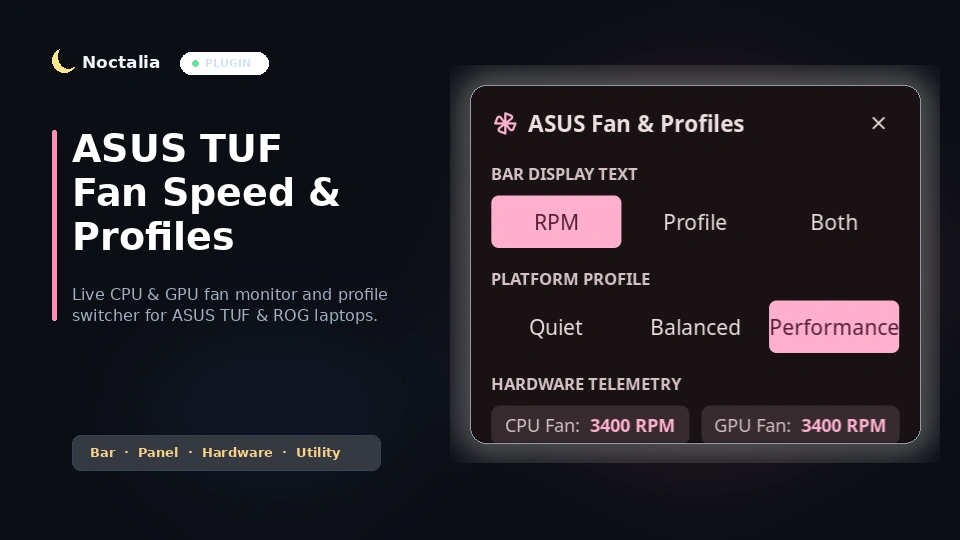
v1.0.0 kv7499
About
ASUS TUF Fan Speed & Profile Switcher
Live CPU and GPU fan RPM monitor and profile switcher for ASUS TUF and ROG laptops on Noctalia Shell.
Plugin
| Field | Value |
|---|---|
| ID | kv7499/asus-fan |
| Entries | Bar widget: asus_fan; panel: panel; service: service |
Requirements
Install asusctl on PATH (available via asusctl on Arch / CachyOS).
Usage
Add the ASUS Fan Monitor bar widget to your bar in config.toml:
[widget.asus_fan]
type = "kv7499/asus-fan:asus_fan"
- Live Monitoring: Displays your active fan RPM and color-codes the icon based on thermal intensity.
- Left Click: Cycles your laptop through its platform profiles (
Quiet➔Balanced➔Performance). - Right Click: Opens the quick settings panel to directly toggle between RPM, Profile Name, or Both, pick a platform profile, and view dual fan speeds.
- Panel Toggle Command:
noctalia msg panel-toggle kv7499/asus-fan:panel
Settings
| Setting | Type | Default | Description |
|---|---|---|---|
display_mode |
select |
"rpm" |
Display live RPM ("rpm"), profile name ("profile"), or both ("both"). |
show_label |
bool |
true |
Show or hide text next to the fan icon. |
poll_interval_ms |
int |
2500 |
Hardware polling interval in milliseconds. |
Notes
Reads fan speeds directly from the kernel hardware monitoring subsystem (/sys/class/hwmon) using non-blocking asynchronous reads. Safe across suspend/resume cycles.
Versions
| Version | Plugin API | Updated |
|---|---|---|
| v1.0.0 latest | 9 | Aug 24, 2026 |
Older versions stay installable on a Noctalia release whose plugin API is below the latest version's.