 Noctalia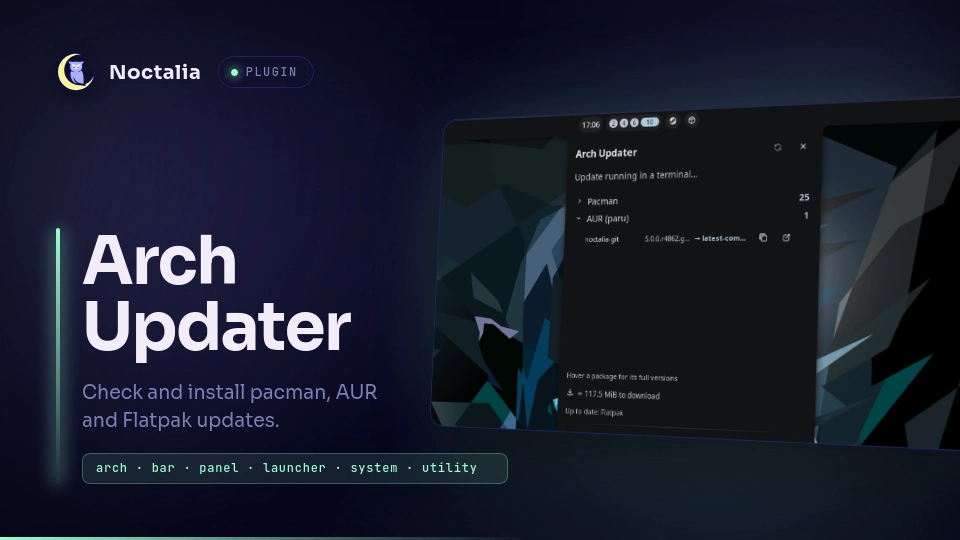
About
Arch Updater
Check pacman, AUR and Flatpak for updates from the bar, with an estimated download size and an Arch news heads-up before you upgrade. Update runs the upgrade in one of two modes (the Update mode setting): a terminal window with the usual interactive upgrade — prompts and the PKGBUILD review work as normal (the default, same behavior as before), or fully in the background — polkit asks for your password, the panel shows a live log tail and a progress bar, and a notification reports the result. Either way the run is logged and recorded in an update history with per-package rollback.
Plugin
| Field | Value |
|---|---|
| ID | yuuto/arch-updater |
| Entries | Bar widget: widget; panel: panel; service: service; launcher: launcher |
| Launcher Prefix | /arch |
Requirements
pacman-contribonPATH(forcheckupdatesandpactree), required.pacman,sh,awk,sed,grep,tail,head,tee,wc,date,rm,cp,ls,mkdir,stat,cmp,install,test,cat,killanduname, required — base tools from any standard Arch install (coreutils and friends), used to run and parse the checks, build the download size estimate, check the running kernel, follow and open the update log, install the optional polkit rule, scan for and back up.pacnewfiles, and detect whether a terminal update run's process is still alive.find,diff,diff3(findutils and diffutils, both inbase) andbsdtar(fromlibarchive, apacmandependency), required for the config-file review:findlocates.pacnew/.pacsavefiles,bsdtarpulls the previous default out of the cached package, anddiff3/diffproduce the 3-way (or 2-way) merge.pkexec(polkit) with an authentication agent, required for the background update mode and for rollback. Noctalia's built-in polkit agent works out of the box.yayorparuonPATH, optional, for the AUR check and update. Auto-detected by default, see the AUR helper setting.flatpak, optional, for the Flatpak check and update.xdg-open, optional, to open a package page or the Arch news page.less, plussudoand a terminal emulator, for the terminal update mode (the default), the Retry in terminal fallback and the Open full log viewer: Noctalia's own terminal detection ($TERMINAL, then the common emulators), or the one named in the Terminal setting.script(util-linux,base), optional, gives the terminal update mode's pacman/paru a real pty so its own download/install progress bar still animates even though the run is alsotee'd into the log. Skipped automatically if missing — the run still works, just without that bar.
A missing optional tool is skipped, not treated as an error.
Usage
Add the widget bar widget from Noctalia's widget picker. Left click opens
the panel, right click checks for updates now, middle click opens the
widget's own settings. You can also open the panel directly or bind it in
your compositor:
noctalia msg panel-toggle yuuto/arch-updater:panel
The panel groups pending packages by source (Pacman, AUR, Flatpak). Click a source row to expand it into its packages. Each package row has an ignore button (see Ignored packages), a copy button (name and versions) and an open button (its page on archlinux.org, the AUR, or Flathub). The history button next to Check opens the plugin's changelog, so you can see what changed in each release without leaving the panel. It also opens on its own once an update finishes, unless you turn that off with the Show changelog after updating setting.
Update follows the Update mode setting:
- In a terminal window (default): opens a terminal running the usual
interactive upgrade —
sudo pacman -Syuor the AUR helper without any auto-answer flags, so prompts, conflicts and the PKGBUILD review work exactly as on the command line. It runs underscriptso pacman/paru still see a terminal and keep drawing their own download/install progress bar, and that same output istee'd into the update log, so the panel also shows the live tail, its own progress bar and the bar-widget percentage, and the run still lands in the update history. - In the background: pkexec raises the polkit password dialog,
everything else is non-interactive (
--noconfirm, and for the AUR helper--skipreview/ the--answer*flags), so any remaining question gets its default answer. The run is spawned detached and survives a shell restart: a restarted engine re-attaches to an unfinished log and keeps showing progress. A background run that cannot proceed non-interactively stops cleanly with a non-zero exit before touching the system; a failed run keeps its log on screen and offers Retry in terminal.
In both modes the Flatpak step runs even when the pacman/AUR step failed (say, one AUR package that won't build, or a declined prompt); the run is still reported as failed, with the exit status of the last failing step.
When a run ends you get a notification and an automatic re-check.
Window rules for the terminal
Every terminal the plugin opens gets the app id (class) arch-updater and
a fixed title per job, so compositor window rules can target it:
Arch Updater - Update, Arch Updater - Log and Arch Updater - Config
(the .pacnew merge/diff tools). The app id is set through the emulator's
own flag for kitty, foot, alacritty, wezterm and xterm (Ghostty only accepts
reverse-DNS ids, so there it's dev.noctalia.arch-updater). That works for
the Terminal setting, or for $TERMINAL when the setting is empty. Other
emulators keep their own app id; the title is still set on launch for
konsole and through an escape sequence for every emulator. Example for niri:
window-rule {
    match app-id="arch-updater" title="^Arch Updater - Update$"
    open-floating true
}
Dismiss clears the pending list until the next check. Check Updates queries all sources.
If a check or a finished update finds .pacnew/.pacsave config files, a
Review line appears in the panel — see Config file review.
Type /arch in the launcher for quick actions (check, update, open news),
or /arch <text> to fuzzy-search the packages from the last check.
Activating a result opens that package's page.
Update history and rollback
A strip at the bottom of the panel has one segment per recorded run (the
last 15), oldest on the left; rollbacks get their own segments. Hover shows
the date and package count, click opens the run's package list: each row
shows name from → to with a rollback button (a second click confirms),
and the header offers rolling back the whole run in one transaction.
Rollback installs the old package files straight from the caches
(/var/cache/pacman/pkg, paru's/yay's build dirs) with
pkexec pacman -U: the chosen version is installed directly, no stepping
through intermediate upgrades. Dependencies updated in the same run ride
along in the same transaction (resolved with pactree against the run's
package list), so a program and its libraries move back together.
--nodeps is never used: a downgrade that would break another package's
versioned dependencies makes pacman refuse the whole transaction before
anything changes. When a run's package list is opened, the engine probes
the caches and reverse dependencies: packages whose old file is gone are
greyed out, and the rollback tooltip warns how many installed packages
require the one being rolled back. Flatpak entries are shown but not
rollbackable.
Before a run is recorded, pacman -Q confirms which packages actually
changed: anything declined during an interactive terminal run is left out
of the entry, so the history never offers to "undo" an update that did not
happen. Failed runs are not recorded.
Config file review (.pacnew / .pacsave)
When a package ships a new default for a config file you have edited, pacman
writes the new version alongside yours as <file>.pacnew, warns once, and
never mentions it again. With Review .pacnew config files on (the
default), every check and every finished update scans the configured roots
(Config search paths, /etc by default) for .pacnew, .pacsave and
.pacorig files and lists them behind a Review line in the panel (and a
badge on the bar widget).
Opening a .pacnew builds a 3-way merge:
- mine — your current file
- theirs — the
.pacnew, i.e. the package's new default - base — the file as shipped by the previous version of the package,
extracted with
bsdtarfrom the pacman cache (the version is taken from the update history, or guessed when exactly one other version is cached)
diff3 -m applies every change that only one side made automatically; only a
region both sides touched becomes a conflict, shown as a card with your
lines, the new lines, and a Keep mine · Take new · Keep both switch
(pre-set by Default choice for conflicts). Preview result renders the
merged file in place; Apply merge writes it. When no base is in the cache
the merge falls back to a 2-way diff where every difference is a choice.
Also on offer: Take new as-is (replace your file wholesale),
Discard new (delete the .pacnew, keep yours), and, for .pacsave
files, Restore / Remove. Files that need root to read are shown with
a lock and can only go through the external tool.
External merge tool. Set External merge tool to a command with the
tokens %mine, %base, %theirs, %merged — e.g.
meld %mine %merged %theirs or kdiff3 %base %mine %theirs -o %merged. The
external-tool button in the merge view opens it against the staged files
(%merged is pre-seeded with the engine's auto-merge); when you save the
tool's result to %merged, Apply tool result installs it the same way
Apply merge would. With the setting empty the button runs pacdiff
instead (which writes /etc itself via sudo). External diff viewer
(%a = current file, %b = .pacnew) is the equivalent for View diff.
Applying writes through one pkexec call: the live file's mode and owner are
preserved (install -m … -o … -g …), the .pacnew is removed, and — unless
Back up the file before applying is off — a copy is saved first (to a
config-backups folder in the plugin's data directory by default; see
Backup location). After a run, new .pacnew files raise a notification,
and Auto-remove identical .pacnew (off by default) sweeps away ones that
are byte-for-byte identical to the live file in a single prompt.
Activity graph
The optional activity graph (off by default, Show activity graph) tracks the pending-update count across recent checks and when you last updated, drawn as a small trend line above the history strip. Hovering the dot axis under the line highlights a check and describes it (count, time, or "Updated" for the check that verified a run). Turning the setting off also stops recording the data.
Ignored packages
Three ignore sources are merged and shown in an expandable Ignored section at the bottom of the package list:
- Panel-managed. The ignore button on a package row adds it to a list kept in the plugin's data directory. These entries have a restore button in the Ignored section.
- The
ignore_packagessetting. Shown with a settings tag; clicking the tag opens the plugin's settings. pacman.conf'sIgnorePkg. Update checkers report these packages with an[ignored]marker; they are shown with a pacman.conf tag and are managed only in that file. The plugin never editspacman.conf.
Ignored packages are excluded from the pending count and passed as
--ignore to the update run in both modes (Flatpak refs are filtered out
of flatpak update the same way).
One polkit password per run
pkexec authenticates every pacman transaction separately, so a background
update that syncs databases and installs AUR builds can raise several
password dialogs. Until a keep-authorization polkit rule is installed, the
panel shows a hint line with an Ask once button (only in background
mode — the terminal mode goes through sudo and never hits this): it
installs, through one pkexec call you confirm, a rule that keeps a
successful authentication for ~5 minutes — like sudo's timestamp.
Scope, stated plainly: the rule grants AUTH_ADMIN_KEEP for any
pkexec-launched /usr/bin/pacman call made from an active local session
of a wheel member — not only this plugin's calls — comparable to a
manually added NOPASSWD-with-timeout sudoers line. It is strictly opt-in,
the same wording appears in the install button's tooltip, and it can be
removed at any time:
sudo rm /etc/polkit-1/rules.d/49-arch-updater-pacman.rules
The rule text ships in polkit/49-arch-updater-pacman.rules and can also
be installed by hand:
sudo install -Dm644 polkit/49-arch-updater-pacman.rules /etc/polkit-1/rules.d/49-arch-updater-pacman.rules
The hint can be hidden with the Hide the polkit rule suggestion setting.
Settings
| Setting | Type | Default | Description |
|---|---|---|---|
aur_helper |
select |
auto |
Which AUR helper to use: auto-detect (yay, then paru), yay, paru, a custom command, or off. |
aur_check_cmd |
string |
(empty) | Custom AUR check command, only used when aur_helper is custom. Must print name oldver -> newver per line. |
flatpak_enabled |
bool |
true |
Also check and update Flatpak. Skipped automatically when flatpak isn't installed. |
ignore_packages |
string_list |
(empty) | Package names excluded from the count and passed as --ignore on update, on top of the panel-managed list and pacman.conf's IgnorePkg. |
auto_check_hours |
int |
0 |
Check automatically every N hours. 0 never checks on its own. |
notify_on_updates |
bool |
true |
Send a desktop notification when a check finds packages to upgrade. |
show_download_size |
bool |
true |
Show the estimated pacman download size (pacman -Si) in the panel. |
check_arch_news |
bool |
true |
Check the Arch Linux news feed and flag unread posts. |
check_reboot_needed |
bool |
true |
Flag when the running kernel is no longer installed on disk. |
show_activity_graph |
bool |
false |
Track pending-update counts across checks and show them as a small graph. Off also stops recording. |
activity_history_length |
int |
10 |
How many recent checks the activity graph keeps (3–30). |
update_mode |
select |
terminal |
How Update runs the upgrade: in a terminal window (interactive, like before) or in the background (non-interactive). |
rollback_auto_ignore |
bool |
false |
After a successful rollback, add the rolled-back packages to the plugin's ignore list. |
hide_polkit_hint |
bool |
false |
Hide the panel line offering to install the polkit keep-authorization rule. |
log_lines |
int |
14 |
How many of the latest update-log lines the panel shows during a run (6–30). |
terminal |
string |
(empty) | Terminal command for terminal-mode updates, the retry fallback and the log viewer. Empty uses Noctalia's detection. |
update_cmd |
string |
(empty) | Full override for the update command, in both terminal and background mode. Empty builds it from the settings above. |
config_review |
bool |
true |
Scan for .pacnew/.pacsave files and offer the in-panel 3-way merge. Off also stops the scan and hides the bar badge. |
config_search_paths |
string_list |
["/etc"] |
Absolute directories to scan for .pacnew/.pacsave/.pacorig files. |
config_include_pacsave |
bool |
true |
Also list .pacsave files (a removed package's kept config), with restore/remove actions. |
config_default_resolution |
select |
mine |
Which side each conflicting hunk starts on: mine (never changes an edited line) or theirs (prefers the new default). |
config_notify |
bool |
true |
Notify when an update run leaves new .pacnew files behind. |
config_auto_remove_identical |
bool |
false |
After a run, delete .pacnew files byte-identical to the live file in one pkexec call. |
config_backup |
bool |
true |
Save a copy of the config before writing the merged result. |
config_backup_dir |
string |
(empty) | Empty: a config-backups folder in the data directory. An absolute path: back up there. alongside: a <file>.arch-updater.bak next to each file (root-owned). |
config_backup_keep |
int |
10 |
Backups to keep per file (0 = all). Ignored for the alongside location. |
config_merge_tool |
string |
(empty) | External merge command with tokens %mine %base %theirs %merged. Empty uses the in-panel merge. |
config_diff_tool |
string |
(empty) | External diff command for View diff, tokens %a (current file) and %b (.pacnew). Empty uses diff in the pager. |
glyph |
glyph |
package |
The glyph shown for the widget on the bar. |
show_count |
bool |
true |
Show the pending-update count next to the bar glyph. |
hide_on_empty |
bool |
false |
Hide the widget entirely when there is nothing to show. |
config_badge |
bool |
true |
Show the pending .pacnew/.pacsave count on the bar widget when no updates are pending. |
IPC
noctalia msg plugin yuuto/arch-updater:service all check
noctalia msg plugin yuuto/arch-updater:service all update
noctalia msg plugin yuuto/arch-updater:service all update_background
noctalia msg plugin yuuto/arch-updater:service all update_terminal
noctalia msg plugin yuuto/arch-updater:service all dismiss
noctalia msg plugin yuuto/arch-updater:service all ignore:NAME
noctalia msg plugin yuuto/arch-updater:service all unignore:NAME
noctalia msg plugin yuuto/arch-updater:service all config_scan
update follows the Update mode setting; update_background and
update_terminal force one mode. ignore:NAME / unignore:NAME edit the
panel-managed ignore list. config_scan re-scans for .pacnew/.pacsave
files.
Notes
- Commands spawned. Checks:
checkupdates; the AUR helper's-Qua(or your custom command);flatpak list/flatpak remote-ls --updates(combined withsed/awk);pacman -Sipiped throughawkfor the download size;test -dagainstuname -rfor the reboot check. Update: a detachedshrunningpkexec pacman -Syuor the AUR helper with--sudo pkexec, then optionallyflatpak update— all output redirected to the update log, which the engine follows withtail/grep. The terminal mode runs the interactive equivalents (sudo pacman -Syu, the helper without auto-answers) under your terminal, wrapped inscriptfor a real pty andtee'd into the same log. Rollback:pactreeto resolve same-run dependencies, a shell glob over the package caches to find the old files,pkexec pacman -Uto install them, andpactree -rd1piped throughwcfor the reverse-dependency warning. After a successful run,pacman -Qverifies which packages actually changed before the history entry is written. Open full log shows the log withlessin your terminal. - Privileges. Escalation happens only through polkit:
pkexec pacmanfor repo packages and rollback, and the AUR helper escalates its install steps throughpkexecitself (--sudo pkexec). AUR builds run unprivileged as usual. The terminal mode escalates throughsudoinside your terminal, as a manual upgrade would. The optional Ask once button installs the shipped polkit rule via one user-confirmedpkexec installcall; nothing else touches system configuration, andpacman.confis never modified. - Config file review.
findover the search paths for*.pacnew/*.pacsave/*.pacorig,cmp -sandpacman -Qoqper hit. Opening one:cpof the live file and the.pacnewinto the data directory,bsdtar -xOof the base out of a cached package, thendiff3 -m(ordiff). Applying: an optional user-sidecpbackup, then onepkexec sh -crunninginstall -m … -o … -g …(orcp -a/rm) and removing the.pacnew..pacnewfiles are only ever created by pacman; the plugin only merges, backs up and removes them. - Network.
checkupdates, the AUR helper and the Flatpak check contact mirrors, the AUR RPC, or a Flatpak remote, same as the corresponding upgrade would. The Arch news check fetchesarchlinux.org/feeds/news/once at startup and then every 6 hours. - Files written. All in the plugin's data directory:
update.log(the current/last run, with::START/::EXITmarkers),run_meta.json(the current run's kind and package list, so a restarted shell can keep tracking it; removed when the run ends),runs.json(the update history, last 15 successful runs),history_state.json(the activity graph data),ignore.json(the panel-managed ignore list),news_state.json(the last read news post), a staged copy of the polkit rule, and a marker recording that the rule was installed (/etc/polkit-1/rules.dis not readable by regular users on Arch, so presence can't always be probed directly). Config file review addscm-mine/cm-base/cm-theirs/cm-merged(the staged merge inputs and result) and, unless backups are off or pointed elsewhere, aconfig-backups/folder. - Stuck-run guard. A background run whose log stops growing for 30 minutes is declared failed; the panel then offers the terminal fallback. Terminal runs are exempt — log silence there can just be you reading a PKGBUILD diff. Unfinished logs older than 6 hours are not resumed after a restart.
- Sizes are pacman-only. AUR and Flatpak downloads aren't sized. Most AUR packages build from source, where a download size wouldn't mean much.
-git(devel) packages and rollback. After rolling one back, the next check usually does not list it as an update: paru/yay track devel packages by the last built commit, not the installed version. Move forward again through the rollback's own history segment, or withparu -S <package>. Regular repo packages reappear as pending on the very next check.
Credits
Ported from the v4 QML "Arch Updater" plugin (MIT), rebuilt for v5's Luau plugin API. Background update mode, ignore management, the polkit integration, and the update history with rollback contributed by UmedjonBA.
License
MIT.
Versions
| Version | Plugin API | Updated |
|---|---|---|
| v2.1.1 latest | 43 | Oct 25, 2026 |
| v2.1.0 | 9 | Oct 21, 2026 |
Older versions stay installable on a Noctalia release whose plugin API is below the latest version's.