 Noctalia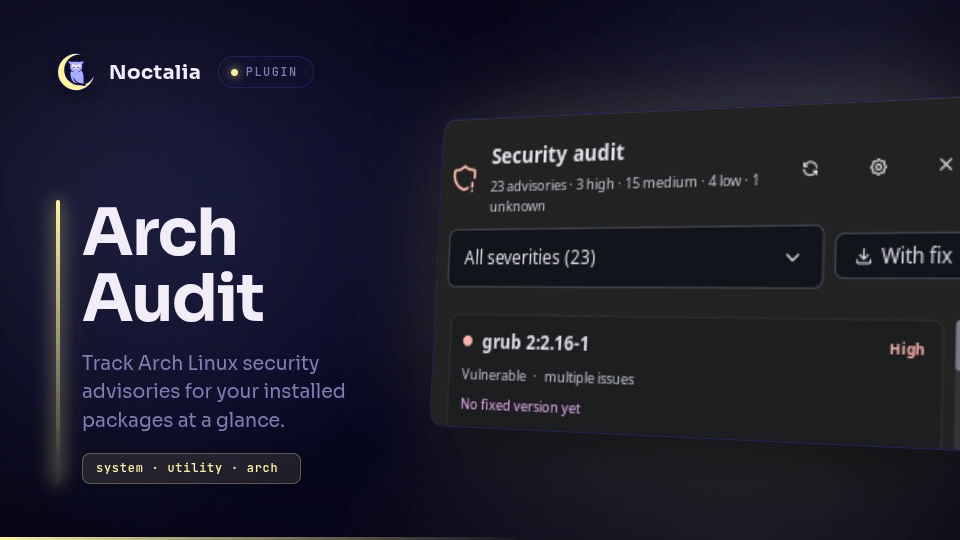
About
Arch Audit
Arch Audit keeps the Arch Security Team advisories in view without turning your
bar into a feed reader. A background service runs arch-audit --json, enriches
each advisory with the installed version from pacman, and shows a severity-aware
badge. The panel groups the findings, filters them, and links to the tracker.
Read-only by design: no root, no package operations, no automatic updates.
Plugin
| Field | Value |
|---|---|
| ID | cero800/arch-audit |
| Entries | Bar widget: widget; panel: panel; service: service |
| Launcher Prefix | — |
Requirements
arch-auditonPATH(sudo pacman -S arch-audit).pacmanfor the installed-version lookup.xdg-openfor opening an advisory in the browser.
The first check downloads the advisory database that arch-audit normally
uses from https://security.archlinux.org/all.json. No account or API key is
needed.
Usage
Add the Arch Audit bar widget from the bar settings. It shows the number of
advisories affecting installed packages; its colour follows the worst severity
(error for critical/high, tertiary for medium, primary for low, and
on_surface_variant for unknown).
When the last check was clean the glyph becomes shield-check.
- Left click opens the panel.
- Right click runs a check immediately.
- The panel's severity selector narrows the list; With fix keeps only advisories that already have a fixed version.
- Open advisory opens the matching page on
security.archlinux.org. - Copy upgrade copies
sudo pacman -Syuto the clipboard. It never runs it: Arch does not support partial upgrades, so a full system upgrade is the correct way to pick up fixes.
Open the panel from a script or keybinding with:
noctalia msg panel-toggle cero800/arch-audit:panel
When arch-audit is missing, cached results stay visible with a banner and the
panel offers a copyable install command. The service re-detects the binary every
ten minutes, or immediately on right click.
The last successful snapshot is cached in the plugin data directory, so a shell restart shows results before the network answers. A check runs at startup when that snapshot is older than the configured interval.
Settings
Plugin settings:
| Setting | Type | Default | Description |
|---|---|---|---|
check_hours |
int |
6 |
Hours between automatic checks (1–168). Startup checks use the same interval against the cached result. |
notify_new |
bool |
true |
Notify when a check finds advisories absent from the previous check. The first check never notifies. |
notify_min_severity |
select |
high |
Lowest severity that triggers a notification: critical, high, medium, or low. |
ignore_packages |
string_list |
[] |
Packages to leave out of the badge and panel. An advisory remains while at least one affected package is still shown. |
Bar widget settings:
| Setting | Type | Default | Description |
|---|---|---|---|
glyph |
glyph |
shield-exclamation |
Glyph shown while advisories are present. Clean and failed checks use dedicated glyphs. |
show_count |
bool |
true |
Show the advisory count next to the glyph. |
hide_on_clean |
bool |
false |
Hide the widget when the last check found nothing. Errors and missing dependencies stay visible. |
Ignoring a package is not the same as marking an advisory safe. It only hides the packages you have consciously accepted the risk on; the advisory disappears when every package it covers is ignored.
IPC
Run a check now:
noctalia msg plugin cero800/arch-audit:service all check
Open the plugin settings:
noctalia msg plugin cero800/arch-audit:service all open-settings
Notes
- Data flow:
arch-audit --json→ pacman version enrichment → ignore filter → state consumed by the widget and panel. Luau never parses the full tracker database; it only handles the small advisory array produced byarch-audit. - Persistence:
snapshot.jsonin the plugin data directory (last good tracker payload, installed versions, and the seen-advisory set). Delete it to force a cold start and re-enable first-run notification suppression. - Network: checks fetch the Arch Security Team database through
arch-audit. There is no telemetry, no third-party endpoint, and no data sent anywhere. - Fix availability:
arch-auditreports the fixed version from the tracker. Depending on repository state it may already be available, or still be on its way to your mirror. Arch Audit deliberately does not query repositories itself. - Severity: the tracker uses Critical, High, Medium, Low, and Unknown. Unknown is shown but ranked last and is below the default notification threshold.
- No destructive actions: the plugin never installs, upgrades, or removes packages, and never asks for privileges.
Versions
| Version | Plugin API | Updated |
|---|---|---|
| v0.1.0 latest | 43 | Oct 27, 2026 |
Older versions stay installable on a Noctalia release whose plugin API is below the latest version's.