
About
Ambient Sounds
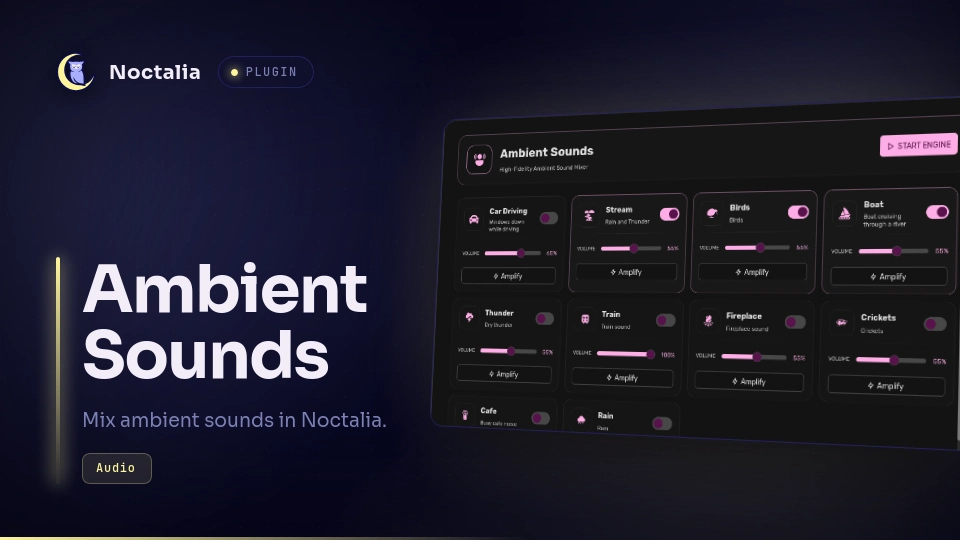
Ambient Sounds is a Noctalia mixer for playing several looping ambient tracks at the same time.
Plugin
| Field | Value |
|---|---|
| ID | reaperhound/ambient-sounds |
| Entries | Bar widget: ambient-sounds; panel: main; shortcut: toggle |
Features
- Mix eight bundled ambient recordings simultaneously.
- Toggle each sound independently and adjust its volume.
- Apply a per-sound amplification boost.
- Start or stop the complete mix from one control.
- Read and adjust the default PipeWire output volume through
wpctl. - Open the mixer from a bar widget, a control-center shortcut, or panel IPC.
Requirements
The following executables must be installed and available on PATH:
mpvfor looping audio playback.socatfor sending control commands to mpv's Unix sockets.wpctlfor reading and changing the default PipeWire sink volume.pkillandrmdirfor process fallback cleanup and temporary socket-directory cleanup.
Usage
Add the ambient-sounds widget from Noctalia's widget picker. Clicking it toggles the mixer panel.
Add the toggle shortcut from Settings → Control Center shortcuts to open the mixer from the control center.
The panel can also be opened directly:
noctalia msg panel-toggle reaperhound/ambient-sounds:main
In the panel, enable individual sounds, move their volume sliders, use Amplify for a small extra gain boost, or use START ENGINE / STOP ENGINE for the whole mix. Enabled sounds are started when the engine starts and loop until disabled or stopped.
Settings
This plugin declares no Noctalia settings. Sound levels and enabled state are session-local.
IPC
The plugin does not expose custom IPC events. The panel-toggle command above opens its panel.
Notes
- Playback is local. The plugin makes no network calls and does not upload audio or user data.
- Each playing sound is a separate
mpvprocess with a private Unix socket under/tmp/noctalia-ambient-<timestamp>/. - Disabling a sound sends mpv a quit command, uses its socket-specific
pkillfallback, and removes the socket. Closing the panel runtime stops all players and removes the temporary socket files and directory. - Sound files are resolved relative to the installed plugin directory, so the plugin does not depend on the author's checkout path.
- Audio sources and license notices are listed in ATTRIBUTION.md.
Attribution
sounds/train.ogg is by SDLx, from Freesound sound 259988, licensed under CC BY 3.0.
Preview
The community plugin store thumbnail is generated from a captured panel screenshot.
Versions
| Version | Plugin API | Updated |
|---|---|---|
| v0.1.2 latest | 24 | Sep 4, 2026 |
Older versions stay installable on a Noctalia release whose plugin API is below the latest version's.