
About
ALS Brightness
Adapts panel brightness — and optionally colour temperature — to the machine's ambient light sensor, and gets out of the way the moment you touch the brightness keys, because a manual adjustment is treated as intent rather than as an error to be corrected.
Plugin
| Field | Value |
|---|---|
| ID | zhangdm/als-brightness |
| Entries | Service: als |
| Plugin API level | 24 |
The plugin is a single headless service (als, entry file service.luau): it
has no bar widget, panel or launcher prefix. Everything is driven by its
settings and a small number of IPC events.
Requirements
Noctalia (noctalia) with plugin API level 24. The plugin shells out to
noctalia msg (with an argv table, no shell interpolation) for status,
brightness-set and config-reload; the idle handshake events described under
Usage flow the other way — your idle policy sends them to the plugin.
Hardware requirements are listed under Notes: an ambient light sensor and a backlight device are required; the colour-temperature sensor, DPMS node and lid switch are optional and each degrades gracefully when absent.
Usage
Install and enable it as a plugin source, then enable the plugin itself:
git clone https://github.com/ZhangDM-520/noctalia-ambient-brightness
noctalia msg plugins source add als-brightness path ~/noctalia-ambient-brightness
noctalia msg plugins enable zhangdm/als-brightness
From then on the panel follows the light in the room: the service polls the sensor and drives the panel brightness inside the band you configured. The moment you change brightness by hand, the adapter treats that as your preference and backs off instead of fighting you.
Two things must be configured outside the plugin.
The idle handshake is required
Your idle policy must send idle-engaged when the idle dim starts and
idle-released after brightness is restored — the dim behaviour in nri-idle's
~/.config/nri-idle/idle.toml, each event delivered with
noctalia msg plugin zhangdm/als-brightness:als all idle-engaged (respectively
idle-released). Order matters: engage before dimming, release after restoring.
This is not optional. Without the handshake the adapter cannot tell the idle dim apart from you lowering the brightness by hand, and will either fight the dim or record it as your preference. Nothing is learned while the session is idle.
Silence the brightness OSD
An adapter that changes brightness continuously pops the brightness OSD on every
adaptation. Add this one line to ~/.local/state/noctalia/settings.toml:
[osd.kinds]
brightness = false
The plugin offers no config-write API for this particular setting and will not touch your OSD settings on your behalf; the colortemp feature's own splice of this same file (see Notes) is a deliberate, documented exception. The gate is per kind, not per writer, so it also silences the OSD for the idle dim and for your own brightness keys.
Settings
Configured in Noctalia's Settings UI, or in
~/.local/state/noctalia/settings.toml under
[plugin_settings."zhangdm/als-brightness"].
| Setting key | Default | What it does |
|---|---|---|
learning_profile |
false |
On: nudge the curve thresholds toward the ambient light you actually adjust brightness in. Off: use the sliders exactly as you set them. Recording is always on, so switching it on shows a profile that has been developing rather than an empty one. |
show_advanced |
false |
On: reveal the two raw curve map editors below. Off: hide them. |
curve_brightness |
10 nodes | Advanced. Power-user override of the brightness curve: one row per node, reading:target (or just target, with the reading taken from the key). At the shipped defaults it is inert and the sliders rule; edit any row and the map becomes the curve and learning is suspended. |
curve_temperature |
10 nodes | Advanced. Same shape, for panel kelvin (lower is warmer). Only used while adaptive colour temperature is on. |
enabled |
true |
Master switch. While off the panel is left alone entirely. |
connector |
"" |
Output to drive. Empty: auto-detect at start (the focused output). Restart the plugin after changing. |
backlight |
"" |
Backlight device under /sys/class/backlight. Empty: auto-detect at start. Restart the plugin after changing. |
min_percent |
15 |
Hard floor in percent, so a dark or occluded sensor reading cannot blank the screen. |
max_percent |
100 |
Hard ceiling in percent. |
colortemp |
false |
Also warm the panel toward the ambient colour temperature. Warning: this forces night light on and rewrites temperature_night. |
Curve threshold sliders
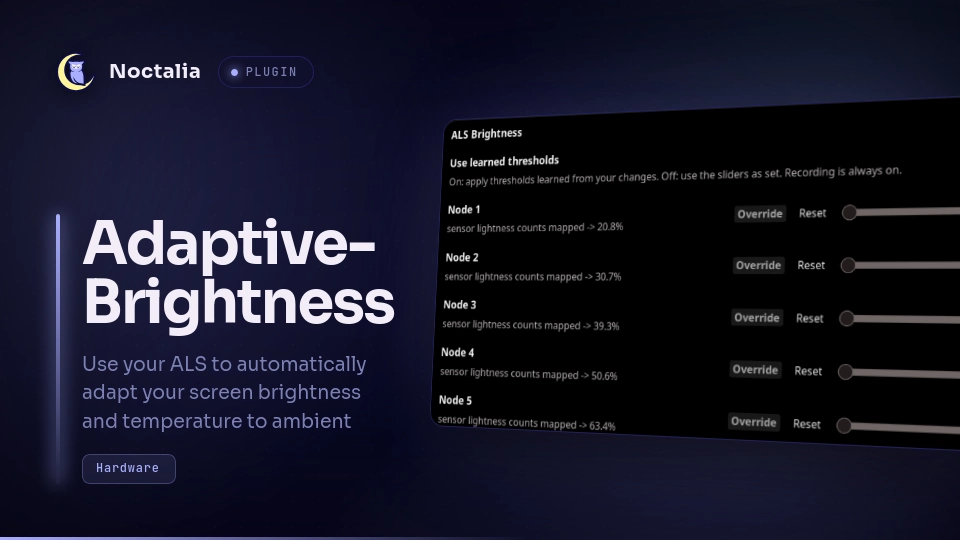
Each curve is ten nodes. A node is a pair — the ambient reading where it takes over, and the output it produces there — and the two halves are edited in different places. The outputs are fixed (20.8 % … 100 % brightness; 5100 K … 6500 K panel warmth) and one slider per node chooses its threshold. As ambient light rises past a slider's value, that node takes over from the one before it. Moving a slider past its neighbour simply swaps two steps of the curve; the shape is never in question.
The temperature sliders are shown only while colortemp is on. Values between
nodes are joined with a monotone cubic interpolation (PCHIP) that cannot
overshoot the two nodes it sits between.
| Setting key | Default | What it does |
|---|---|---|
thr_brightness_01 |
1 |
Node 1 threshold in raw sensor counts; node outputs 20.8 % brightness. |
thr_brightness_02 |
4 |
Node 2 threshold; outputs 30.7 %. |
thr_brightness_03 |
10 |
Node 3 threshold; outputs 39.3 %. |
thr_brightness_04 |
30 |
Node 4 threshold; outputs 50.6 %. |
thr_brightness_05 |
100 |
Node 5 threshold; outputs 63.4 %. |
thr_brightness_06 |
185 |
Node 6 threshold; outputs 70 %. |
thr_brightness_07 |
400 |
Node 7 threshold; outputs 78.3 %. |
thr_brightness_08 |
1000 |
Node 8 threshold; outputs 88.3 %. |
thr_brightness_09 |
2200 |
Node 9 threshold; outputs 96.8 %. |
thr_brightness_10 |
16384 |
Node 10 threshold (the sensor ceiling); outputs 100 %. |
thr_temperature_01 |
2500 |
Temperature node 1 threshold in ambient kelvin; panel output 5100 K. |
thr_temperature_02 |
2700 |
Node 2 threshold; panel 5240 K. |
thr_temperature_03 |
3000 |
Node 3 threshold; panel 5380 K. |
thr_temperature_04 |
3500 |
Node 4 threshold; panel 5520 K. |
thr_temperature_05 |
4000 |
Node 5 threshold; panel 5660 K. |
thr_temperature_06 |
4500 |
Node 6 threshold; panel 5800 K. |
thr_temperature_07 |
5000 |
Node 7 threshold; panel 5940 K. |
thr_temperature_08 |
5500 |
Node 8 threshold; panel 6080 K. |
thr_temperature_09 |
6000 |
Node 9 threshold; panel 6220 K. |
thr_temperature_10 |
6500 |
Node 10 threshold; panel 6500 K. |
Notes
Files this plugin writes.
profile.jsonandals-brightness.login the plugin's data directory (if that directory is unavailable the plugin falls back to/tmp).- With
colortempon, a byte-exact text splice of Noctalia'ssettings.toml, located the way the shell locates it:NOCTALIA_STATE_HOME, elseXDG_STATE_HOME, else~/.local/state, thennoctalia/settings.toml(the file is returned unchanged when nothing changes; the new content is written to asettings.toml.als-brightness.tmpscratch file next to it, then atomically renamed over the original, thennoctalia msg config-reloadis run).
Hardware probe. At service start the plugin probes the machine once.
Required: an ambient light sensor under /sys/bus/iio/devices
(in_illuminance_raw or in_illuminance_input) and a backlight device under
/sys/class/backlight. If either is missing — or the connector or backlight
setting names hardware this machine does not have — the plugin stays idle, shows
one error notification and writes nothing to the panel. Optional: the
colour-temperature sensor, the DPMS node and the lid switch; each drops out with
a log line when absent and everything else keeps working. Discovery runs once,
so after plugging in hardware or changing connector or backlight, toggle the
plugin off and on to re-probe.
Readings are raw sensor counts, not lux. The curve is defined against the numbers you can read directly:
cat /sys/bus/iio/devices/iio:device*/in_illuminance_raw
The learned profile lives in profile.json in the plugin's data directory.
The plugin cannot write its own settings, so the learned thresholds apply at
runtime and are not written back to the sliders; a slider you move yourself is
the seed learning starts from. While an edited curve_brightness or
curve_temperature map is winning, learning is suspended entirely.
Versions
| Version | Plugin API | Updated |
|---|---|---|
| v0.4.1 latest | 24 | Sep 30, 2026 |
Older versions stay installable on a Noctalia release whose plugin API is below the latest version's.