
About
AI Triage
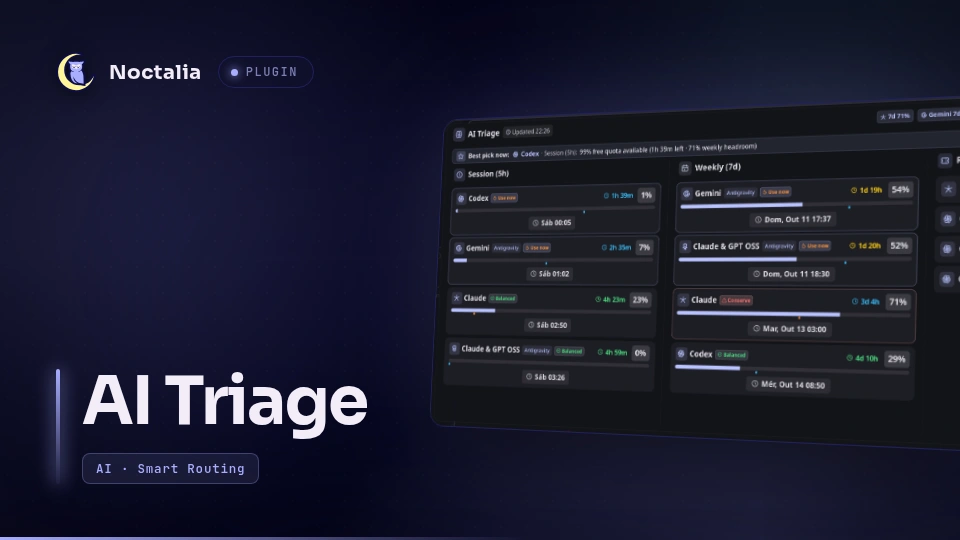
AI Triage is an intelligent AI quota monitoring, smart routing, and rolling session triage plugin for the Noctalia Wayland shell.
Built on top of the telemetry engine provided by ai-usagebar, AI Triage elevates basic quota numbers into actionable routing decisions, real-time pace analysis, and automated session priming.
Plugin
| Field | Value |
|---|---|
| ID | miguelfm/ai-triage |
| Entries | Bar widget: bar; panel: panel; service: poller |
Requirements
Install ai-usagebar on PATH. The plugin runs it by name and has no separate
path setting. It ships as ai-usagebar-bin on the AUR, and as release
tarballs on the project's GitHub Releases page. Configure your providers once in
~/.config/ai-usagebar/config.toml; the CLI manages credentials and provider
connections.
When the CLI is missing or provider dashboards are clicked, the panel opens URLs
with xdg-open. Install xdg-open alongside ai-usagebar.
The plugin requires Noctalia plugin API 22 for require().
For the interactive rolling session kickstart feature ([⚡ Start 5h]), ensure bin/ai-kickstart is
accessible or placed on your PATH (e.g. ~/.local/bin/ai-kickstart). The helper triggers rolling sessions via provider-specific CLI tools:
claude(Anthropic Claude Code CLI) for Claudecodex(OpenAI Codex CLI) for Codexagy(Antigravity CLI) for Gemini and Claude & GPT OSS Install the respective CLI for any backend provider you wish to prime.
Features
- Cross-Weighted Best Pick Engine: Dynamically calculates the optimal model to route prompts to by balancing rolling 5-hour session headroom against 7-day weekly health and pace (severely penalizes models with $<15%$ free or $\le -15\text{pts}$ behind pace; boosts models with healthy weekly pace and detects urgent resets with quota remaining).
- Interactive Session Priming (
ai-kickstart): Providers with rolling windows (Claude, OpenAI, Antigravity) only start counting when the first prompt is sent. Cards whose 5-hour session period has not yet been initiated display a[⚡ Start 5h]button that sends a minimal 1-token prompt to start the clock at the beginning of your workday. Once initiated, the button cleanly yields to the active countdown. - Dynamic Time Needle Marker: The dual-layer gauge features a live needle marker that ticks with the active countdown, immediately showing whether token consumption is ahead or behind elapsed time.
- Triage Status Badges: Real-time triage pills (
Optimal,Safe,Low,Critical,Starved,Fresh) with detailed consumption pace tooltips on hover. - Compact Geometry: Optimized 710px vertical height with zero wasted screen space.
Usage
Add miguelfm/ai-triage:bar to a bar in Settings, Bar. The capsule shows
one provider's headline reading beside its icon. Readings use the bar's text
color, the theme's secondary color for high usage, and error for critical
usage. Icons keep their normal color unless a read fails.
- Left click: Opens the AI Triage panel for the provider that capsule tracks.
- Right click: Requests an immediate quota refresh via background poller.
- Middle click: Opens widget settings.
To toggle or open the panel from a terminal or keybinding:
noctalia msg panel-toggle miguelfm/ai-triage:panel
Keyboard shortcuts inside the panel:
Escape: Close panel.r: Force quota refresh.Left/Right: Navigate provider tabs.
Settings
Plugin-level settings (shared across poller, capsules, and panel):
| Setting | Type | Default | Description |
|---|---|---|---|
refresh_minutes |
int |
5 |
Minutes between CLI calls (1 to 120). Countdowns tick locally in between. |
Per-widget settings (configurable for each bar capsule):
| Setting | Type | Default | Description |
|---|---|---|---|
vendor |
select |
auto |
Tracked provider (auto, anthropic, openai, antigravity, etc.). auto tracks the busiest plan. |
account |
string |
empty | Optional named account label from the CLI config. |
visualization |
select |
gauge |
Visual indicator style: gauge or none. |
show_value |
bool |
true |
Show percentage text. |
show_glyph |
bool |
true |
Show provider icon. |
glyph_position |
select |
before |
Icon position: before or after. |
provider_limit |
int |
1 |
Providers carried in one capsule (1 to 4). Only applies on auto. |
extras |
select |
countdown |
Auxiliary info beside percentage: countdown, pace, both, or none. |
show_name |
bool |
false |
Show provider name beside reading. |
color_by_usage |
bool |
true |
Color readings according to quota severity. |
IPC
Force an immediate quota check without waiting for the polling interval:
noctalia msg plugin miguelfm/ai-triage:poller all refresh
Point the panel at a specific provider:
noctalia msg plugin miguelfm/ai-triage:poller all select anthropic
License
MIT © miguelfm
Versions
| Version | Plugin API | Updated |
|---|---|---|
| v1.0.0 latest | 22 | Oct 9, 2026 |
Older versions stay installable on a Noctalia release whose plugin API is below the latest version's.