
Back to plugins 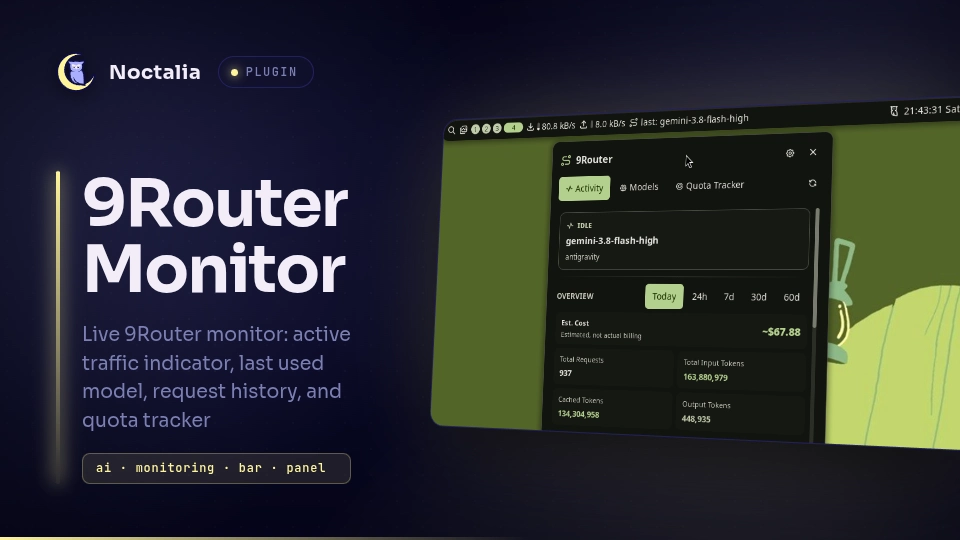
v0.1.0 bardiz12
About
9Router Monitor
A status bar pill and interactive popup panel for monitoring your 9Router dashboard in real-time.
- Always-visible bar pill — shows current or last used AI model with glowing accent when requests are in flight.
- Real-time SSE updates — connects to the 9Router stream (
/api/usage/stream) for instant request start/finish notifications. - Dual authentication — automatic zero-config local CLI token hashing (
~/.9router/) or dashboard password login. - 3-Tab popup panel — Activity overview and recent request tokens, multi-period Model usage breakdown, and Provider Quota tracker.
Plugin
| Field | Value |
|---|---|
| ID | bardiz12/9router-monitor |
| Entries | Bar widget: pill; panel: panel; service: service |
Toggle the panel from the bar widget, or with:
noctalia msg panel-toggle bardiz12/9router-monitor:panel
Requirements
- Noctalia v5.0.0 or higher.
- A running 9Router server (default:
http://localhost:20128). - External commands:
curl— required when using password login to capture the session cookie from/api/auth/login.secret-tool— optional, used to securely store and retrieve the dashboard password in the system keyring.xdg-open— used to open the 9Router web dashboard in your default browser.
Usage
Add the 9Router Monitor widget (bardiz12/9router-monitor:pill) to your bar under Settings → Bar → Widgets.
Mouse interactions on the bar pill:
- Left click: Toggle the 9Router Monitor panel.
- Right click: Open the 9Router web dashboard in your default browser.
- Middle click: Trigger an immediate stats and quota refresh.
Panel Tabs
- Activity: Live hero status badge, 9Router Overview stats card (requests, in/out/cached tokens, cost) with interactive period filter (
today,24h,7d,30d,60d), active in-flight requests, and recent requests with token metrics. - Models: Usage breakdown by model for the selected period (
today,24h,7d,30d,60d), showing total requests, prompt tokens, completion tokens, cached tokens, and estimated costs. - Quotas: Multi-provider quota tracker (
antigravity,kiro,codex, etc.) with color-coded progress bars, remaining percentages, and live reset countdowns.
Settings
| Setting | Type | Default | Description |
|---|---|---|---|
auth_mode |
select |
cli_token |
Authentication method (cli_token or password). |
cli_token_path |
folder |
~/.9router |
Directory containing CLI secrets (machine-id and auth/cli-secret). |
dashboard_password |
string |
"" |
Password used to authenticate with 9Router (when auth_mode = "password"). |
base_url |
string |
http://localhost:20128 |
Base URL of the 9Router server (supports host, port, IPv6, and subpaths). |
refresh_seconds |
int |
5 |
Heartbeat poll interval (seconds) if stream disconnects. |
show_model_label |
bool |
true |
Show model text in the bar pill (false shows icon only). |
remember_password |
bool |
true |
Save password in system keyring for automatic re-login. |
busy_hold_seconds |
int |
12 |
Duration to keep active state after a request finishes. |
IPC
Control the plugin and panel tabs via CLI commands or compositor keybindings:
# Toggle popup panel open / closed
noctalia msg panel-toggle bardiz12/9router-monitor:panel

# Switch directly to a specific tab (activity, models, quotas)
noctalia msg plugin bardiz12/9router-monitor:panel all set-tab activity
noctalia msg plugin bardiz12/9router-monitor:panel all set-tab models
noctalia msg plugin bardiz12/9router-monitor:panel all set-tab quotas

# Cycle through tabs sequentially
noctalia msg plugin bardiz12/9router-monitor:panel all next-tab
noctalia msg plugin bardiz12/9router-monitor:panel all prev-tab

# Trigger an immediate data and quotas refresh
noctalia msg plugin bardiz12/9router-monitor:service all refresh

# Open 9Router web dashboard in default browser
noctalia msg plugin bardiz12/9router-monitor:service all open-dashboard
Notes
- Pure native Luau architecture: Zero-config CLI token hashing is computed using built-in Luau
bit32operations without spawningsha256sum. - Real-time updates utilize native
noctalia.httpStreamto stream SSE events from/api/usage/stream. - Inspired by
omarchy-9router-monitorin the omarchy ecosystem, rebuilt and modernized for Noctalia v5+.
Versions
| Version | Plugin API | Updated |
|---|---|---|
| v0.1.0 latest | 15 | Oct 4, 2026 |
Older versions stay installable on a Noctalia release whose plugin API is below the latest version's.