
Back to plugins 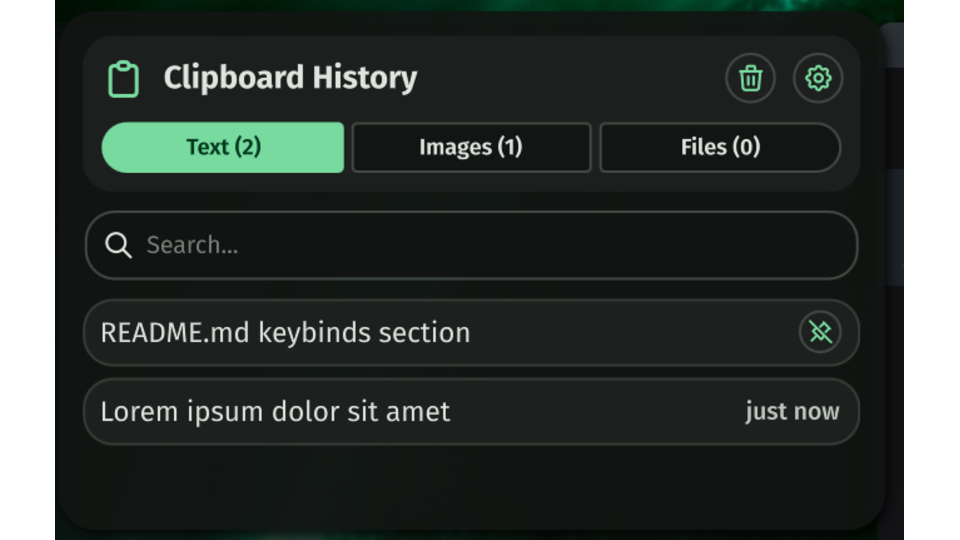
Clipboard
Clipboard history panel with search, pinning, and image previews.
v1.0.3 yanekyuk MIT Apr 22, 2026
About
Clipboard
A clipboard history panel for the Noctalia shell. Backed by cliphist.
Features
- History panel — searchable, scrollable clipboard history accessible from the status bar
- Tabs — switch between Text, Images, and Files views with keyboard shortcuts (1 / 2 / 3)
- Search — filter history in real time by content
- Pinning — pin entries to keep them at the top across sessions and reboots
- Timestamps — relative timestamps shown on every entry (e.g. "2 min ago")
- Image previews — inline thumbnails for image entries (toggleable)
- Settings panel — configure the plugin from Noctalia Settings without editing JSON
- IPC commands —
toggleandwipefor compositor keybind integration
Requirements
- Noctalia
4.1.2+ - cliphist
wl-clipboard
Installation
Open Noctalia Settings → Plugins, search for Clipboard, and click Install.
Development
To run a local checkout instead:
git clone https://github.com/yanekyuk/clipboard ~/.config/noctalia/plugins/clipboard
qs kill -c noctalia-shell; sleep 1; qs -d -c noctalia-shell
Settings
Settings are stored in ~/.config/noctalia/plugins/clipboard/settings.json (created on first load) and can be edited from Noctalia Settings → Plugins → Clipboard.
| Key | Default | Description |
|---|---|---|
maxHistorySize |
100 |
Maximum number of entries retained in history. |
showImagePreviews |
true |
Show image thumbnails inline in the history panel. |
density |
"comfortable" |
Visual density of the list. "comfortable" or "compact". |
IPC
| Command | Effect |
|---|---|
toggle |
Open/close the panel on the focused screen. |
wipe |
Clear history without opening the panel. |
qs -c noctalia-shell ipc call plugin:clipboard <command>
Keybinds
Niri
Add to ~/.config/niri/config.kdl so the shell starts with your session:
spawn-at-startup "qs" "-d" "-c" "noctalia-shell"
Add keybinds:
binds {
    Mod+V { spawn "qs" "-c" "noctalia-shell" "ipc" "call" "plugin:clipboard" "toggle"; }
    Mod+Shift+V { spawn "qs" "-c" "noctalia-shell" "ipc" "call" "plugin:clipboard" "wipe"; }
}
Hyprland
bindr = SUPER, V, exec, qs -c noctalia-shell ipc call plugin:clipboard toggle
bindr = SUPER SHIFT, V, exec, qs -c noctalia-shell ipc call plugin:clipboard wipe
Sway / others
Any compositor that can run a shell command from a keybind works:
qs -c noctalia-shell ipc call plugin:clipboard toggle
License
MIT.