
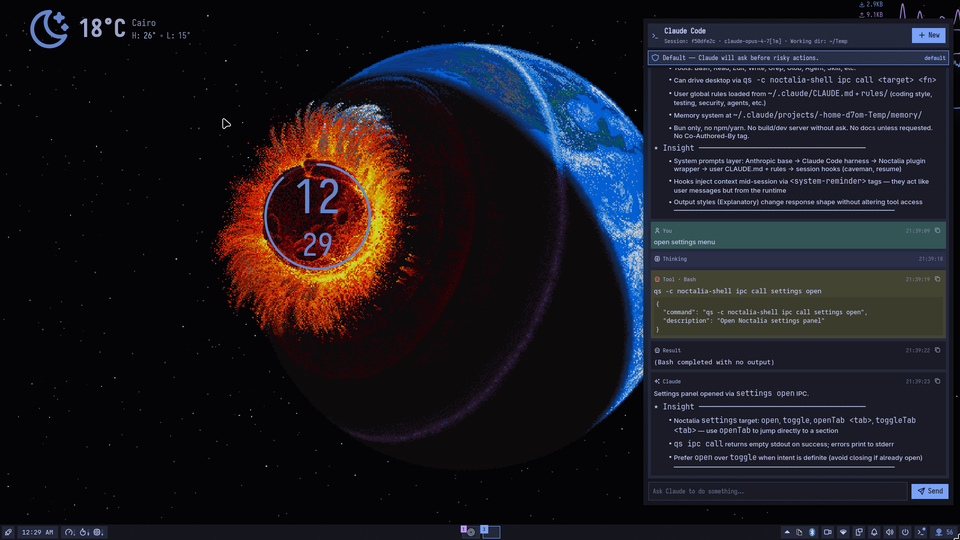
Claude Code Panel
Claude Code (Anthropic agentic CLI) with full tool access, permission controls, session management, MCP servers, and device integration
About
Claude Code Panel — Noctalia Plugin
Run Claude Code (Anthropic's agentic CLI) inside your Noctalia shell, with full tool
access, session continuity, and built-in Noctalia awareness: Claude knows it's running
in your shell and can drive the desktop via qs ipc call directly.



Features
| Feature | Implementation |
|---|---|
| Chat with Claude Code | claude -p --output-format stream-json per turn |
| Built-in tools (Bash, Read, Edit, Write, Glob, Grep, WebFetch, Task, …) | Native CLI |
| Session continuity | Captures session_id, resumes via --resume |
| Permission modes | default · acceptEdits · plan · bypassPermissions |
| Per-tool allow/deny | --allowedTools / --disallowedTools |
| Multi-directory access | --add-dir list |
| MCP servers | --mcp-config <path> + optional --strict-mcp-config |
| Model pinning + fallback | --model / --fallback-model |
| Custom system prompt | --append-system-prompt |
| Noctalia context injection | Baseline system prompt with full IPC surface (toggleable) |
| Danger mode | --dangerously-skip-permissions (gated behind confirmation) |
| IPC surface | qs ipc call plugin:claude-code-panel <fn> [args] |
Requirements
- Noctalia Shell ≥ 4.1.2 (
noctalia-qs) - Claude Code CLI —
npm install -g @anthropic-ai/claude-code - Authenticate it once:
claude(Anthropic account, Bedrock, or Vertex)
The plugin never sees your Anthropic credentials — auth lives in ~/.claude/.
Installation
Open Noctalia's in-app plugin browser and search for Claude Code Panel, then install.
- Enable Claude Code Panel in Settings → Plugins
- Add the bar widget in Settings → Bar
- Open the panel from the bar icon — or keybind it
Manual install
git clone --depth=1 https://github.com/noctalia-dev/noctalia-plugins /tmp/ncp \
  && cp -r /tmp/ncp/claude-code-panel ~/.config/noctalia/plugins/
Restart Noctalia (or reload plugins), then follow the steps above.
Noctalia context injection (new in 0.1.1)
When injectNoctaliaContext is enabled (default on), every turn is prefixed with a
baseline system prompt that tells Claude:
- It's running inside the
claude-code-panelplugin of Noctalia Shell. - How to drive the desktop:
qs -c noctalia-shell ipc call <target> <function> [args...]. - The full catalogue of IPC targets and functions extracted from
IPCService.qml—bar,settings,notifications,brightness,darkMode,nightLight,volume,wallpaper,media,powerProfile,bluetooth,wifi,sessionMenu,lockScreen,launcher,systemMonitor,plugin, and more — each with its function signatures. - Conventions for the environment (no tilde expansion, argv-safe quoting, etc.).
Example — ask Claude "turn on dark mode and set brightness to 30%" and it will run:
qs -c noctalia-shell ipc call darkMode setDark
qs -c noctalia-shell ipc call brightness set 30
Your own appendSystemPrompt is still honoured — it's concatenated after the baseline
under a User-provided instructions heading.
To disable: Settings → Session & Model → Inject Noctalia context → off.
Discovering IPC targets at runtime
Claude can call qs ipc show to list the live IPC surface of the running shell — useful
if you have extra plugins that register their own IpcHandlers.
Permission flow
The panel has a coloured banner that always tells you what Claude is allowed to do:
| Banner | Mode | Meaning |
|---|---|---|
| Blue "Default" | default |
Claude asks the CLI before risky tools |
| Orange | acceptEdits |
File edits auto-apply; commands still prompted |
| Green "Plan" | plan |
Claude can read + reason but cannot write or exec |
| Red "Bypass" | bypassPermissions or --dangerously-skip-permissions |
No prompts |
Switching to bypass pops a confirmation. You can disable that gate in settings.
Recommended starting configuration
permissionMode: "default"workingDir: a specific project folder — not~(see troubleshooting below)additionalDirs: emptyallowedTools: empty (CLI defaults will prompt)dangerouslySkipPermissions: false
Slash commands
Type these in the input box (Enter to execute). Anything not in this list is passed
through to Claude itself — so /compact, /cost, /config, etc. still work.
| Command | Effect |
|---|---|
/help |
Show this list inline |
/clear |
Clear chat history (plugin-local; session preserved) |
/new |
Start a new Claude session |
/stop |
Stop the current run |
/model <name> |
Switch model |
/mode <default|acceptEdits|plan|bypass> |
Change permission mode |
/cwd <path> |
Set working directory |
/dirs <p1,p2> |
Set additional readable dirs |
/allow <Tool1,Tool2> |
Replace allowedTools |
/deny <Tool1,Tool2> |
Replace disallowedTools |
/session |
Print current session id |
/copy |
Copy last assistant message |
Plugin-level IPC
All plugin IPC targets are namespaced plugin:claude-code-panel.
qs -c noctalia-shell ipc call plugin:claude-code-panel toggle
qs -c noctalia-shell ipc call plugin:claude-code-panel open
qs -c noctalia-shell ipc call plugin:claude-code-panel close
qs -c noctalia-shell ipc call plugin:claude-code-panel send "Summarize this repo"
qs -c noctalia-shell ipc call plugin:claude-code-panel stop
qs -c noctalia-shell ipc call plugin:claude-code-panel clear
qs -c noctalia-shell ipc call plugin:claude-code-panel newSession
qs -c noctalia-shell ipc call plugin:claude-code-panel setModel claude-sonnet-4-6
qs -c noctalia-shell ipc call plugin:claude-code-panel setPermissionMode plan
qs -c noctalia-shell ipc call plugin:claude-code-panel setWorkingDir /home/me/project
Keybinding examples
Hyprland — ~/.config/hypr/hyprland.conf:
bind = SUPER, C, exec, qs -c noctalia-shell ipc call plugin:claude-code-panel toggle
Niri — ~/.config/niri/config.kdl:
binds {
    Mod+C { spawn "qs" "-c" "noctalia-shell" "ipc" "call" "plugin:claude-code-panel" "toggle"; }
}
Sway — ~/.config/sway/config:
bindsym $mod+c exec qs -c noctalia-shell ipc call plugin:claude-code-panel toggle
Settings reference
| Key | Type | Notes |
|---|---|---|
claude.binary |
string | Path or name of the CLI, default "claude" |
claude.workingDir |
string | Path to Claude's cwd. ~/ is expanded |
claude.model |
string | e.g. claude-opus-4-7. Empty → CLI default |
claude.fallbackModel |
string | Used on primary-model overload |
claude.permissionMode |
enum | default / acceptEdits / plan / bypassPermissions |
claude.allowedTools |
string[] | e.g. ["Read","Edit","Bash(git:*)"] |
claude.disallowedTools |
string[] | e.g. ["Bash(rm:*)"] |
claude.additionalDirs |
string[] | Extra dirs. ~/ is expanded |
claude.mcpConfigPath |
string | JSON file of MCP servers |
claude.strictMcpConfig |
bool | Only load servers from that file |
claude.injectNoctaliaContext |
bool | New. Inject Noctalia system prompt (default true) |
claude.appendSystemPrompt |
string | Your own additions, appended after baseline |
claude.includePartialMessages |
bool | Emit partial-token stream events |
claude.maxTurns |
int | Cap agent turns per run (0 = unlimited) |
claude.autoResume |
bool | Pass --resume <sessionId> automatically |
claude.dangerouslySkipPermissions |
bool | Root mode — disables all prompts |
claude.requireConfirmBypass |
bool | Gate bypass toggles behind a dialog |
File layout
claude-code-panel/
├── manifest.json
├── Main.qml            # subprocess + state + IPC
├── Panel.qml           # chat UI + permission banner
├── BarWidget.qml       # bar toggle
├── Settings.qml        # configuration UI
├── ClaudeLogic.js      # pure helpers (command builder, stream-json parser, system prompt)
├── i18n/en.json
├── preview.png
└── README.md
Security notes
- Plugin runs with your user privileges. Claude in bypass mode is equivalent to
giving a remote model a shell on your account. Scope
workingDirto a project. - Credentials live in the CLI, not the plugin. The plugin only spawns
claude. - No shell injection surface. The prompt,
workingDir,additionalDirs, allowed tools, etc. are passed as discrete argv elements — no shell interpolation. - State cache at
$NOCTALIA_CACHE_DIR/plugins/claude-code-panel/state.json: stores last session id, message history, input draft. No API keys.
Troubleshooting
Process fails to start with "binary could not be found"
Qt's QProcess reports every pre-exec failure (missing binary, failed chdir, bad
permissions) as the same FailedToStart enum — the message always reads "not found".
Most common cause: workingDir or an entry in additionalDirs uses a literal ~
that your shell would normally expand. QProcess does not expand tildes. 0.1.1
expands leading ~/ internally; older versions must use absolute paths.
Second most common cause: the binary path doesn't exist, isn't executable, or its
dynamic-linker interpreter (/lib64/ld-linux-x86-64.so.2) is missing.
Diagnosis:
file "$(which claude)"
readlink -f "$(which claude)"
ldd "$(readlink -f "$(which claude)")" | head
Settings panel renders empty
Reload the plugin. If it persists, check the Noctalia log for QML parse errors — each line prints the offending file and line number.
Runs exit immediately with no output
Run the exact command you see in the Noctalia log manually in a terminal; the CLI's own error will tell you what it wants (usually authentication).
Session IDs rotate
Claude Code sometimes returns a new session_id in the result event. The plugin
captures it automatically.
Speed
Per-turn invocation pays a Node/MCP bootstrap cost on every message. Partial-message
streaming (--include-partial-messages) is on by default so tokens appear live.
Persistent-mode (--input-format stream-json over stdin) is plumbed but gated behind a
Quickshell stdinEnabled bug — will flip on once that lands upstream.
Any change that affects the command line (model, permission mode, working dir, tool allow/deny, MCP config, …) restarts the process on the next turn automatically.
Contributing
PRs welcome against noctalia-dev/noctalia-plugins.
ClaudeLogic.js is pure and unit-testable with node: strip the leading .pragma library,
require('vm') it into a clean context, and call buildPerTurnCommand directly.
License
MIT