
Back to plugins 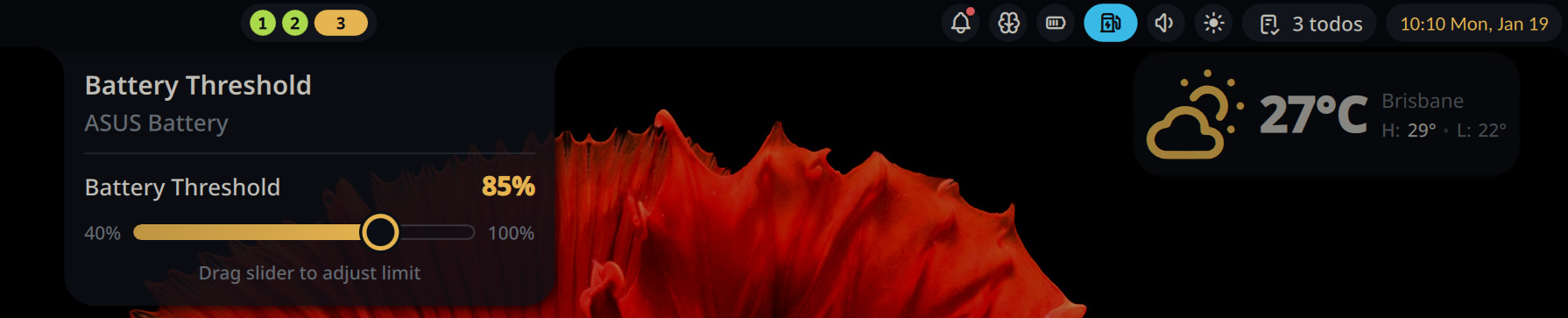
Battery Threshold Control
Set the battery threshold for laptop batteries to extend battery lifespan
v1.2.4 Wilfred Mallawa MIT May 18, 2026
About
Battery Threshold
A plugin for Noctalia Shell to control the battery threshold on laptops, helping extend battery lifespan. This plugin only works if your laptop supports charge threshold control (as exported by the kernel in sysfs). The plugin looks like this in action:
Features
- Bar Widget: Shows current battery threshold in the bar
- Panel: Adjust battery threshold with a slider (40-100%)
- Persistent Settings: Saves and restores threshold across reboots
Usage
Add the bar widget to your bar. Click to open the panel and adjust the battery threshold using the slider.
Panel Controls
- Drag the slider to set battery threshold (40-100%)
- Changes are applied immediately
- Settings persist across reboots
Setup (Required)
This plugin requires write access to the battery threshold sysfs file. The
included setup_rules.sh script configures an udev rule that grants write
permission to members of the battery_ctl group:
$ sudo ./setup_rules.sh
This script will:
- Create a
battery_ctlgroup (if it doesn't exist) - Add your user to the
battery_ctlgroup - Install the udev rule to
/etc/udev/rules.d/ - Reload udev rules
Note: A reboot may be required for write access to take effect.
IPC Commands
# Toggle panel
qs -c noctalia-shell ipc call plugin:battery-threshold togglePanel

# Set threshold
qs -c noctalia-shell ipc call plugin:battery-threshold set <value>
Troubleshooting
- Read-only mode: Ensure udev rule is installed, and you're in the correct group
- Not available: Your laptop may not support charge threshold control, or select the correct battery in the settings menu
- Changes not saving: Check write permissions on the sysfs file
Requirements
- Laptop with battery charge threshold support (ThinkPad, ASUS, etc.)
- Noctalia 3.6.0 or later
- Tested on Asus Zenbook 14 UX3405
- Tested on Asus TUF Gaming F15 FX506L