
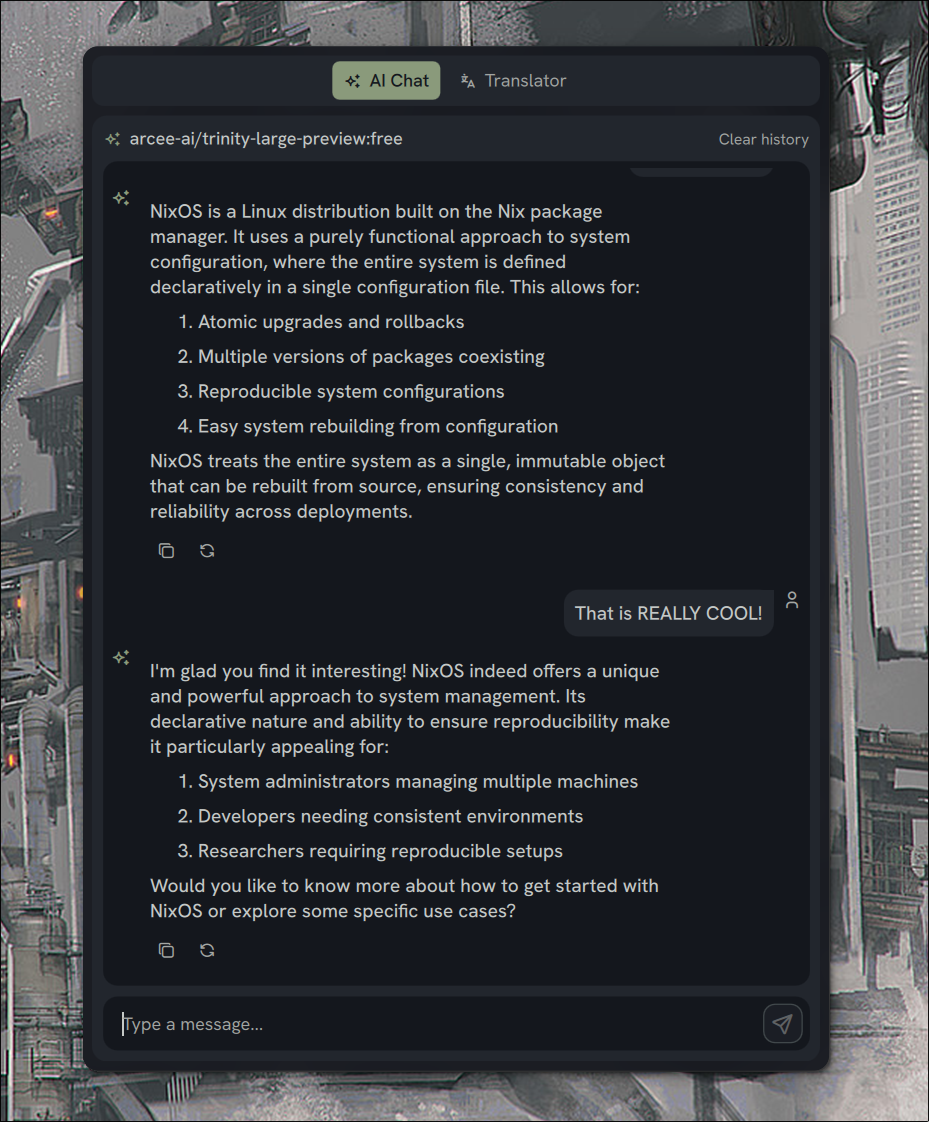
Assistant Panel
AI Chat and Translation panel
About
Assistant Panel Plugin for Noctalia Shell
An AI Chat and Translation panel plugin for Noctalia Shell, inspired by the sidebar in end-4's config.
Demo
https://github.com/user-attachments/assets/0d1fb5eb-0b16-4ff4-a6ed-f78c196f756f
Features
AI Chat
- Multiple AI Providers: Support for Google Gemini and any model compatible with OpenAI API endpoints.
- Conversation History: Persistent chat history with configurable length
- System Prompts: Customize AI behavior with system instructions
- Temperature Control: Adjust response creativity
Translator
- Multiple Backends: Google Translate and DeepL support
- Real-time Translation: Translate as you type
- Language Swap: Quickly swap source and target languages
- Copy/Paste Integration: Easy clipboard access
Installation
- Copy the
assistant-panelfolder to~/.config/noctalia/plugins/ - Restart Noctalia Shell
- Enable the plugin in Settings > Plugins
- Add the bar widget in Settings > Bar
Configuration
AI Provider Setup
- Obtain API key from your AI provider (if using a remote service).
- Select the relevant provider in the plugin settings.
Google Gemini
- Get key from Google AI Studio.
- Enter key in settings.
OpenAI Compatible (OpenAI, OpenRouter, Ollama, etc.)
This provider serves as a universal client for any service compatible with the OpenAI Chat API.
For Remote Services (OpenAI, OpenRouter):
- Uncheck "Local Mode".
- Enter your Base URL (e.g.,
https://api.openai.com/v1/chat/completionsorhttps://openrouter.ai/api/v1/chat/completions). - Enter your API Key.
For Local Services (Ollama, LM Studio):
- Check "Local Mode" (hides API Key input).
- Enter your Base URL (e.g.,
http://localhost:11434/v1/chat/completions). - Ensure your local server is running.
Translator Setup
Google Translate
No configuration needed - works out of the box.
DeepL
- Go to DeepL API
- Create a free or pro API key
- Enter the key in plugin settings
Environment Variables (Alternative)
API keys can also be configured via environment variables. Environment variables take priority over settings.json when both are configured.
| Variable | Description |
|---|---|
NOCTALIA_AP_GOOGLE_API_KEY |
Google Gemini API key |
NOCTALIA_AP_OPENAI_COMPATIBLE_API_KEY |
OpenAI Compatible API key |
NOCTALIA_AP_DEEPL_API_KEY |
DeepL translator API key |
Example (add to your shell profile):
export NOCTALIA_AP_GOOGLE_API_KEY="your-api-key-here"
When an API key is set via environment variable:
- The settings UI input field will be disabled
- A message "Managed via environment variable" will be shown
- The env var value is used regardless of any value in settings.json
IPC Commands
Control the plugin from the command line:
# Toggle panel visibility
qs -c noctalia-shell ipc call plugin:assistant-panel toggle

# Open panel
qs -c noctalia-shell ipc call plugin:assistant-panel open

# Close panel
qs -c noctalia-shell ipc call plugin:assistant-panel close

# Send a message
qs -c noctalia-shell ipc call plugin:assistant-panel send "Hello, how are you?"

# Clear chat history
qs -c noctalia-shell ipc call plugin:assistant-panel clear

# Translate text
qs -c noctalia-shell ipc call plugin:assistant-panel translateText "Hello world" "es"

# Change provider
qs -c noctalia-shell ipc call plugin:assistant-panel setProvider "openai_compatible"

# Change model
qs -c noctalia-shell ipc call plugin:assistant-panel setModel "gpt-4o-mini"
Keybinding Examples
Add to your compositor configuration:
Hyprland
bind = SUPER, A, exec, qs -c noctalia-shell ipc call plugin:assistant-panel toggle
Niri
binds {
    Mod+A { spawn "qs" "-c" "noctalia-shell" "ipc" "call" "plugin:assistant-panel" "toggle"; }
}
Configuration Options
AI Settings
| Setting | Description | Default |
|---|---|---|
| Provider | AI service (Google Gemini, OpenAI Compatible) | Google Gemini |
| Model | Model name (leave empty for provider default) | Per-provider |
| API Key | Provider API key (or use env var) | - |
| Local Mode | Toggle for local inference servers | false |
| Base URL | API Endpoint URL (Required for OpenAI Compatible) | https://api.openai.com/v1/chat/completions |
| Temperature | Response creativity (0.0 = focused, 2.0 = creative) | 0.7 |
| System Prompt | Instructions for AI behavior | General assistant |
| Max History Length | Number of messages to keep | 100 |
Translator Settings
| Setting | Description | Default |
|---|---|---|
| Backend | Translation service (Google, DeepL) | |
| Source Language | Input language (auto-detect available) | Auto |
| Target Language | Output language | English |
| Real-time Translation | Translate as you type | true |
Panel Settings
| Setting | Description | Default |
|---|---|---|
| Panel Detached | Panel floats independently | true |
| Panel Position | Screen edge (left, right) | right |
| Panel Width | Width in pixels | 520 |
| Panel Height Ratio | Height as fraction of screen | 0.85 |
| UI Scale | Scale factor for plugin UI | 1.0 |
License
MIT License - see repository for details.
Credits
- Inspired by dots-hyprland sidebar implementation
- Built for Noctalia Shell