
Back to plugins 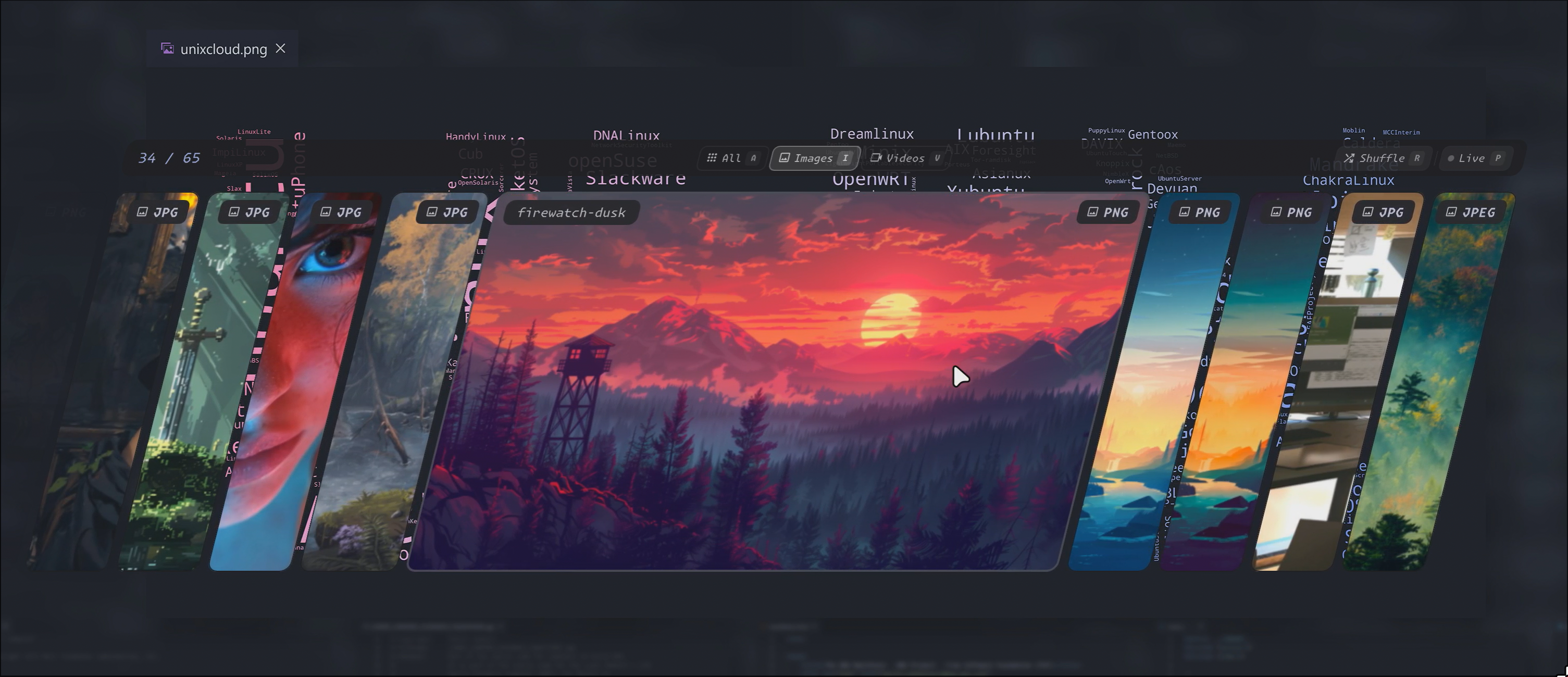
Wallcards
A `lively` wallpaper selector.
v0.1.1 tonigineer MIT May 1, 2026
About
Wallcards
A lively wallpaper selector for images and videos with live preview.
[!NOTE] Heavily inspired by other work — see Credits for details.
https://github.com/user-attachments/assets/9ffbc83d-95e5-4dcd-a834-7bd224211b55
Features
- Browse image and video wallpapers as a scrollable card stack
- Live preview — applies the wallpaper and updates the colorscheme as you navigate
- Filter by type or by dominant color
- Keyboard and partial mouse navigation
- Full settings panel with layout and behavior options
Dependencies
pacman -S ffmpeg mpvpaper imagemagick
IPC Commands
Control the plugin from the command line:
qs -c noctalia-shell ipc call plugin:wallcards toggle
Keybinding Examples
Add to your compositor configuration:
Hyprland
bind = SUPER, A, exec, qs -c noctalia-shell ipc call plugin:wallcards toggle
Keybinds
Navigation
| Key | Action |
|---|---|
J / ← |
Previous wallpaper |
K / → |
Next wallpaper |
H |
Scroll page back |
L |
Scroll page forward |
R |
Shuffle |
Actions
| Key | Action |
|---|---|
Enter |
Apply wallpaper and close |
Space / ↓ |
Apply wallpaper |
Esc / Q |
Close |
Filters
| Key | Action |
|---|---|
A |
Show all |
I |
Filter images |
V |
Filter videos |
F |
Toggle color filter (based on current card) |
View
| Key | Action |
|---|---|
T |
Toggle top bar |
P |
Toggle live preview |
? |
Toggle shortcut panel |
Layout
| Key | Action |
|---|---|
Shift + H / L |
Adjust card height |
Shift + J / K |
Adjust center card width |
Shift + N / P |
Adjust number of visible cards |
Ctrl + J / K |
Adjust card spacing |
Ctrl + H / L |
Adjust side strip width |
Save
| Key | Action |
|---|---|
Ctrl + S |
Save current layout and view settings |
Scroll wheel also works for navigation.
Configuration
All settings are available through the plugin settings panel in Noctalia. They can also be edited directly in settings.json in the plugin directory ~/.config/noctalia/plugins/wallcards.
| Setting | Description |
|---|---|
animation_cards_duration |
Duration of card transition animations in ms |
animation_window_duration |
Duration of open/close animations in ms |
animate_window |
Enable or disable open/close animations |
background_color |
Color of the dimmed backdrop |
background_opacity |
Opacity of the dimmed backdrop |
cards_shown |
Number of visible cards in the stack |
card_height |
Height of the card area in pixels |
card_spacing |
Gap between cards in pixels |
card_strip_width |
Width of non-center cards |
card_radius |
Border radius of the cards |
center_width_ratio |
Width of the center card as a ratio of the screen |
image_filter |
File extensions treated as images |
video_filter |
File extensions treated as videos |
hide_help |
Hide the keyboard shortcuts panel |
hide_top_bar |
Hide the toolbar above the cards |
live_preview |
Apply wallpaper while navigating |
selected_filter |
Default filter on open (all, images, videos) |
shear_factor |
Shearing applied to the card stack |
top_bar_height |
Height of the toolbar |
Known Issues
- When a video card is played, the following warning is spamed
WARN: vaExportSurfaceHandle failed. Please contact me, if you have a solution for this. - Performance for going left or right differs. It is also affected by the total number of cards (is on my todo list)
License
MIT License - see repository for details.
Credits
- Inspired by ilyamiro and liixini
- Built for Noctalia Shell