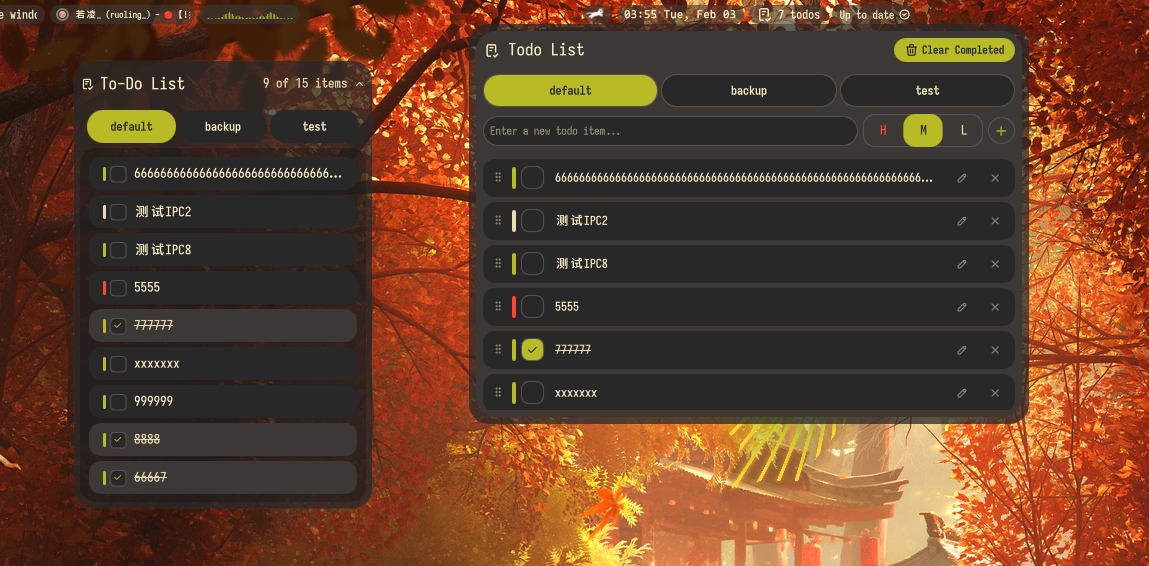
Todo List
A simple todo list manager plugin for Noctalia Shell.
About
Todo List
A simple todo list manager plugin for Noctalia Shell with multiple interfaces and IPC support.
Features
- Bar Widget: Shows todo count in the bar
- Panel: Full todo management interface with add, complete, and delete functionality
- Desktop Widget: View and manage todos directly on your desktop
- Multi-page Support: Organize todos across different pages/categories
- Priority System: Assign priorities (high, medium, low) to todos with customizable colors
- Settings: Configure display preferences and priority colors
- IPC Support: Control todos programmatically via IPC commands
Usage
Add the bar widget to your bar, or add the desktop widget to your desktop. Click to open the panel for full management.
Panel
The panel provides a full interface to manage todos with options to add, complete, delete, and organize them by pages and priorities.
Desktop Widget
The desktop widget displays active todos directly on your desktop with configurable appearance and visibility settings.
Bar Widget
The bar widget shows the count of active todos and opens the panel when clicked.
Multi-page Organization
Organize todos across different pages for better management and categorization.
Priority System
Assign priority levels (high, medium, low) to todos with customizable colors for each level.
IPC Commands
Control the todo list from external scripts using Quickshell IPC:
# Add a new todo to the default page with medium priority (text)
qs -c noctalia-shell ipc call plugin:todo addTodoDefault "Buy groceries"

# Add a new todo (text, pageId, priority)
qs -c noctalia-shell ipc call plugin:todo addTodo "Buy groceries" 0 "medium"

# Toggle a todo's completion status (by ID)
qs -c noctalia-shell ipc call plugin:todo toggleTodo "1234567890"

# Remove a specific todo (by ID)
qs -c noctalia-shell ipc call plugin:todo removeTodo "1234567890"

# Clear all completed todos
qs -c noctalia-shell ipc call plugin:todo clearCompleted

# Toggle the panel
qs -c noctalia-shell ipc call plugin:todo togglePanel
Configuration
- Show Completed: Toggle visibility of completed todos
- Show Background: Toggle desktop widget background visibility
- Custom Priority Colors: Enable and configure custom colors for priority levels
- Priority Colors: Customize the colors for high, medium, and low priority items