Back to plugins 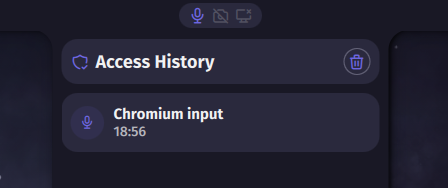
Privacy Indicator
A privacy indicator widget that shows when microphone, camera or screen sharing is active.
v1.2.7 Noctalia Team MIT Mar 29, 2026
About
Privacy Indicator Plugin
A privacy indicator widget that monitors and displays when microphone, camera, or screen sharing is active on your system.
Features
- Microphone Monitoring: Detects active microphone usage via Pipewire
- Camera Monitoring: Detects active camera usage by checking
/dev/video*devices - Screen Sharing Detection: Monitors screen sharing sessions via Pipewire
- Visual Indicators: Shows icons that change color based on active state
- Active: Primary color
- Inactive: Semi-transparent variant color
- App Information: Tooltip displays which applications are using each resource
- Adaptive Layout: Automatically adjusts layout for horizontal or vertical bar positions
Configuration
Access the plugin settings in Noctalia to configure the following options:
- Hide Inactive States: If enabled, microphone, camera, and screen icons are hidden whenever they are inactive. Only active states are shown.
- Remove Margins: If enabled, removes all outer margins of the widget.
- Icon Spacing: Controls the horizontal/vertical spacing between the icons.
- Active/Inactive Icon Color: Customize the colors for active and inactive states.
- Microphone Filter Regex: Regex pattern to filter out specific microphone applications. Matching apps are completely excluded from detection (they won't trigger the indicator or appear in tooltips). Use
|to specify multiple patterns, e.g.,effect_input.rnnoise|easyeffects.
Usage
The widget displays three icons in the bar:
- Microphone: Shows when any app is using the microphone
- Camera: Shows when any app is accessing the camera
- Screen Share: Shows when screen sharing is active
Hover over the widget to see a tooltip listing which applications are using each resource.
Requirements
- Noctalia Shell 3.6.0 or higher
- Pipewire (for microphone and screen sharing detection)
- Access to
/dev/video*devices (for camera detection)
Technical Details
- Updates privacy state every second
- Uses Pipewire API to monitor audio/video streams
- Checks
/proc/[0-9]*/fd/for camera device access - Detects screen sharing by analyzing Pipewire node properties and media class