
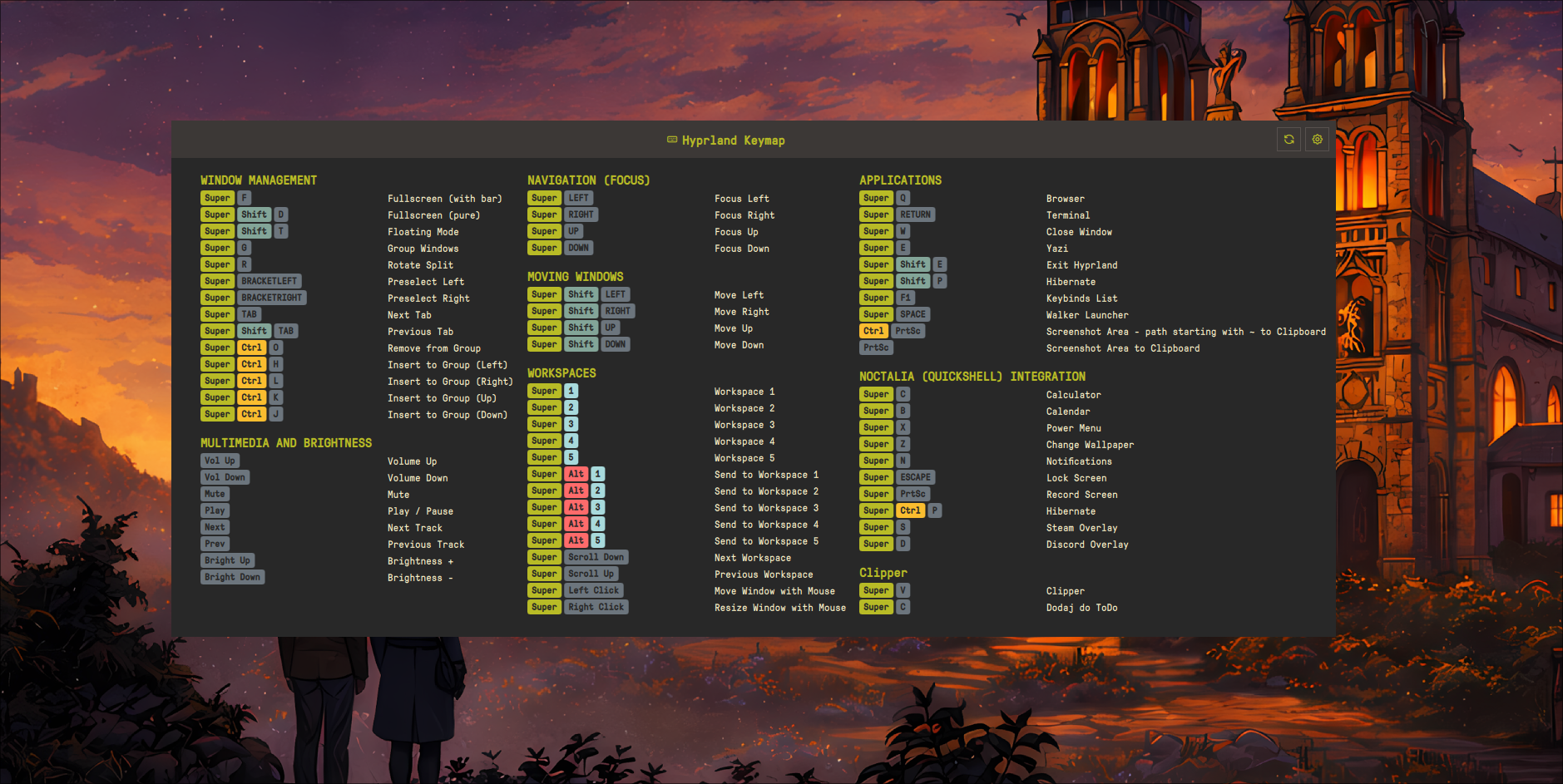
Keybind Cheatsheet
Universal keyboard shortcuts keymap that automatically detects and displays keybindings for Hyprland, Niri, or MangoWC compositors.
About
Keybind Cheatsheet for Noctalia
Universal keyboard shortcuts cheatsheet plugin for Noctalia that automatically detects your compositor (Hyprland, Niri or MangoWC) and displays your keybindings with recursive config parsing. Supports the classic Hyprland .conf format, the new Hyprland 0.55+ Lua config, Niri KDL and MangoWC.
Features
- Automatic compositor detection (Hyprland, Niri, MangoWC)
- Hyprland Lua config support (Hyprland 0.55+) via
hyprctl binds -j - Recursive config parsing - follows
source(Hyprland.conf),require()(Hyprland Lua) andinclude(Niri) directives - Glob pattern support - parses
~/.config/hypr/*.confstyle includes - Without Description section - binds with no description are surfaced, not dropped; add a custom description or hide them inline
- Full per-category color customization - background + text color for every key category, with live preview and clipboard quick-paste
- Search filter - type to filter keybindings in the panel
- Configurable paths & parser mode - custom config locations and forced Lua/conf parser in settings
- Smart key formatting - XF86 keys display as readable names (Vol Up, Bright Down, etc.)
- Flexible column layout (1-4 columns) with auto-height
- IPC support -
toggleandrefreshfor global hotkeys
Supported Compositors
| Compositor | Default Config | How it's read |
|---|---|---|
| Hyprland 0.55+ | ~/.config/hypr/hyprland.lua |
hyprctl binds -j (live, already-evaluated binds) |
| Hyprland (classic) | ~/.config/hypr/hyprland.conf |
hyprlang .conf text parser (recursive) |
| Niri | ~/.config/niri/config.kdl |
KDL parser (recursive include) |
| MangoWC | ~/.config/mango/config.conf |
bind= / axisbind= / mousebind= parser |
Installation
cp -r keybind-cheatsheet ~/.config/noctalia/plugins/
Usage
Bar Widget
Add the plugin to your bar configuration in Noctalia settings. Click the keyboard icon to open the cheatsheet.
Global Hotkey
Hyprland:
bind = $mod, F1, exec, qs -c noctalia-shell ipc call plugin:keybind-cheatsheet toggle
You can set your custom Super key variable (e.g. $mainMod) in the plugin settings.
Niri:
binds {
    Mod+F1 { spawn-sh "qs -c noctalia-shell ipc call plugin:keybind-cheatsheet toggle"; }
}
MangoWC:
bind=SUPER,F1,spawn,qs -c noctalia-shell ipc call plugin:keybind-cheatsheet toggle
IPC Commands
| Command | Effect |
|---|---|
qs -c noctalia-shell ipc call plugin:keybind-cheatsheet toggle |
Open / close the cheatsheet panel |
qs -c noctalia-shell ipc call plugin:keybind-cheatsheet refresh |
Force a re-parse of your keybindings |
refresh is useful after editing your config — bind it to a key to reload without restarting the shell.
Hyprland Lua Config (0.55+)
Hyprland 0.55 replaced the static hyprlang .conf with a Lua config (hyprland.lua). Binds can now be generated with require(), for loops and runtime logic, so they cannot be recovered by reading the file as text.
How it works
Instead of parsing the Lua file, the plugin asks Hyprland directly:
- Authoritative bind list — runs
hyprctl binds -jand reads the already-evaluated JSON bind list. This correctly handlesrequire()modules,forloops and multi-key chords — whatever Hyprland actually has bound at runtime. - Category & description recovery — the plugin then lightly scans
hyprland.luaand every file it pulls in viarequire()to recover human-readable structure:- Category headers: a comment in the form
-- N. NAME(e.g.-- 1. Applications) - Static descriptions: a
description = "..."(ordesc = '...') literal maps that exact description to the current category - Loop-generated descriptions: a concatenated literal such as
description = "Workspace " .. iis treated as a prefix — any bind whose description starts withWorkspaceis filed under that category
- Category headers: a comment in the form
- Binds whose description can't be matched fall into a generic Other category; binds with no description at all go to the Without Description section (see below).
You don't need to change your Lua config — just keep using -- N. NAME comment headers and description = "..." fields where you want grouping.
Example Lua structure the scanner understands:
-- 1. Applications
Hyprland.config.bind("$mod, T", function() ... end, { description = "Terminal" })
Hyprland.config.bind("$mod, B", function() ... end, { description = "Browser" })

-- 2. Workspaces
for i = 1, 9 do
  Hyprland.config.bind("$mod, " .. i, function() ... end,
    { description = "Workspace " .. i })   -- prefix "Workspace " -> category "Workspaces"
end

require("keybinds")   -- followed and scanned recursively
Parser mode
A Parser Mode setting controls which Hyprland parser is used:
| Mode | Behavior |
|---|---|
auto (default) |
Use the Lua parser if hyprland.lua exists, otherwise fall back to the .conf parser |
lua |
Always use hyprctl binds -j (Lua parser) |
conf |
Always use the classic .conf text parser |
The legacy hyprlang .conf parser is kept unchanged as a fallback for users still on hyprlang configs.
Without Description Section
Binds with no description are no longer silently dropped. They appear in a dedicated Without Description section where you can:
- Add a custom description inline — it is remembered and displayed like any other bind
- Hide a bind you don't care about
Overrides are keyed by a stable bind identity (submap | modmask | key | flags | dispatcher) that deliberately excludes Hyprland's unstable internal Lua registry reference, so your custom descriptions and hidden binds survive Hyprland restarts.
Settings provide a "Show binds without a description" toggle, plus "Restore hidden" and "Clear all overrides" actions.
Config Format
Hyprland (classic .conf)
Recursively parses your main config and all source includes.
# 1. APPLICATIONS
bind = $mainMod, T, exec, alacritty #"Terminal"
bind = $mainMod, B, exec, firefox #"Browser"

# 2. WINDOW MANAGEMENT
bind = $mainMod, Q, killactive, #"Close window"
bind = $mainMod, F, fullscreen, #"Toggle fullscreen"
- Categories:
# N. CATEGORY NAME(N is a number) - Descriptions:
#"description"at end of the bind line source = ~/.config/hypr/keybinds.confand globs likesource = ~/.config/hypr/apps/*.confare followed automatically
Niri
Parses the binds { } block and follows all include directives.
binds {
    // #"Applications"
    Mod+T hotkey-overlay-title="Terminal" { spawn "alacritty"; }

    // #"Window Management"
    Mod+Q hotkey-overlay-title="Close window" { close-window; }

    // #"Workspaces"
    Mod+1 { focus-workspace 1; }
}
- Categories:
// #"Category Name"(exact format) - Descriptions:
hotkey-overlay-title="description"attribute - Without descriptions, actions are auto-categorized by type (see table below)
include "~/.config/niri/binds.kdl"is followed automatically
MangoWC
Parses bind=, axisbind= and mousebind= directives from ~/.config/mango/config.conf.
# Applications
bind=SUPER,T,spawn,alacritty #"Terminal"
bind=SUPER,B,spawn,firefox #"Browser"

# Window Management
bind=SUPER,Q,killclient, #"Close window"
- Categories: standalone
# Category Namecomment lines - Descriptions: trailing
#"description"on a bind line - Modifier aliases recognized:
LOGO=SUPER,MOD1=ALT - XF86 media keys are formatted (Vol Up, Mute, Bright Up/Down, …)
- Lines without a preceding
# Categoryuse the localized default category
Auto-Categorization (Niri)
When no category comment is provided, keybindings are grouped by action:
| Action prefix | Category |
|---|---|
spawn |
Applications |
focus-column-* |
Column Navigation |
focus-window-* |
Window Focus |
focus-workspace-* |
Workspace Navigation |
move-column-* |
Move Columns |
move-window-* |
Move Windows |
close-window, fullscreen-window |
Window Management |
maximize-column |
Column Management |
set-column-width |
Column Width |
screenshot* |
Screenshots |
power-off-monitors |
Power |
quit |
System |
Special Key Formatting
| Raw Key | Display |
|---|---|
XF86AudioRaiseVolume |
Vol Up |
XF86AudioLowerVolume |
Vol Down |
XF86AudioMute |
Mute |
XF86MonBrightnessUp |
Bright Up |
XF86MonBrightnessDown |
Bright Down |
Print |
PrtSc |
Prior / Next |
PgUp / PgDn |
Color Customization
Every key category has independently themeable background and text colors:
Super, Ctrl, Shift, Alt, XF86, Print, numeric, mouse and default letter keys — plus the description text color.
- Two-pill rows per category: left pill = background, right pill = label text on that background. Click a pill to open the color picker.
- Theme-aware defaults:
Super/Ctrl/Shiftuse an empty sentinel meaning "use the Material theme accent" (mPrimary/mSecondary/mTertiary), so themed setups stay untouched unless you deliberately override. - Clipboard quick-paste: copy a
#RRGGBB/#RRGGBBAAhex and a paste icon appears in each pill — one click applies it (clipboard polled viawl-paste). - Live preview + revert: changes preview immediately; closing Settings without Save restores the snapshot taken when the panel opened.
- Per-row reset and a "Reset all colors" action restore theme defaults.
Settings
Access settings via the gear icon in the panel header:
- Window width / height (auto or manual) and column count (1-4)
- Hyprland config path — classic
.conflocation - Hyprland Lua path —
hyprland.lualocation (0.55+) - Parser mode —
auto/lua/conf - Niri config path / MangoWC config path
- Show binds without a description toggle + Restore hidden / Clear all overrides
- Merge sequential binds and split large workspace category (threshold configurable)
- Per-category colors — background + text for every category, with clipboard paste and reset
- Refresh — force reload keybindings
Troubleshooting
"Loading..." stays forever
- Check the compositor is detected: look for logs tagged
[KeybindCheatsheet] - Verify the config file exists at the configured path
- On Hyprland 0.55+, confirm
hyprctl binds -jworks in your terminal
hyprctl error shown in the panel
The Lua parser depends on hyprctl binds -j. Ensure Hyprland is running and hyprctl is on your PATH, or force the classic parser by setting Parser mode to conf.
No categories found
- Hyprland
.conf/ MangoWC: categories must be# 1./# Category Namecomment lines - Hyprland Lua: add
-- N. NAMEheaders anddescription = "..."fields inhyprland.lua(andrequire()d modules) - Niri: use
// #"Category Name"format
Binds missing or under "Without Description"
On Lua configs, descriptions are matched from description = "..." literals against the live hyprctl binds. Loop-generated binds need a concatenated prefix literal (e.g. "Workspace " .. i). Anything unmatched lands in Without Description, where you can add a description or hide it.
Keybinds from included files not showing
The plugin follows source (Hyprland .conf), require() (Hyprland Lua) and include (Niri) directives automatically. Check logs to see which files are parsed.
Requirements
- Noctalia Shell 3.6.0+
- Hyprland (classic
.confor 0.55+ Lua), Niri, or MangoWC hyprctlonPATHfor Hyprland Lua configswl-paste(wl-clipboard) for the color clipboard quick-paste feature
License
MIT