
Back to plugins 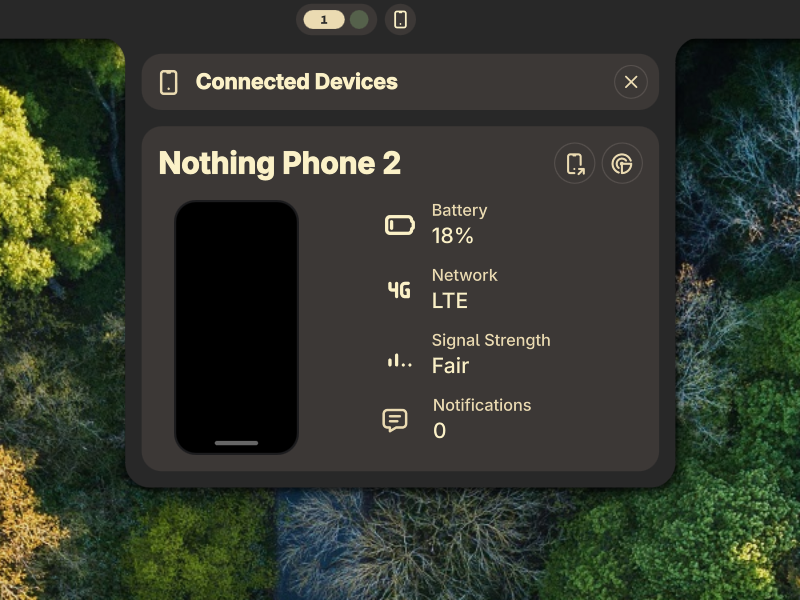
KDE Connect
A Plugin integrating your mobile devices into a panel using KDEConnect
v1.2.1 WerWolv GPLv2 Mar 29, 2026
About
Noctalia KDE Connect
A Plugin integrating your mobile devices into a panel using KDEConnect
[!IMPORTANT] Please submit any Pull Requests to https://github.com/WerWolv/noctalia-kde-connect and NOT to the noctalia-plugins repository!
Features
- Support for multiple devices
- Panel to manage all devices
- Current battery charge and if the device is plugged in
- Mobile network connection state
- Number of notifications
- Wake up the device from the panel
- Browse files on the device
- Send files to the device
- Make the device ring
Requirements
kdeconnectdneeds to be running which can be installed by setting up the official KDE Connect app- In case it's not getting started by default, you might need to configure a systemd service for it
- Certain functionality will only work when enabling the right plugins on the device. Otherwise, they might not work or simply display "Unknown"
- The "Browse files" option mounts the device over SFTP using sshfs. Make sure you have
libfuseandsshfsinstalled- If clicking the button just opens the file browser without displaying anything, make sure you have the option enabled on your phone and that your file browser has permissions to access that path.
- If your file browser is sandboxed (e.g. when installed as a Flatpak or Snap), it's possible that it won't have access. Install it through the package manager instead
- On some systems kdeconnect's URL handler isn't configured properly and the button will instead just open your web browser
- In that case you can override the file handler by running
xdg-mime default org.kde.dolphin.desktop x-scheme-handler/kdeconnect
- In that case you can override the file handler by running
- If clicking the button just opens the file browser without displaying anything, make sure you have the option enabled on your phone and that your file browser has permissions to access that path.