
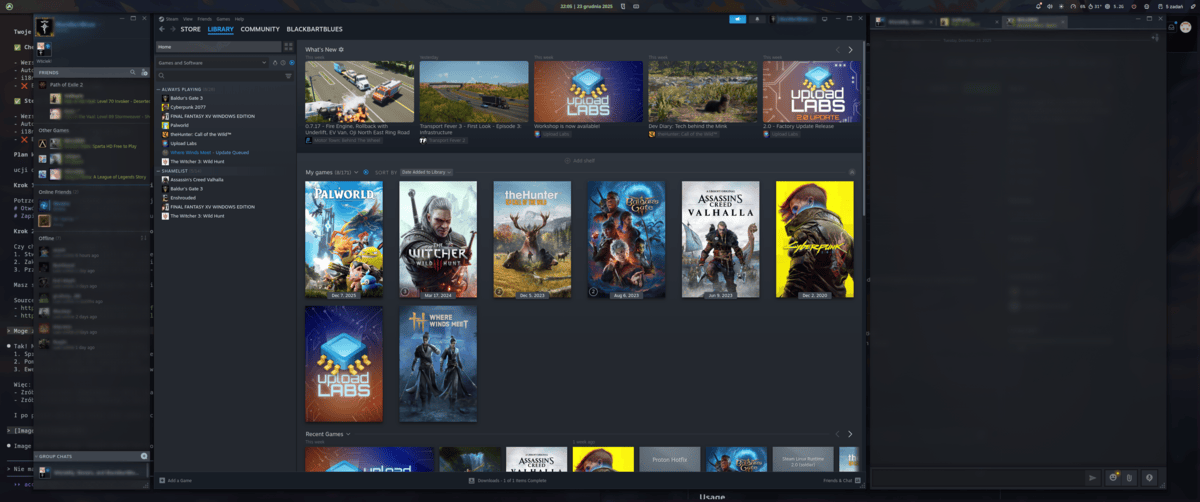
Steam Overlay (Hyprland)
[DEPRECATED — not maintained from Hyprland 0.55+] Steam overlay with automatic window management for Hyprland. Due to Hyprland 0.55 deprecating hyprlang in favour of Lua (changing hyprctl dispatch parsing and popup/xdg handling), this plugin is no longer actively maintained. The 2.2.0 release adds a best-effort dual-mode dispatch fix and an optional custom Lua layout, but no further updates are planned. Automatically moves all Steam windows (except fullscreen games) to an overlay workspace; main 3 windows (Friends, Client, Chat) positioned in a row, fully responsive percentage-based layout. Requires Hyprland window manager.
About
Steam Overlay for Noctalia
⚠️ DEPRECATED — not maintained from Hyprland 0.55+
Hyprland 0.55 deprecated hyprlang (
.conf) in favour of Lua (.lua), which changed howhyprctl dispatchis parsed and how popups/xdg surfaces are handled. These changes broke the overlay's window management and the bar widget's context menu, and make the special-workspace overlay approach no longer worthwhile.This plugin is no longer actively maintained. The final
2.2.0release includes a best-effort dual-mode dispatch fix and an optional custom Lua layout so it still works on Hyprland 0.55, but no further updates are planned. Use at your own discretion.
Steam overlay plugin for Noctalia/Quickshell with automatic window management using Hyprland special workspace.
Features
- 🎮 Automatic Steam window detection and positioning
- 🖥️ Multi-monitor support with automatic resolution detection
- 📐 Responsive layout: 10% / 60% / 25% split (Friends / Main / Chat)
- 🎯 Centered overlay with 95% screen height
- 🔔 Chat notifications indicator
- ⌨️ Keyboard shortcut support via IPC
- 🎨 Bar widget with Steam status indicator
Installation
- Copy the plugin to your Noctalia plugins directory:
cp -r steam-overlay ~/.config/noctalia/plugins/
- Restart Quickshell:
pkill -f "qs.*noctalia" && qs -c noctalia-shell &
Usage
Via Bar Widget
Click the gamepad icon in your top bar to toggle the Steam overlay.
Via Keyboard Shortcut
hyprlang config (~/.config/hypr/hyprland.conf):
bind = SUPER, G, exec, qs -c noctalia-shell ipc call plugin:hyprland-steam-overlay toggle
Lua config (~/.config/hypr/hyprland.lua, Hyprland 0.55+):
hl.bind("SUPER + G", hl.dsp.exec_cmd("qs -c noctalia-shell ipc call plugin:hyprland-steam-overlay toggle"))
Via IPC Command
qs -c noctalia-shell ipc call plugin:hyprland-steam-overlay toggle
How It Works
- Detection: Automatically detects Steam windows by class and title
- Workspace: Moves all Steam windows to Hyprland special workspace
special:steam - Positioning: Arranges windows in a centered layout:
- Friends List: 10% width (left)
- Main Steam: 60% width (center)
- Chat: 25% width (right)
- Toggle: Shows/hides the special workspace as an overlay
Layout
┌─────────────────────────────────────────┐
│  [Friends]   [   Main Steam   ]  [Chat] │ 95% height
│    10%              60%            25%   │ Centered
└─────────────────────────────────────────┘
Configuration
Default settings in settings.json:
{
  "autoLaunchSteam": true,
  "hasNewMessages": false
}
Hyprland 0.55+ / Lua config
Since Hyprland 0.55, hyprlang (.conf) is deprecated in favour of Lua
(.lua). Under a Lua config, hyprctl dispatch is parsed as Lua, so the
old classic dispatch syntax errors out — this is what broke the overlay on
older plugin versions.
The plugin now auto-detects the active config mode at startup (probing
hyprctl dispatch 'hl.dsp.no_op()') and emits the correct syntax for either
hyprlang or Lua. No configuration needed — it just works on both.
Optional: custom Hyprland Lua layout
Instead of floating + pixel-positioning the windows, you can let Hyprland's custom layout API (0.55+) tile them. This auto-reflows on window add/remove /resize, with no polling and no pixel math.
- Copy the layout next to your Lua config:
cp ~/.config/noctalia/plugins/hyprland-steam-overlay/steam-layout.lua ~/.config/hypr/steam-layout.lua - In
~/.config/hypr/hyprland.luaadd:
Therequire("steam-layout") hl.workspace_rule({ workspace = "special:steam", layout = "lua:steam" })workspace_rulescopes the layout to only the steam overlay workspace, leaving your normal layout untouched everywhere else. - Reload Hyprland, then enable "Use custom Hyprland layout (Lua)" in the plugin settings.
If the setting is enabled but the snippet is missing, Steam windows still
open in the overlay workspace using your default layout (graceful fallback).
Edit the width ratios at the top of steam-layout.lua to taste.
Requirements
- Noctalia/Quickshell 3.6.0+
- Hyprland compositor (hyprlang or Lua config — both supported)
- Steam
jqfor JSON parsinghyprctlfor window management- Custom layout (optional): Hyprland 0.55+ with a Lua config
Files
Main.qml- Core plugin logicBarWidget.qml- Top bar widget with iconPanel.qml- Overlay panel (optional)manifest.json- Plugin metadatasettings.json- Plugin settingssteam-layout.lua- Optional Hyprland custom Lua layout (0.55+)
Author
Created with ❤️ using Claude Code
License
MIT