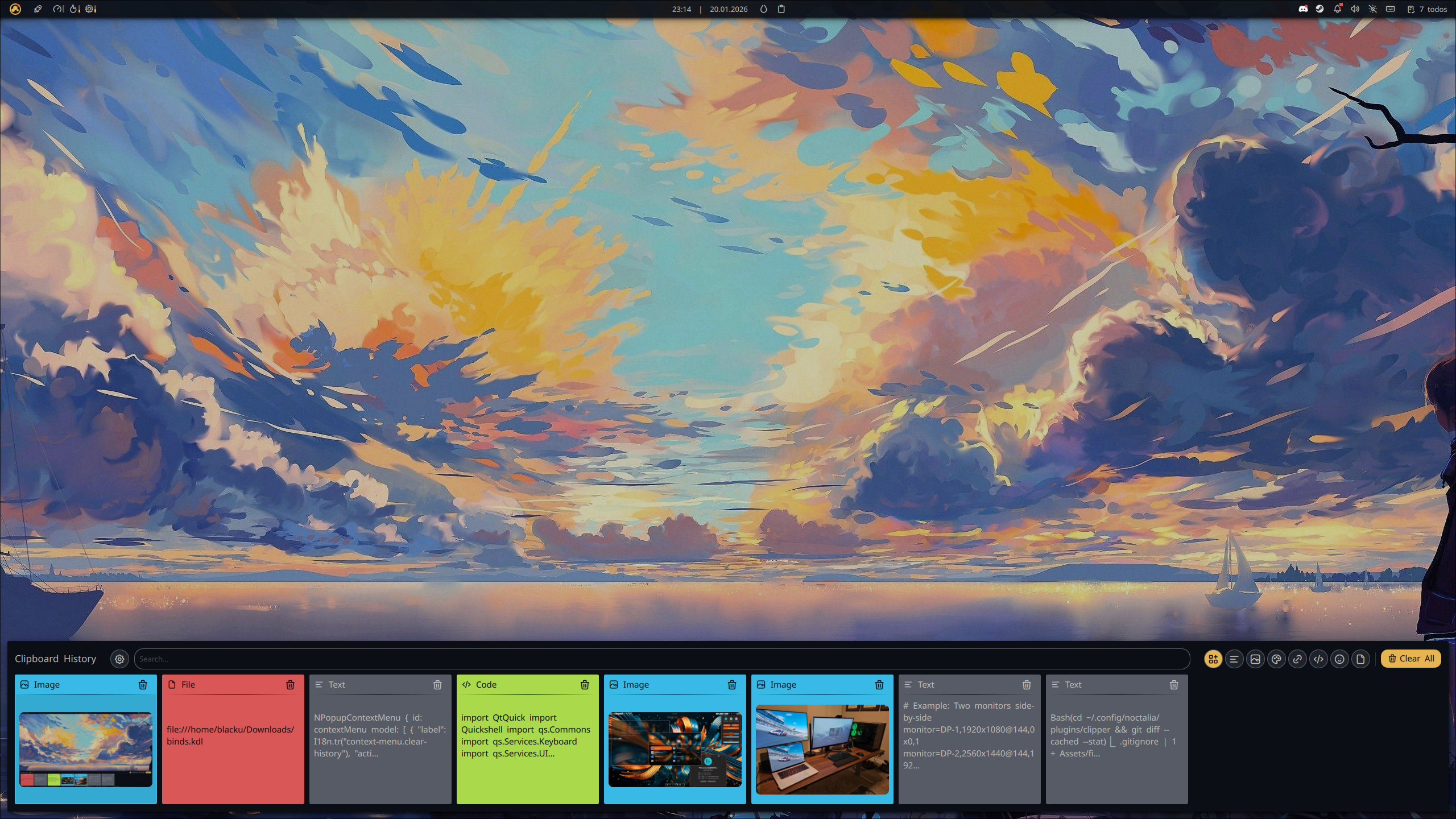
Clipper
Advanced clipboard manager with history, search, keyboard navigation, ToDo integration, pinned items, notecards/sticky notes, and selection-to-notecard feature. Fully translated with comprehensive i18n support.
About
Clipper - Advanced Clipboard Manager for Noctalia Shell
Version 2.3.0 - A powerful clipboard history manager with persistent pinned items, NoteCards sticky notes, seamless ToDo integration and auto-paste.

✨ Features
⚙️ Control Center Shortcut
- Control Center Shortcut: Access Clipper in Control Center shortcut instead to save widget spaces in your bar
📋 Clipboard Management
- Unlimited History: Access your entire clipboard history powered by
cliphist - Smart Filtering: Filter by type (text, images, colors, links, code, emoji, files)
- Quick Search: Real-time search through clipboard items
- Persistent Pinned Items: Pin important items that survive across sessions
- Rich Preview: Image previews, color swatches, and formatted text
📝 NoteCards (Sticky Notes)
Quick capture and organize your thoughts with persistent sticky notes:

- Individual JSON Storage: Each notecard stored separately for data safety
- Editable Titles: Click title to edit, press Enter to save
- Color Coding: 8 preset colors for visual organization
- Auto-saving Content: Content saves when panel closes
- Export to TXT: Export notecards to
~/Documents/ - Drag to Reorder: Organize cards by dragging (visual feedback)
- Add Selection: Capture selected text directly to notecard via keybind
✅ ToDo Integration
Seamless integration with Noctalia ToDo plugin:

- Smart Context Menu: Right-click clipboard items to add to specific ToDo pages
- Selection to ToDo: Capture selected text directly to ToDo via keybind
- Multi-Page Support: Choose target ToDo page from visual menu
- Auto-Copy: Selected text automatically copied to clipboard
🎨 Visual Customization
Per-Type Color Schemes: Customize colors for each card type separately
- Text cards, Image cards, Color cards, Link cards, etc.
Three Color Properties: Background, Separator, Foreground (text/icons)
Live Preview: See changes instantly in settings panel
Reset to Defaults: One-click restore to default theme
⚡ Auto-Paste
Toggle in Settings → Auto-Paste: After selecting a clipboard item, content is automatically pasted into the focused window
Right-Click Only mode: Left-click copies normally; right-click copies and pastes
Paste Delay slider: Tune the delay (100–1000 ms) for compositor focus timing
Requires
wtype(sudo pacman -S wtype); settings show a warning when not installed
🎬 Video Demonstrations
NoteCards in Action
Creating notecards, editing titles and content, color coding, and exporting:
ToDo Integration
Adding clipboard items to ToDo, selection to ToDo workflow, and multi-page management:
🚀 Installation
From Noctalia Plugin Manager (Recommended)
- Open Noctalia Settings → Plugins
- Search for "Clipper"
- Click Install
- Reload Noctalia Shell
Manual Installation
# Clone repository
cd ~/.config/noctalia/plugins/
git clone https://github.com/blackbartblues/noctalia-clipper clipper

# Reload Noctalia
qs -c noctalia-shell reload
⌨️ Keybind Setup
Hyprland Configuration
Add to ~/.config/hypr/keybind.conf:
# Clipper - Clipboard Manager
bindr = SUPER, V, exec, qs -c noctalia-shell ipc call plugin:clipper toggle

# Selection to ToDo (chord: Super+V, then C)
binds = SUPER_L, V&C, exec, qs -c noctalia-shell ipc call plugin:clipper addSelectionToTodo

# Selection to NoteCard (chord: Super+V, then X)
binds = SUPER_L, V&X, exec, qs -c noctalia-shell ipc call plugin:clipper addSelectionToNoteCard
Chord Keybinds Explained:
- Press
Super+V(don't release Super) - While holding Super, press
C→ adds selection to ToDo - While holding Super, press
X→ adds selection to NoteCard
🎮 Usage
Basic Operations
Toggle Panel:
qs -c noctalia-shell ipc call plugin:clipper toggle
Pin/Unpin Item:
- Click pin icon on clipboard card
- Or use context menu (right-click)
Add to ToDo:
- Right-click clipboard item → "Add to ToDo"
- Select target ToDo page from menu
NoteCards
Create NoteCard:
- Click "+ Create Note" button in NoteCards panel
- Or via IPC:
qs -c noctalia-shell ipc call plugin:clipper addNoteCard "Quick note"
Edit NoteCard:
- Click title to edit, press Enter to save
- Type in content area (auto-saves on panel close)
Change Color:
- Right-click notecard → "Change Color"
- Select from 8 preset colors
Export NoteCard:
- Right-click notecard → "Export to .txt"
- Saved to
~/Documents/note_TIMESTAMP.txt
Add Selection to NoteCard:
- Select text in any application
- Press keybind (e.g.,
Super+V, X) - Choose existing notecard or create new one
- Text added as bullet point
Advanced IPC Commands
# Panel Management
qs -c noctalia-shell ipc call plugin:clipper openPanel
qs -c noctalia-shell ipc call plugin:clipper closePanel
qs -c noctalia-shell ipc call plugin:clipper togglePanel

# Pinned Items
qs -c noctalia-shell ipc call plugin:clipper pinClipboardItem "123456"
qs -c noctalia-shell ipc call plugin:clipper unpinItem "pinned-123"
qs -c noctalia-shell ipc call plugin:clipper copyPinned "pinned-123"

# NoteCards
qs -c noctalia-shell ipc call plugin:clipper addNoteCard "Quick note"
qs -c noctalia-shell ipc call plugin:clipper exportNoteCard "note_abc123"
qs -c noctalia-shell ipc call plugin:clipper addSelectionToNoteCard

# ToDo Integration
qs -c noctalia-shell ipc call plugin:clipper addSelectionToTodo
⚙️ Settings
General
- ToDo Plugin Integration: Enable/disable ToDo integration (auto-detects if plugin installed)
NoteCards
- Enable NoteCards: Toggle NoteCards panel visibility
- Default Note Color: Choose default color for new notecards
- Current Notes Count: Shows number of stored notecards
- Clear All Notes: One-click removal of all notecards
Appearance
Customize colors for each card type:
- Card Type Selector: Choose which type to customize (Text, Image, Color, Link, Code, Emoji, File)
- Live Preview: See changes in real-time
- Background Color: Card background
- Separator Color: Line between header and content
- Foreground Color: Text, icons, and content color
- Reset to Defaults: Restore default color scheme
📁 Data Storage
~/.config/noctalia/plugins/clipper/
├── settings.json          # Plugin settings and color customization
├── pinned.json            # Persistent pinned items
└── notecards/
    ├── note_abc123.json   # Individual notecard files
    ├── note_def456.json
    └── ...
🔧 Technical Details
Dependencies
- cliphist: Clipboard history backend (required)
- wl-clipboard: Wayland clipboard utilities (required)
- Noctalia ToDo Plugin: For ToDo integration (optional)
Install dependencies:
# Arch Linux
sudo pacman -S cliphist wl-clipboard

# Or use your distribution's package manager
Architecture
- Main.qml: Core logic, IPC handlers, data management
- Panel.qml: Main clipboard history panel UI
- NoteCardsPanel.qml: Sticky notes panel UI
- TodoPageSelector.qml: ToDo page selection logic
- NoteCardSelector.qml: Notecard selection logic
- SelectionContextMenu.qml: Universal context menu for selections
- ClipboardCard.qml: Individual clipboard item card
- NoteCard.qml: Individual notecard component
- Settings.qml: Settings panel UI
- BarWidget.qml: Bar widget button
Translation System
- 16 Languages Supported: en, de, es, fr, hu, it, ja, ko-KR, nl, pl, pt, ru, sv, tr, uk-UA, zh-CN, zh-TW
- 100% Coverage: All user-facing strings translated
- Synchronized Structure: All translation files have identical keys
Memory Management
- Automatic Cleanup: All components properly destroyed on exit
- Process Termination: Background processes stopped on destruction
- Timer Management: All timers stopped when not needed
- No Memory Leaks: Tested with 500+ operations
🐛 Troubleshooting
Clipboard history not working
# Ensure cliphist is running
pkill -9 wl-paste; wl-paste --watch cliphist store &
Pinned items not persisting
- Check
~/.config/noctalia/plugins/clipper/pinned.jsonexists - Verify file permissions (should be readable/writable by user)
NoteCards not saving
- Check
~/.config/noctalia/plugins/clipper/notecards/directory exists - Verify write permissions
ToDo integration not working
- Check if ToDo plugin is installed and enabled
- Verify settings: Enable "ToDo Plugin Integration"
- Check
~/.config/noctalia/plugins.jsoncontains ToDo plugin
Context menu not appearing
- Ensure screen is correctly detected
- Check logs:
journalctl --user -u plasma-qs@noctalia-shell.service -f
📝 Changelog
See CHANGELOG.md for detailed version history.
v2.2.0 (2026-03-11) - Current Release
Bug Fixes:
- 🐞 Clear All Notes doesn't clear notes when reopen plugin panel fix
- 🐞 Square Panel Corners at the bottom corners fix
- 🐞 Export a Note multiple times and not deleting it fix
- 🐞 Wait until user press Apply button to apply the settings
- 🐞 clicking the NoteCards panel would close the plugin panel even when the Close Button was enabled. The panel now only closes on background click when the Close Button is disabled.
Improvements:
- 🎨 Panel will now attach to bar instead of being separate
- 🎨 Decrease panel Width and Height for a cleaner look
- 🎨 Added a separator between Note Card and Pinned Itemnhanced visual customization
- 🎨 Move Panel Close Button to the top right corner instead of being next to Open Plugin Settings
- 🎨 Added active ring, badge counts for filter buttons
- 🔧 Remaps keybindings using Alt + 1 to 8 instead of Alt + 0 to 7
- 🔧 Mouse Wheel Scroll left and right clipboards support
Technical:
- 📦 Zero console.log statements in production
- 🧹 No internal IPC calls (only external API)
- 🔒 Secure command execution (no injection vulnerabilities)
- ✅ Tested: 500+ operations, no memory growth
🤝 Contributing
Contributions welcome! Please:
- Follow QML code style guidelines
- Use
pluginApi?.tr()for all user-facing strings - Test memory management (Component.onDestruction)
- Ensure all translation files are synchronized
- No console.log in production code
📄 License
MIT License - See LICENSE file for details
👤 Author
blackbartblues
- GitHub: @blackbartblues
🙏 Acknowledgments
- Noctalia Shell team for the amazing desktop environment
- cliphist for robust clipboard history
- Community contributors and testers
Made with ❤️ for Noctalia Shell